
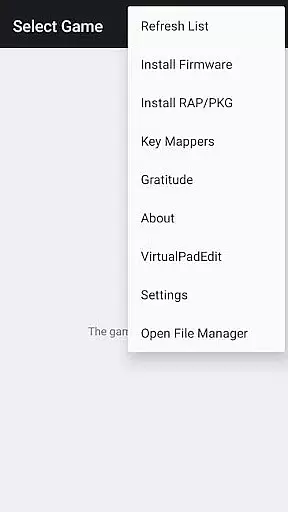
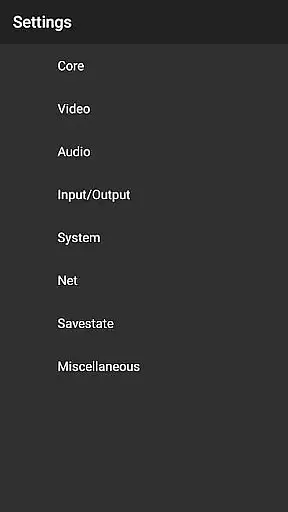

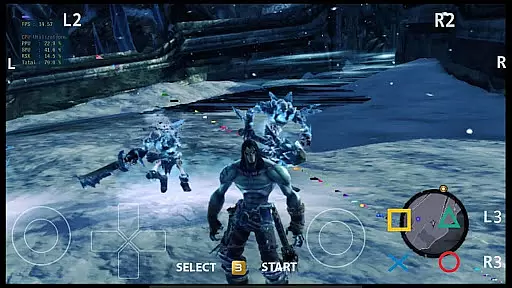

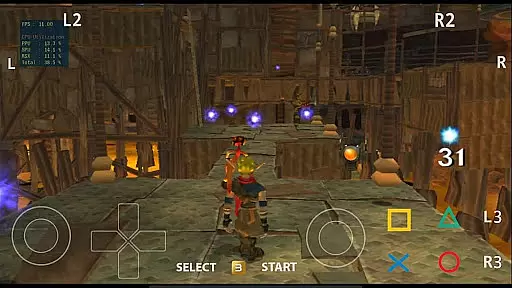
aPS3e Premium is an advanced Android emulator designed to bring PlayStation 3 gaming experiences to mobile devices. This application, based on the RPCS3 emulator's source code, allows users to run many PS3 games directly on their Android smartphones or tablets. While performance may vary depending on device specifications, aPS3e offers numerous innovative features that enhance gameplay.
Key functionalities include LLVM-based re-compilation for optimized performance, support for multiple game formats (PKG/ISO/folder), and Vulkan graphics acceleration. The emulator also provides customizable virtual button positions and creates unique configurations for different games. With its active development cycle and continuous improvements, aPS3e represents a significant step forward in mobile gaming emulation.
This premium version supports ongoing development while offering an ad-free experience. Gamers can enjoy their favorite PS3 titles on compatible Android devices running Android 10 or higher with Vulkan support and arm64 architecture. The application's comprehensive feature set makes it particularly valuable for enthusiasts seeking authentic console experiences on their mobile devices.
aPS3e Premium distinguishes itself through its sophisticated feature set tailored for PS3 emulation enthusiasts. The application employs LLVM-based re-compilation with microarchitecture-level optimization, ensuring enhanced performance across supported games. Users can choose between LLE and HLE modes for library simulation, providing flexibility in how games are processed and rendered on Android devices.
The emulator supports various game formats including PKG, ISO, and folder structures, making it compatible with different types of PS3 game dumps. Its implementation of Vulkan graphics acceleration significantly improves visual fidelity and performance. Additional notable features include in-game save/load functionality, custom GPU driver support (hardware-dependent), and Talkback accessibility features.
For optimal user experience, aPS3e offers customizable virtual button positions and maintains separate configuration settings for individual games. These features, combined with complete ad removal in the premium version, create a seamless and personalized emulation experience. The application's technical sophistication and attention to detail make it a compelling choice for mobile gamers seeking high-quality PS3 emulation on their Android devices.
In simulation applications like aPS3e Premium, the economic system depth refers to how intricately financial transactions and resource management are woven into the gameplay. This emulator allows users to experience games with complex in-game economies, providing an authentic PS3 gaming experience on Android devices.
The emulator's support for various game formats such as PKG/ISO/folder enables gamers to engage with titles that feature sophisticated economic models. These could range from managing virtual businesses to handling currencies within a game, thus offering dynamic feedback based on player decisions and strategies.
Players benefit from this depth by enjoying more immersive and realistic simulations that respond to their actions. As they save and load games using aPS3e's supported functionality, users can witness the consequences of their economic choices, enhancing replayability and engagement.
Ultimately, the value lies in experiencing true-to-life scenarios where cause-and-effect relationships drive the narrative forward, allowing players to refine their strategic thinking and decision-making skills within a simulated environment that mirrors real-world economics.
Resource management balance is crucial in simulation games, ensuring that players have a fair yet challenging experience when allocating assets or making trade-offs. In aPS3e Premium, this balance is achieved through meticulous optimization of the original RPCS3 source code for Android platforms.
By re-compiling using LLVM and performing microarchitecture-level optimizations, aPS3e delivers efficient performance across different devices. Gamers can enjoy balanced gameplay even on hardware with varying capabilities, thanks to features like Vulkan graphics acceleration and customizable virtual button positions.
This careful balancing act benefits users by providing them access to high-quality PS3 game simulations without needing top-tier equipment. It democratizes gaming experiences, allowing more people to partake in complex simulations regardless of their deviceu2019s specifications.
The true innovation here is not just about running games but doing so while maintaining equilibrium between challenge and playabilityu2014offering gamers an opportunity to explore richly detailed worlds where every choice matters and resources must be wisely managed.
Advanced LLVM optimization
Vulkan graphics support
Customizable controls
Ad-free experience
Active development
Performance limitations
Incomplete game support
Hardware requirements
No included games
Technical setup needed

Advanced 3d bow simulator app for hunters, using real archery ballistics.
 4.50
4.50
Explore sandbox simulator featuring crafting and socializing in Portia
4.10
A casual city building game. Become the mayor and create your own metropolis!
4.30
Cook in the kitchen, Serve food: Manage the dash fever in my restaurant games!
4.20
Build a cult empire and become a tycoon in the addictive idle cultist simulator
4.30
Lead a Magical School and Cast Spells in an Incremental Game!
4.70
Control the traffic flow. Decide when the cars can pass and avoid crashes
4.60
Be the leader of wobblers from ancient lands, spooky places, and fantasy worlds.
4.10
Nail salon combining crayola nail art at the halfway of fashion and beauty care.
4.30
The most wanted app, based on your feedback, is now here!
4.90
Mystical Mixing: little alchemy meets tiny wings spiced with potion permit magic
4.80
Replay gaming history - The hit tycoon game, now on Android
4.80
Start painting, match paint, merge colors and get creative in this coloring game
4.60
Incredible Sandbox Playground - Beats Ragdolls
4.50
Explore the open world and run your business empire in this real life simulator!
4.50
Merge chips, craft upgrades, and power up your microcircuit to earn more!
4.30
7 years packed with fun
4.20
Merge and mine to become Gold Tycoon in this clicker game - idle Zombie Miner.
4.10
Step into the world of tycoon simulator games and seal profitable business deals
4.10


User Reviews