
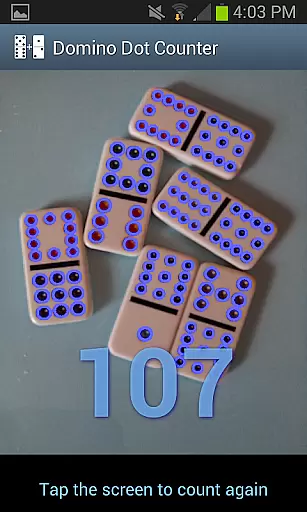
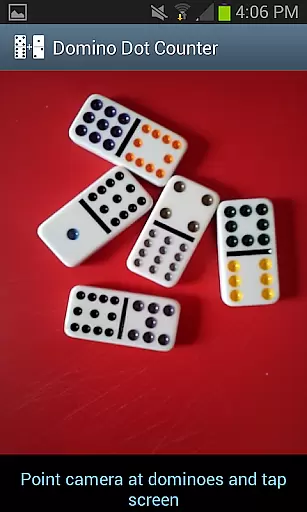
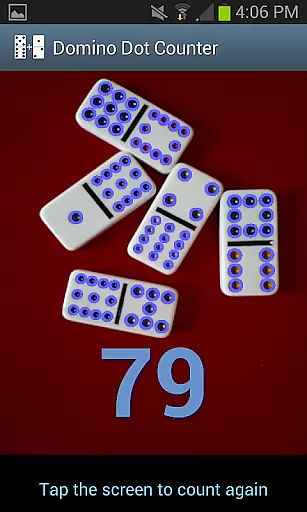
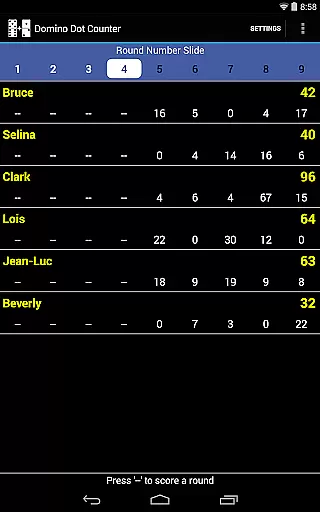
Domino Dot Counter is a casual gaming app that simplifies the process of counting domino dots during gameplay. The app utilizes your phone's camera to automatically sum up the dots on a group of dominoes, making it an ideal tool for games like Mexican Train. With features such as AUTO COUNT, users can quickly tally scores without manual effort.
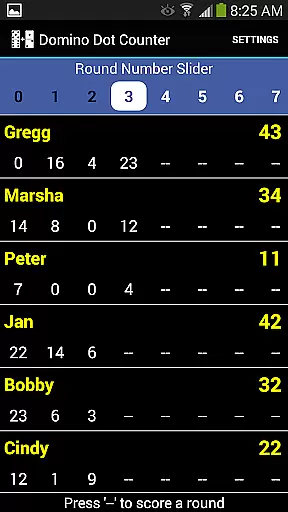
Beyond just counting, Domino Dot Counter offers a complete scorekeeping solution for 2 to 8 players. It allows customization of player names, mid-game addition or deletion of players, and tracking of multiple rounds. Its intuitive interface ensures ease of use while providing warnings against re-scoring completed rounds. This makes it versatile for various casual gaming scenarios.
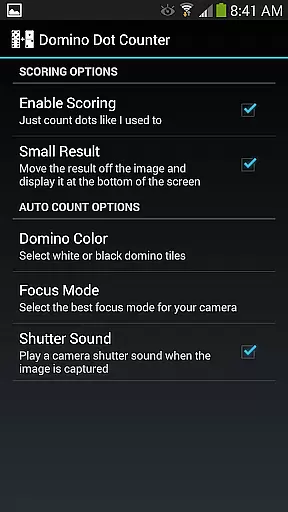
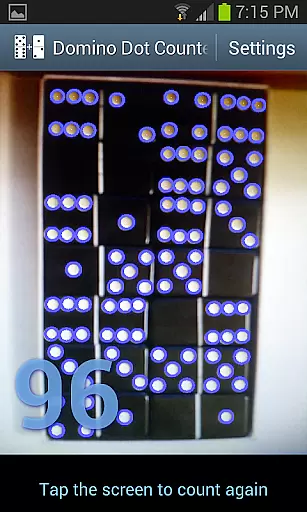
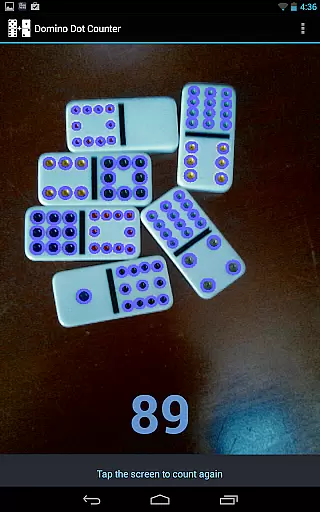
The app also provides visual feedback by drawing circles around each counted dot, ensuring accuracy and allowing verification. Whether you're playing on a wood table or a solid-colored surface, this app delivers reliable performance. For traditionalists, the scoring feature can be disabled, preserving the original functionality users love.
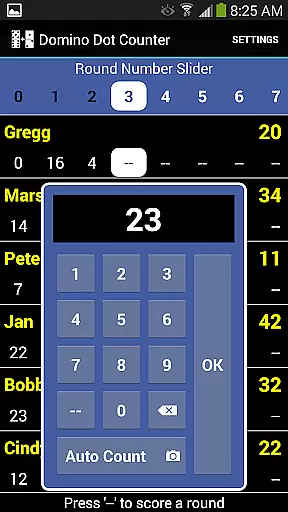
Domino Dot Counter stands out with its innovative AUTO COUNT feature, which uses advanced image recognition to tally domino dots swiftly. By simply pointing the camera at the dominoes and tapping the screen, users receive accurate counts within seconds. This technology not only speeds up gameplay but also reduces human error in scoring.
In addition to automatic counting, the app includes comprehensive score management tools. Players can customize names, add or remove participants mid-game, and navigate through numerous rounds using a slider interface. Each round can count upwards or downwards, catering to different game rules and preferences.
For optimal results, the app recommends holding the camera horizontally over a solid-colored surface. These guidelines ensure maximum accuracy when counting. Moreover, users who prefer the classic experience can disable the scoring system via settings, maintaining the app’s original charm while offering enhanced functionality for modern gamers.
Domino Dot Counter offers a straightforward and intuitive core gameplay that revolves around the simple yet engaging task of counting domino dots. This application leverages your phone's camera to automatically sum up the dots on a group of dominoes, making it easy for users to focus on their game without getting bogged down by manual counting.
The latest version enhances this experience by including a complete score application, allowing for seamless tracking of scores for 2 to 8 players. The AUTO COUNT feature is particularly beneficial, as it lets your device take over the counting process, ensuring accuracy and saving time during gameplay.
Players can easily add or delete participants mid-game and customize player names with a simple long press. The app also provides warnings for attempting to rescore completed rounds, maintaining the integrity of the game while offering flexibility in managing rounds and scores.
One of the standout features of Domino Dot Counter is its session length flexibility, accommodating various play styles and schedules. Whether you have a quick game in mind or are settling in for an extended dominoes session, this app adapts to your needs effortlessly.
Users can add more rounds whenever they like, and the ability to count rounds up or down adds another layer of customization. A convenient slider at the top allows navigation through rounds when they can't all be displayed at once, ensuring that gameplay remains fluid and uninterrupted.
For optimal performance, it's recommended to hold the camera horizontally over the dominoes and play on a solid-colored surface. These considerations contribute to a hassle-free experience, letting players enjoy sessions of any length without concern for technical hiccups.
User-friendly interface
Accurate dot counting
Customizable player names
Flexible scoring options
Intuitive round management
Requires solid-colored surfaces
Camera positioning crucial
Limited to domino games
No multiplayer online
Dependent on device camera quality

How does a p fall?
 3.70
3.70
Aim and Destroy as many blocks as you can!
4.40
Enjoy the craft without the mess
4.50
Keep Popgoes alive in a quirky collection of LCD minigame challenges!
5.00
1000 Start Ups is a fun endless running game suitable for all ages.
4.3
Repair, Refit, Repaint. Customize your truck today!
4.60
1V1 Hunting Game
4.40
Compete with opponents through precise archery skills
3.20
Offline Games - Enjoy Endless Fun Anywhere, Anytime!
4.20
Be the Coin Master: attack friends & collect coins in this fun adventure game!
4.80
RPG Adventure in the Caribbean as Pirate or Trader.
4.60
Style your hair with Hair salon, Spa Beauty salon - Make up doll game
4.50
No internet. Play Fun Mini Puzzles, Color Blocks & Cards, 2 Player, Boys & Girls
4.50
Enjoy an endless treasure hunt journey! Beat bosses in this arcade shooter game
4.50
Build the Most Beautiful Queen!
4.40
Talking Tom and pets bring adventure to this fun virtual cat game.
4.30
Merge numbers on the balls and run to aim for 2048!
4.20
The classic Snake with vibrant neon colors for just 5 cents!
4.3
Join LeeFoxie in a fun tower defense! Cute towers, tricky enemies, endless fun.
4.5


User Reviews