
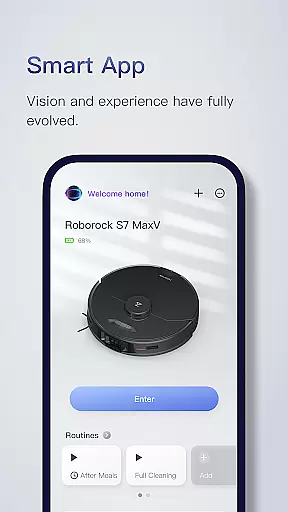
Roborock is a cutting-edge home cleaning solution that combines advanced hardware with intelligent software to deliver superior performance. The app provides complete control over your Roborock robot, allowing you to manage everything from cleaning schedules to suction strength. With features like Precision LIDAR navigation, sensor-based movement, and AI-powered object recognition, the system ensures efficient and safe cleaning.
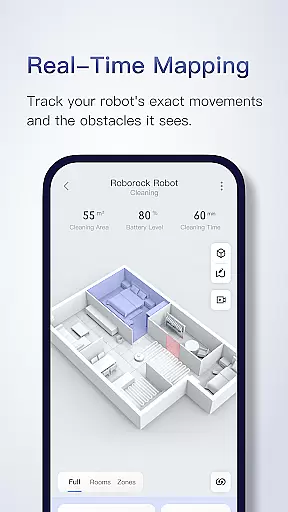
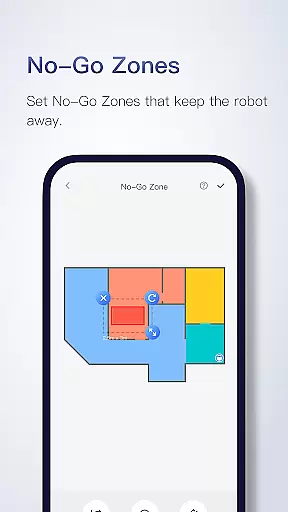
The app's smart mapping technology creates detailed floorplans after the first run, enabling room-specific customizations. You can set advanced cleaning schedules, adjust suction power for different rooms, and even designate no-go zones to protect delicate areas. Whether it's mopping with sonic vibration or navigating multi-level homes, Roborock adapts to your needs while offering real-time tracking of the cleaning process.
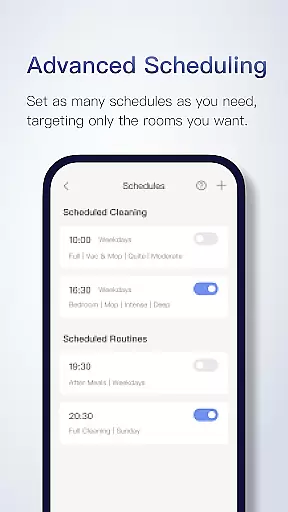
Roborock stands out with its range of innovative features designed to enhance user convenience and cleaning efficiency. The Seriously Smart Mapping technology generates precise floorplans and divides rooms automatically, unlocking extensive customization options. Advanced Scheduling allows users to program multiple cleaning routines, targeting specific rooms at different times, such as cleaning the kitchen post-breakfast or scheduling whole-house cleanings when unoccupied.
Customizable Cleaning lets you tailor suction strength and water flow based on individual room requirements. Zone Cleaning enables focused cleaning in up to five designated areas, each cleanable up to three times per session. Additionally, No-Go Zones and Invisible Walls help avoid obstacles without physical barriers. Multi-Level Mapping supports up to four unique maps, while Real-Time Viewing offers live tracking of the robot's path and obstacle avoidance.
In the realm of smart home technology, Roborock stands out by offering a comprehensive suite of features that cater to various lifestyle needs. The app provides users with control over their robotic vacuum's functionalities, ranging from scheduling cleanings to customizing cleaning modes for different rooms. This ensures that whether you need a quick clean-up in high-traffic areas or a thorough scrub in less-frequented spaces, Roborock has got it covered.
Roborock's advanced scheduling feature allows for multiple cleaning times which can be set on an hourly, daily, or weekly basis. This flexibility means that your home can be cleaned at optimal times without manual intervention, adapting to your dynamic lifestyle effortlessly. Whether it's tidying up the kitchen post-meal prep or ensuring the living room is spotless before guests arrive, Roborock aligns its operations with your routine.
The app also supports multi-level mapping, which is crucial for homes with more than one floor. Users can save up to four distinct maps and tailor cleaning settings for each level, allowing the robot to automatically recognize and adapt to the floor it's on. This feature significantly enhances the convenience factor, making Roborock an indispensable tool for maintaining cleanliness across all areas of a multi-story residence.
Roborock places a strong emphasis on content authenticity and expert credibility, ensuring that every feature offered through its app is both reliable and effective. With cutting-edge technologies like PreciSense LIDAR navigation and ReactiveAI, users are guaranteed a high level of precision in home cleaning. These innovations are not just buzzwords but are rooted in expert engineering designed to navigate and clean homes efficiently.
The app's seriously smart mapping feature exemplifies this commitment to authenticity. After its initial run, the Roborock robot generates a detailed floor plan and divides rooms accurately, providing users with a trustworthy representation of their home layout. This accurate mapping unlocks extensive customization options, empowering users to modify cleaning schedules and preferences based on genuine insights into their living spaces.
Moreover, Roborock's customer service channels reinforce the brand's dedication to expert support. With accessible contact options such as a service hotline and dedicated email addresses for different regions, users can reach out for professional assistance whenever needed. This robust support system underscores Roborock's pledge to deliver credible and dependable solutions for modern lifestyles.
Advanced AI navigation
Customizable cleaning modes
Multi-level home support
Real-time tracking feature
Precise floor mapping
Limited device compatibility
Some features are model-specific
High price point
Occasional connectivity issues
Steep learning curve

Healthy eating timer app to track meal pace, improve habits, and eat slowly.
 4.4
4.4
Discover how to help puppies stay calm around noise with this helpful app.
4.2
Unique Dark Analog style for Wear OS watches.
4.0
The all-new Cync app. The simple, connected app for Cync and C by GE.
4.50
Good magnifier app to see tiny things bigger and more clearly!
4.80
Connect to your Shark ROBOT™ from anywhere using the SharkClean™ App.
3.60
Play fun games, complete quick surveys, and earn money. It's fun and easy!
4.40
Simple, stylish & fresh watch face. Customize colors, gradients & complications.
4.70
Earn money for every survey and game you play, and get real rewards every time
4.50
Countdown to Christmas 2025 with festive games & activities in a virtual village
4.80
Your store’s deals, where you are.
4.80
Made To Order Faves
4.70
A smart Siddur with halachic times
4.60
The Work of Byron Katie— the mobile app for inner peace.
4.40
Chat, meet genuine singles in your area. Real connections start with being real.
4.30
Paranormal Spirit Bell Trigger Device
4.30
Discounts, savings, and rewards
4.20
Use your device sensors to detect energy and convert it into spoken words.
4.10
Immerse yourself in the serenity of lavender fields and white butterflies
4.5


User Reviews