
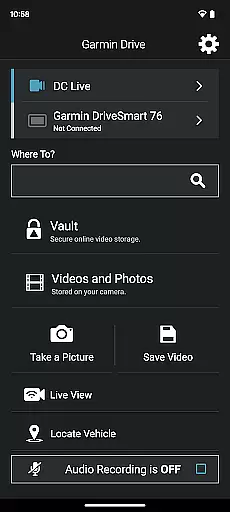
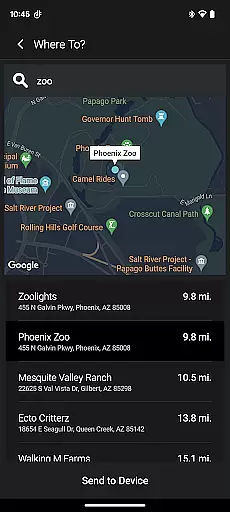
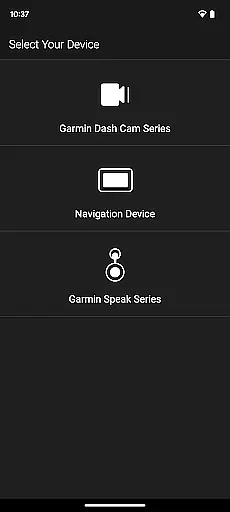
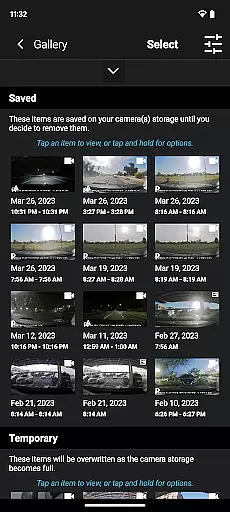
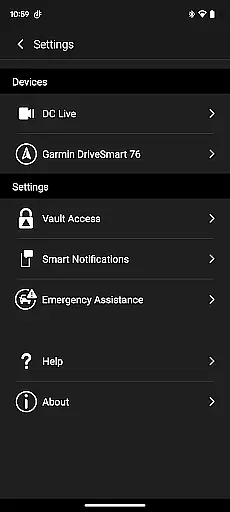
Garmin Drive is a versatile app designed for Garmin automotive navigators and dash cams. It offers real-time traffic updates, parking information, advanced weather alerts, and access to photoLive traffic cameras. The app seamlessly integrates with your Bluetooth-enabled mobile device, allowing you to manage calls, texts, and notifications directly from your navigator.
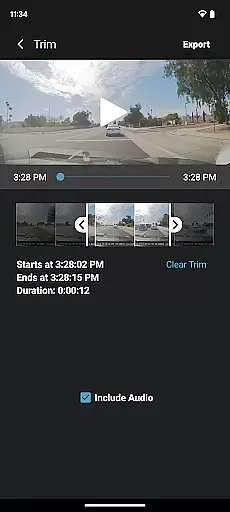
For dash cam users, the app provides intuitive controls for camera settings and recorded footage management. With support for up to four wireless dash cams through Dash Cam Auto Sync, it ensures 360-degree vehicle coverage. Additionally, its picture-in-picture functionality allows simultaneous viewing of two camera perspectives, making video review and sharing effortless.
Whether you're navigating city streets or reviewing dash cam footage, Garmin Drive enhances your driving experience by combining navigation, safety, and connectivity features in one convenient solution.
Garmin Drive stands out with its comprehensive feature set tailored for drivers. For navigators, it delivers real-time traffic data, parking availability, and advanced weather forecasts, ensuring you stay informed on the road. Integration with Bluetooth-enabled devices allows hands-free communication, while photoLive traffic cameras provide visual insights into current road conditions.
For dash cam users, the app simplifies video management. The Dash Cam Auto Sync feature connects up to four cameras, offering multi-angle recording for complete vehicle coverage. Its picture-in-picture mode lets you view two camera feeds simultaneously, enhancing video review efficiency. Sharing footage with insurance agencies or legal authorities is straightforward, thanks to the app's user-friendly interface.
Additionally, Garmin Speak with Amazon Alexa integration brings voice-controlled navigation and entertainment to your vehicle. By connecting to your car stereo via Bluetooth or AUX, you can enjoy music, news, and turn-by-turn directions effortlessly.
Accessing detailed vehicle information is crucial for drivers who want to stay informed about their vehicle's status and surroundings. The Garmin Drive app excels in providing comprehensive data tailored specifically for automotive navigators and dash cams.
This app offers real-time traffic updates, parking availability, advanced weather forecasts, and access to photoLive traffic cameras. These features ensure that drivers have the most up-to-date and relevant information to make informed decisions while on the road.
For dash cam users, the app allows control over camera settings and quick access to recorded footage. With support for up to four wirelessly connected dash cams, it provides extensive coverage around the vehicle. This multi-angle view capability enhances security and convenience, allowing users to review and share videos effortlessly.
Price transparency in navigation and dash cam solutions can greatly enhance the user experience by clearly communicating costs associated with various services. The Garmin Drive app addresses this need by offering a range of features that are both useful and cost-effective.
While the app itself is free to download, it provides valuable services such as real-time traffic and weather updates without hidden fees. Users can also manage calls, texts, and notifications from their Bluetooth-enabled devices, adding an extra layer of convenience without additional charges.
Furthermore, the integration with Garmin Speak and Amazon Alexa offers premium functionalities like voice-activated navigation and entertainment options. These features provide significant value without incurring extra costs, ensuring that users fully understand the benefits they receive at no additional expense.
User-friendly interface
Real-time traffic updates
Multi-camera support
Picture-in-picture mode
Voice control with Alexa
Limited device compatibility
Requires stable internet
Premium features cost extra
Complex initial setup
Battery drain on phones

Monitor specific TOYOTA parameters by adding this plugin to Torque Pro.
 2.00
2.00
Ferrari inspired analog & digital watch face with quick access and premium style
4.4
Practice the drills within MotoJitsu Master Riding Program Volume 1 & 2!
4.80
Buy and sell your boat
4.70
The Texaco App allows you to pay for fuel from the comfort of your car!
4.80
DMV Test Pro offers all the updated FREE DMV tests online.
4.60
Take state-specific DMV permit tests and ace the exam.
3.90
Your car is talking. Start listening.
4.30
Marathon ARCO Rewards members earn rewards & apply the rewards for fuel savings!
4.80
Play what you want through Android Auto
4.90
Your go-to app for car, truck & SUV parts, DIY tools, and expert repair help.
4.70
Autolist - The Largest Selection of Local Used Cars and Trucks
4.50
Get price alerts, vehicle history details and more for cars near you!
4.50
Instant diesel savings. No credit checks or fees. Nationwide growing network.
4.40
Taximeter; the professional's choice
4.30
myAudi offers users services and Audi connect services for Audi drivers
4.10
Boost profits and hit your goals faster with GigU's amazing tools for gigworkers
4.00
Discover new and used cars in Syria easily! Browse ads and connect with sellers.
3.70
DIY Vehicle Wheel Alignment
4.3


User Reviews