
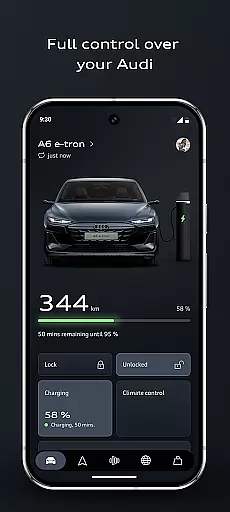
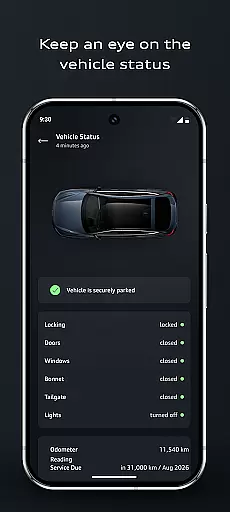

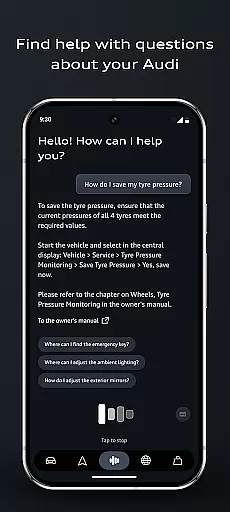

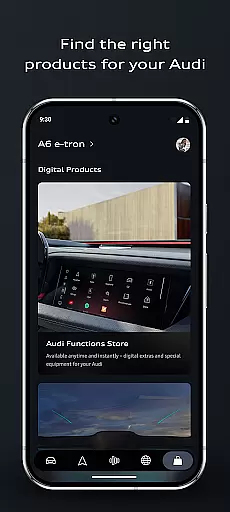
The myAudi app is your ultimate companion for managing and interacting with your Audi vehicle. This advanced application allows you to control essential vehicle functions remotely, plan efficient routes using real-time data, and receive instant answers from the AI-supported Audi assistant. Whether you drive an electric, hybrid, or combustion vehicle, the app optimizes your driving experience through smart features like remote climate control, digital key access, and intelligent charging management.
With its sleek design and user-friendly interface, the myAudi app makes it easier than ever to stay connected with your car. From automating daily routines based on time or location to discovering new functionalities tailored to your vehicle configuration, this app ensures a smarter, more convenient driving experience. Perfect for Audi owners who value seamless connectivity and cutting-edge technology in their automotive lifestyle.
The myAudi app offers a comprehensive suite of features designed to enhance convenience and connectivity. One standout feature is the AI-powered Audi assistant, which provides real-time information about your vehicle without requiring manual searches. Another highlight is the improved route planner, which integrates live traffic updates, range calculations, and charging schedules to optimize journeys for all types of Audi vehicles.
Additionally, the app includes innovative tools such as the digital key, enabling users to lock, unlock, and start their cars via smartphone. The remote vehicle control functionality lets you locate your car, check lights, or pre-cool the interior before use. With customizable app routines, you can automate tasks like off-peak charging or preconditioning, ensuring maximum efficiency while simplifying everyday interactions with your Audi.
In the realm of automotive technology, access to detailed vehicle information is paramount for an enhanced driving experience. The myAudi app excels in this area by providing users with comprehensive data about their Audi's status and functions. This includes real-time updates on the vehicleu2019s fuel level, battery status, and tire pressures, ensuring that drivers are always informed about their car's health.
Moreover, the app goes beyond mere status updates by integrating advanced features such as the AI-supported Audi assistant. This intelligent feature allows users to inquire about their vehicle's specifics without needing to consult the owneru2019s manual. Whether it's understanding warning lights or seeking guidance on vehicle functionalities, the assistant delivers clear, concise information, streamlining the interaction between driver and vehicle.
The significance of having detailed vehicle information at one's fingertips cannot be overstated. It empowers Audi owners with the knowledge needed to maintain their vehicle proactively, schedule timely maintenance, and make informed decisions regarding potential upgrades or services. This level of detail not only enhances user convenience but also contributes significantly to vehicle longevity and performance optimization.
Price transparency in automotive apps like myAudi plays a crucial role in fostering trust and satisfaction among users. By offering a clear overview of costs associated with Audi connect services, individual upgrades, and other on-demand functionalities, the app ensures that customers are never caught off guard by hidden fees. This openness in pricing structures enables users to plan their expenses wisely and choose services that best fit their budget and needs.
Beyond just displaying prices, the myAudi app provides personalized recommendations based on the user's current vehicle configuration. This tailored approach not only highlights cost-effective options but also introduces customers to new features they might find valuable, all while maintaining clarity on how each choice impacts overall spending. Such personalized insights into potential costs enhance the decision-making process for Audi owners.
Ultimately, the emphasis on price transparency within the myAudi app serves to strengthen customer relationships. By demystifying the cost aspects of owning and upgrading an Audi, the app builds confidence in the brand, encouraging long-term loyalty. Users appreciate the straightforward access to financial information, which simplifies their interactions with the vehicle and enhances their overall ownership experience.
User-friendly interface
AI-powered assistance
Real-time route optimization
Remote vehicle management
Customizable app routines
Limited to Audi models
Requires stable internet
Premium feature costs
Complex setup process
Battery usage concerns

Take Control of Your Car
 4.80
4.80
Practice the drills within MotoJitsu Master Riding Program Volume 1 & 2!
4.80
Theme for Car Launcher
4.4
Autolist - The Largest Selection of Local Used Cars and Trucks
4.50
Oil change service & coupons for car maintenance at Valvoline Instant Oil Change
4.70
Digital Car Key/Launcher, Screen Mirror, Android Dashboard, Remote Wireless Link
4.40
Control maps, media and messaging, with the Google Assistant while you drive
4.10
Secure mobile payments & fuel savings at Phillips 66®, Conoco® and 76® stations
4.40
Take state-specific DMV permit tests and ace the exam.
3.90
7-Day Returns on All Cars
4.80
Buy and sell your boat
4.70
View your car’s service records and find out when maintenance is due.
4.70
Trip computer+car diagnostic tool with widest variety of features and dashboard!
4.70
Find Fast EV Chargers | Charge Your Vehicle at 1,100+ Fast Car Charging Stations
4.60
Easy connect & control your cars from afar. Remote Lock & unlock car and carplay
4.60
CVT diagnostics with ELM327 for Nissan-based vehicles
4.40
Your car is talking. Start listening.
4.30
Car Sounds Engine Sounds app welcomes Auto Lovers to feel Car Simulator Sound
4.20
Blink Charging Mobile app makes finding an EV charger an intuitive experience.
3.80


User Reviews