
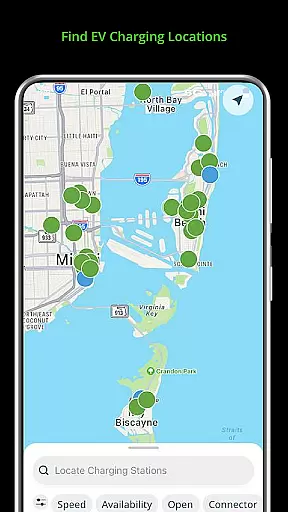
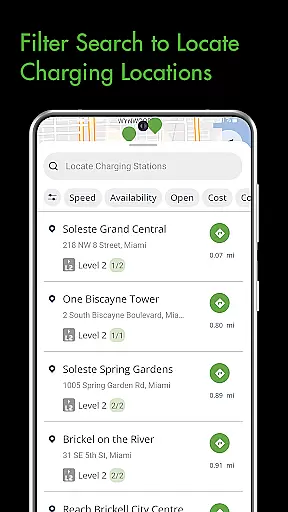
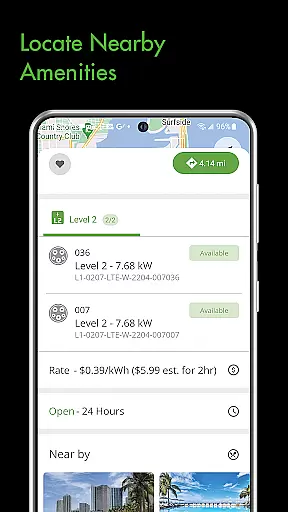
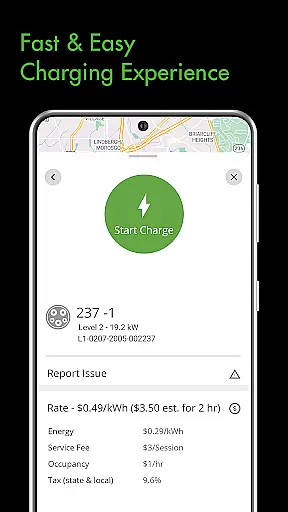
The Blink Charging Mobile App is a comprehensive solution for electric vehicle (EV) owners, designed to simplify and enhance the charging experience. This app allows users to locate EV charging stations effortlessly by searching via zip code, city, business name, or location category. It also enables management of charge sessions with real-time information on energy delivered, costs, and charging speed.
One standout feature is the ability to set up and manage the HQ 200 home charging station directly from the app. Users can track their charging history, configure station settings, and receive status notifications. Additionally, the app supports an expanded network that includes SemaConnect stations, allowing drivers to access more charging options and manage payments seamlessly.
This app is particularly useful for EV drivers who frequently travel and need reliable access to charging stations. By providing detailed session monitoring and expanding its network, Blink Charging ensures convenience and peace of mind for EV owners, making it easier than ever to maintain their vehicles' charge levels.
The Blink Charging Mobile App offers a variety of advanced features tailored to meet the needs of modern EV drivers. One key feature is the ability to locate public EV charging stations using multiple search criteria such as zip code, city, or business name. This functionality helps users find available chargers quickly and efficiently, reducing downtime and enhancing convenience.
Another significant feature is the comprehensive management of charge sessions. Users can monitor real-time data including occupancy time, estimated costs, energy delivered, and current charging speed. The app also provides status notifications for various stages of the charging process, ensuring users are always informed about their vehicle's charging status.
Additionally, the app supports the setup and management of the HQ 200 home charging station. This includes tracking charging history, configuring settings, and managing sessions from home. With the integration of the SemaConnect network, users gain access to even more charging stations and enjoy enhanced functionalities like payment management, making this app a versatile tool for all EV charging needs.
When it comes to managing your EV charging sessions, having access to detailed vehicle information is crucial. The Blink Charging mobile app provides comprehensive details about each charging session, ensuring that users are well-informed at every step.
The app allows you to monitor real-time data during a charge, including occupancy time, estimated costs, and energy delivered. This level of detail helps EV owners make informed decisions about their charging habits and manage expenses effectively.
Additionally, the app offers specifics about the charging station itself, such as its location, availability, and the current vehicle charging speed. These insights enable users to optimize their charging strategy and ensure their vehicle is charged efficiently.
By delivering precise and actionable vehicle information, the Blink Charging app enhances the overall EV charging experience, making it more convenient and reliable for drivers who demand transparency and control over their charging activities.
Price transparency is a key factor in ensuring a seamless and trustworthy EV charging experience. With the Blink Charging mobile app, users can easily access clear and upfront information about the costs associated with each charging session.
Before initiating a charge, the app provides an estimated cost, allowing users to plan their expenses accordingly. This feature eliminates any surprises and ensures that EV drivers are fully aware of the financial aspects of charging their vehicles.
Moreover, the app supports various payment options and maintains a wallet system for hassle-free transactions. Users can manage their payments and view transaction histories, further enhancing the clarity and convenience of the charging process.
By prioritizing price transparency, the Blink Charging app builds trust with its users, providing them with the confidence that they are getting fair and competitive rates for their EV charging needs.
User-friendly interface
Real-time charging data
Expanded network coverage
Home charger management
Comprehensive notifications
Limited international support
Occasional connectivity issues
Requires account setup
Premium features cost extra
Dependent on network availability

Monitor specific TOYOTA parameters by adding this plugin to Torque Pro.
 2.00
2.00
* This app needs an adapter cable and a certain OBD2 adapter to work *
4.20
Play what you want through Android Auto
4.90
Launcher for use in the car
4.40
Better fuel to help keep you on the road
3.20
Autolist - The Largest Selection of Local Used Cars and Trucks
4.50
Lexus app currently supports 2010 or newer vehicles (2018 or newer for Hawaii).
4.80
View your car’s service records and find out when maintenance is due.
4.70
Earn and save with Fuel Rewards®
3.20
Shop, finance, or sell today.
4.80
Oil change service & coupons for car maintenance at Valvoline Instant Oil Change
4.70
DMV Test Pro offers all the updated FREE DMV tests online.
4.60
Taximeter; the professional's choice
4.30
Control maps, media and messaging, with the Google Assistant while you drive
4.10
By enthusiasts, for enthusiasts
4.00
Wonder how much horsepower and torque your car/truck makes? Look no further.
3.40
Read and delete OBD codes with any ELM327 OBD scanner. Coding functions included
3.40
Club Car Wash Mobile App—the fast lane to managing your wash membership.
3.30
Easily notify car owners in urgent situations, safe, fast, multilingual.
4.0


User Reviews