
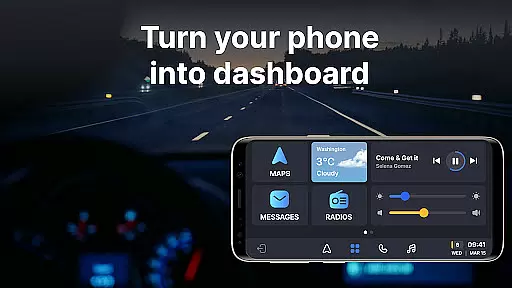
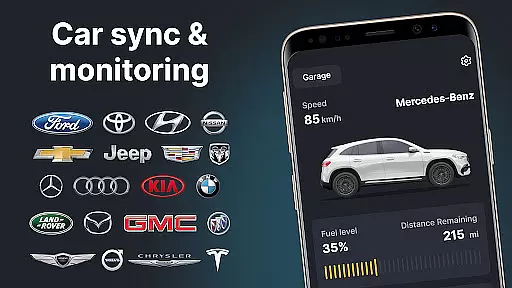
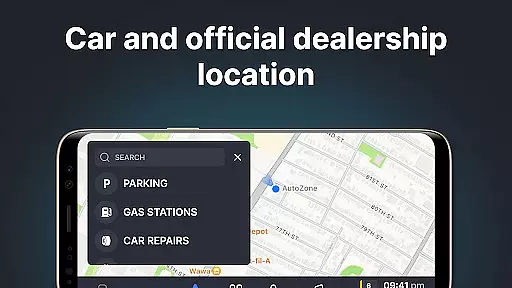
Auto Sync for Android/Car Play is a comprehensive vehicle management app that transforms your smartphone into an advanced car dashboard. Designed for both Apple CarPlay and Android Auto users, it provides real-time monitoring of crucial vehicle statistics including fuel level, battery status, engine oil life, and tire pressure through a wireless interface.
The app's standout feature is its seamless integration with your car's system, enabling functions such as digital car key access and screen mirroring. This functionality allows drivers to maintain focus on the road while still having access to essential apps like navigation maps, music players, and communication tools. The inclusion of a Driving Mode optimizes safety by minimizing distractions during travel.
With support for multiple vehicles through its Digital Garage feature, Auto Sync becomes an indispensable tool for managing various cars from different manufacturers. Whether you own a Tesla or a Toyota, this app ensures all your vehicles are accessible in one place, making it perfect for households with multiple cars or fleet managers who need to monitor numerous vehicles efficiently.
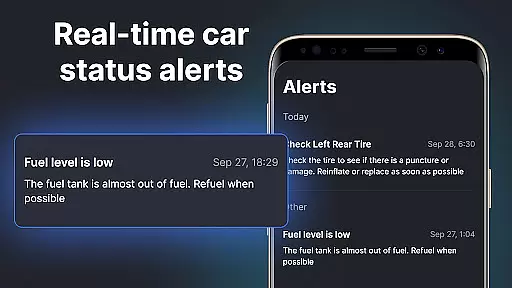
One of the most notable features of Auto Sync for Android/Car Play is its ability to present a complete snapshot of your vehicle's status directly on your phone. Through real-time updates, users can track maintenance needs, receive low fuel alerts, and get tire pressure warnings, ensuring their vehicle remains in optimal condition at all times.
The app's wireless Driving Mode creates a safe driving environment by transforming your phone into a dedicated car dashboard. This mode supports hands-free calling, voice-activated navigation, and audio entertainment controls, allowing users to interact with their devices safely while driving. Additionally, the screen mirroring function lets users display their phone's interface on the car's built-in screen, providing easy access to favorite apps without compromising safety.
Another significant advantage is the Digital Garage feature, which enables management of multiple vehicles within a single platform. Regardless of the make or model - from luxury brands like Mercedes and Porsche to mainstream manufacturers like Honda and Ford - users can conveniently oversee all their cars' statuses and receive personalized notifications for each vehicle. This makes Auto Sync particularly valuable for those who require reliable information about several automobiles simultaneously.
Auto Sync for Android/Car Play offers an extensive range of detailed vehicle information, ensuring drivers have access to crucial data about their car's status. This app provides real-time updates on vital statistics such as fuel level, battery life, engine oil condition, mileage, and tire pressure directly on a car dashboard interface.
The importance of having such detailed vehicle information at your fingertips cannot be overstated. With this app, users receive notifications that allow them to address any potential issues promptly. This proactive approach helps maintain the vehicle's safety and reliability, giving peace of mind to drivers who want to prevent breakdowns or accidents due to mechanical failures.
Specifically, Auto Sync stands out by integrating seamlessly with both Apple CarPlay and Android Auto systems. It transforms your phone into a convenient digital car dashboard with just one touch. This feature not only enhances convenience but also ensures that drivers can keep their focus on the road while still being informed about their vehicleu2019s health and maintenance needs.
Ultimately, the value provided by Auto Sync lies in its ability to consolidate all essential vehicle information into a user-friendly platform. Whether you're monitoring ongoing performance metrics or receiving timely alerts for maintenance reminders, low fuel notifications, or tire pressure warnings, this app equips you with the knowledge needed to make informed decisions regarding your vehicle's upkeep and safety.
Price transparency is a critical aspect of any automotive-related application, and Auto Sync for Android/Car Play excels in this area by providing clear insights into various costs associated with vehicle ownership. The app includes features that display price comparisons, discounts, and detailed fee breakdowns, ensuring users are never caught off guard by hidden charges.
The significance of price transparency within the automotive industry cannot be understated. By offering comprehensive details on expenses such as fuel consumption rates, maintenance costs, and even insurance premiums, Auto Sync empowers users to budget effectively and make financially sound decisions regarding their vehicles.
Auto Sync achieves price transparency through innovative functionalities like wireless Driving Mode integration and Digital Garage management. These tools enable users to monitor multiple vehicles' cost-related data from different brands within a single platform. Whether it's tracking Tesla's energy consumption or comparing service prices across Ford and BMW models, the app delivers accurate financial insights tailored to each user's specific fleet.
In summary, Auto Sync for Android/Car Play not only enhances driving experiences through advanced connectivity features but also ensures users are well-informed about the economic aspects of owning and maintaining their cars. This dual focus on technological innovation and financial clarity makes it an indispensable tool for modern drivers seeking both convenience and fiscal responsibility.
User-friendly interface
Real-time vehicle monitoring
Supports multiple vehicles
Wireless connectivity options
Comprehensive safety features
Limited to supported car models
Requires stable internet connection
Premium features may cost extra
Occasional syncing issues reported
Steep learning curve for beginners

Theme for Car Launcher
 4.0
4.0
App Mirroring for Tesla Car's Browser
2.80
Theme for Car Launcher
4.0
CVT diagnostics with ELM327 for Nissan-based vehicles
4.40
Get your personalized financing options and shop for used cars today!
4.20
Simplify your drive
3.90
Get more out of your AAWireless adapter with this companion app | aawireless.io
4.80
Lexus app currently supports 2010 or newer vehicles (2018 or newer for Hawaii).
4.80
1M+ high-quality auto parts at your fingertips. Fitment guaranteed.
4.70
Trip computer+car diagnostic tool with widest variety of features and dashboard!
4.70
The ExtraMile App allows you to pay for fuel from the comfort of your car!
4.70
Find Your Local Store or Shop Online for the Car, Truck, or SUV Parts You Need
4.70
Autolist - The Largest Selection of Local Used Cars and Trucks
4.50
On the CarShield app, you can view contracts, make payments, & request roadside.
4.40
Your Path to Driving Licensing Success Begins Here! Develop your driving skills.
4.40
Secure mobile payments & fuel savings at Phillips 66®, Conoco® and 76® stations
4.40
Control maps, media and messaging, with the Google Assistant while you drive
4.10
Monitor your behind-the-wheel behavior to become a safer driver and save.
4.10
Read and delete OBD codes with any ELM327 OBD scanner. Coding functions included
3.40


User Reviews