
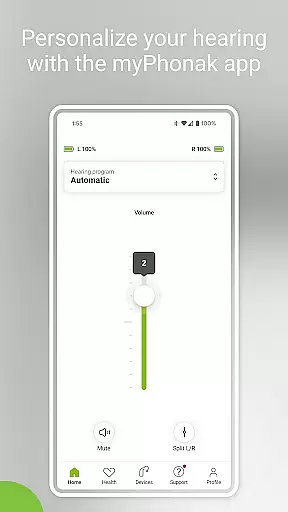
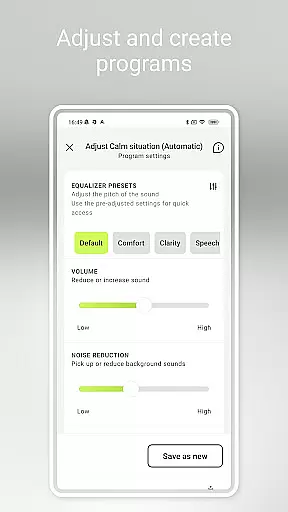
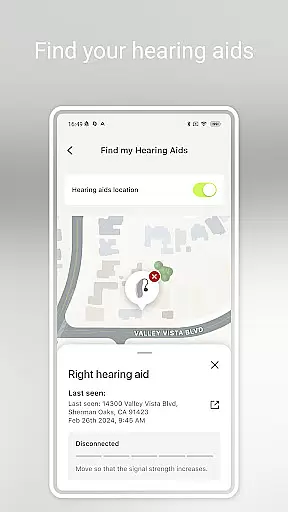
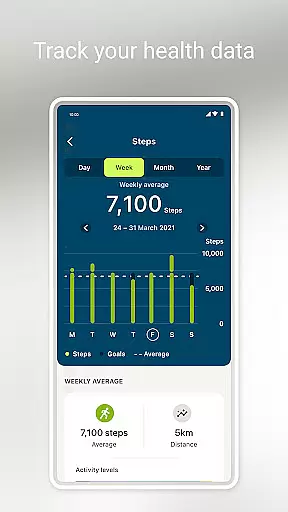
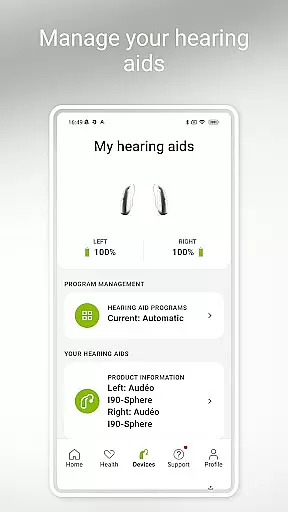
myPhonak is a comprehensive hearing aid management application designed for users of Phonak hearing aids. The app offers advanced remote control features, allowing users to adjust volume, noise reduction, microphone directionality, and equalizer settings to suit different listening environments. With personalized presets and detailed sliders, users can tailor their hearing experience with precision.
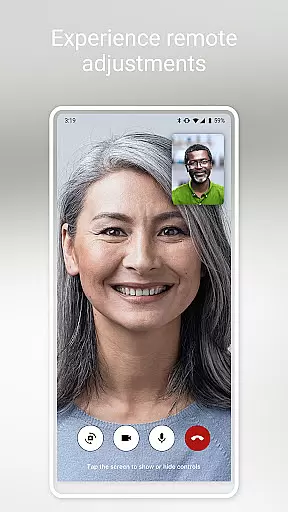
In addition to its core functionality, myPhonak provides remote support through live video calls with hearing care professionals, enabling remote adjustments to hearing aids. The app also integrates health tracking features such as step counting, activity levels, heart rate monitoring, and more, depending on the device model. These features make it an essential tool for those seeking both convenience and personalization in managing their hearing aids.
This app is particularly beneficial for individuals using Phonak hearing aids with Bluetooth connectivity, offering compatibility with various models across the Paradise, Audéo Fit, Lumity, and Infinio lines. By combining advanced hearing controls with health tracking and professional support, myPhonak enhances the overall hearing experience while promoting better health awareness.
myPhonak stands out with its diverse feature set tailored specifically for hearing aid users. One of its key features is the Remote Control functionality, which allows users to modify hearing aid settings effortlessly. This includes adjusting volume, selecting pre-defined programs, and fine-tuning sound pitch through customizable presets or manual slider adjustments for bass, middle, and treble frequencies.
The app also offers Remote Support, enabling users to connect with their hearing care professionals via live video calls. This feature facilitates timely adjustments and consultations without needing in-person visits. Additionally, myPhonak incorporates a Health section that tracks various metrics like steps, wearing time, activity levels, heart rate, and distance walked, depending on the compatible hearing aid model.
Other notable features include Tap Control configuration, cleaning reminders, and real-time information on battery levels and connected devices. With compatibility across multiple Phonak hearing aid models and integration with Apple Health, myPhonak delivers a seamless blend of convenience, customization, and health monitoring capabilities.
In the realm of medical applications, content credibility is paramount. myPhonak stands out by providing users with access to enhanced hearing controls and personalization options for Phonak hearing aids, all reviewed and approved by hearing care professionals. This ensures that every feature, from noise reduction to microphone directionality, meets high medical standards.
The app includes Remote Support functionality, allowing users to consult with their hearing care professional via live video calls. These professionals can adjust hearing aid settings remotely, ensuring that all changes are made under expert supervision. This level of professional oversight adds an additional layer of credibility to the app's offerings.
Furthermore, myPhonak offers health tracking features such as step counting, activity levels, and heart rate monitoring on compatible devices. These metrics are crucial for users who need to monitor their overall well-being alongside their hearing health. The integration of these features has been carefully designed to provide accurate and reliable data.
By combining advanced hearing aid management with health tracking capabilities, myPhonak delivers a comprehensive solution that is both credible and beneficial for users seeking to improve their quality of life. Always remember to consult with a healthcare provider before making any medical decisions based on app data.
Teleconsultation has become an essential service in modern healthcare, and myPhonak excels in this area by offering Remote Support through live video calls with hearing care professionals. This feature allows for real-time adjustments to hearing aid settings, ensuring that users receive personalized care without needing to visit a clinic physically.
The quality of these teleconsultations is bolstered by the app's compatibility with a wide range of Phonak hearing aids, each equipped with Bluetooth connectivity. This seamless integration ensures that all remote adjustments are transmitted accurately and efficiently, maintaining the high standard of care expected from in-person visits.
Additionally, myPhonak supports users in tracking various health metrics, which can be discussed during teleconsultations. Having access to data such as wearing time, activity levels, and heart rate empowers both users and professionals to make informed decisions regarding hearing health management.
Overall, myPhonak sets a benchmark for teleconsultation quality within the medical app sector. By facilitating expert-guided adjustments and providing valuable health insights, it enhances the user experience while upholding stringent medical standards.
User-friendly interface
Comprehensive hearing controls
Remote professional support
Health tracking integration
Wide device compatibility
Limited to Phonak devices
Health features model-specific
iOS version required
Bluetooth necessary
Professional access needed

MySafeRide simplifies booking and managing rides for health plan members.
 3.50
3.50
Pelvic Floor Muscle Exercises
4.80
OKN Strips, OptoDrum, OKN
4.3
Manage your prescriptions and pharmacy care anytime, anywhere.
4.80
The Better Pharmacy Experience
4.90
Easy access to benefits and rewards
3.70
Save up to 80% on your pharmacy prescriptions & medications with free Rx coupons
4.70
Use the phone microphone or headset mic as sound amplifier for louder hearing.
4.30
Online Doctors & Condition Management
4.40
Want to make it easier to manage your health? We’re with you, wherever you are.
4.70
Sync your blood glucose device, log values automatically and tame your diabetes!
4.60
The MDLIVE app makes connecting with a doctor fast, easy, and convenient.
4.60
Take on apraxia and aphasia with a powerful video-driven speech therapy app.
4.60
PPP provides quick offline access to over 350 field treatment protocols.
4.60
Secure video visits with your VA care team from anywhere
4.50
Perform pure-tone audiometry and a speech intelligibility test on your phone.
4.50
Zepbound & Mounjaro support & resources for savings, tracking & more
3.90
Donating plasma just got easier with the BioLife Plasma Services mobile app.
3.90
X-Vein: Advanced vein detection for medical practice
3.10


User Reviews