
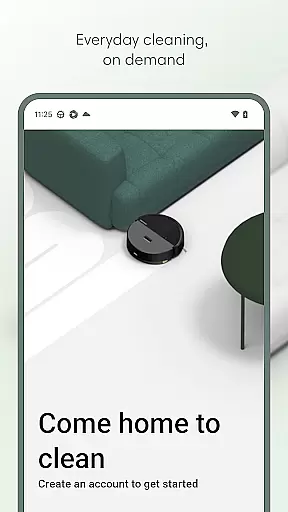
Roomba Home is a smart cleaning management app designed for Roomba robot vacuum owners. The application allows users to remotely control their robotic vacuums, offering functionalities such as starting, stopping, and scheduling cleaning sessions. With compatibility across multiple Roomba series, it provides an intuitive interface for managing cleaning routines, adjusting settings, and creating personalized cleaning schedules.
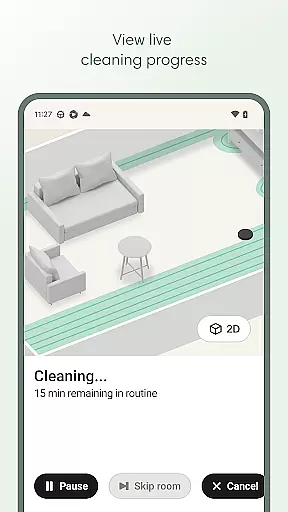
The app also features advanced mapping capabilities, allowing users to label rooms, create zones, and target specific areas for cleaning. Real-time tracking of the robot's cleaning path ensures optimal performance while smart home integration with Alexa, Siri, and Google Assistant enables voice-activated cleaning. Additionally, proactive maintenance alerts help keep your Roomba in top condition, ensuring uninterrupted cleaning performance.
Whether you need to clean your entire home or just a single room, Roomba Home streamlines the process through intelligent recommendations and user-friendly controls. This makes it an essential tool for maintaining a consistently clean home with minimal effort.
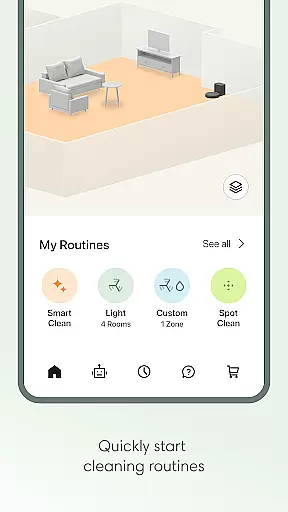
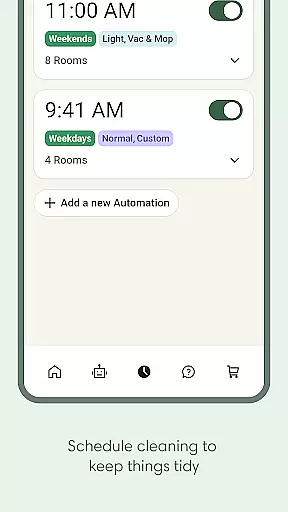
Roomba Home offers a comprehensive suite of features that enhance the robotic vacuuming experience. One of its standout capabilities is the Routine Builder, which allows users to customize cleaning schedules by selecting specific rooms, adjusting suction power, and enabling advanced scrubbing modes. This level of customization ensures that each area of your home receives the appropriate level of cleaning attention.
The app also supports detailed mapping functionality, saving up to five unique floor plans. Users can label rooms, add virtual no-go zones, and even mark furniture locations to optimize navigation during cleaning sessions. Real-time insights provide visibility into where and how the robot is cleaning, empowering users to make adjustments on the fly. Furthermore, seamless integration with popular smart home ecosystems like Alexa, Siri, and Google Assistant adds another layer of convenience.
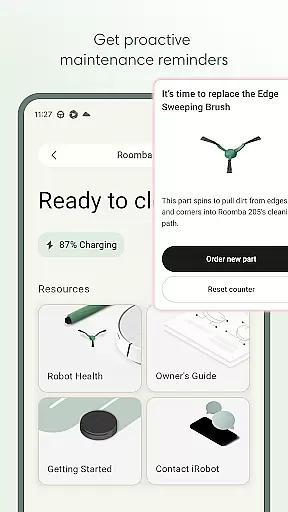
Maintenance monitoring is another key feature, alerting users when filters need replacement or when other service tasks are due. These proactive notifications ensure that your Roomba remains in peak operating condition. Overall, Roomba Home combines ease of use with powerful customization options, making it an indispensable companion for modern households.
The Roomba Home app offers extensive lifestyle category coverage by integrating multiple home management features into a single platform. This includes advanced cleaning routines, scheduling options, and personalized settings that cater to various household needs.
Users can create detailed cleaning plans using the Routine Builder feature, which allows them to select specific rooms, adjust cleaning settings, and even enable advanced scrubbing for more thorough cleaning. The app also supports both vacuuming and mopping functions, providing flexibility in maintaining different types of flooring.
In addition to cleaning functionalities, the app provides real-time insights and controls, enabling users to monitor their robot's progress and make adjustments as needed. With support for up to five saved maps, users can label rooms, add zones, and manage furniture placement for targeted cleaning.
The app further enhances lifestyle convenience through voice control compatibility with Alexa, Siri, and Google Assistant. This hands-free functionality allows users to initiate cleaning tasks effortlessly, making daily chores simpler and more efficient.
The Roomba Home app ensures content authenticity and expert credibility by offering verified features developed by iRobot, a leader in robotic cleaning solutions. Each function within the app is designed based on extensive research and development, ensuring reliable performance and user satisfaction.
One key aspect of the app's credibility lies in its proactive product maintenance system. The Health Dashboard monitors the robot's status and provides timely maintenance suggestions, helping users keep their devices in optimal condition. This feature reflects iRobot's commitment to delivering trustworthy and durable products.
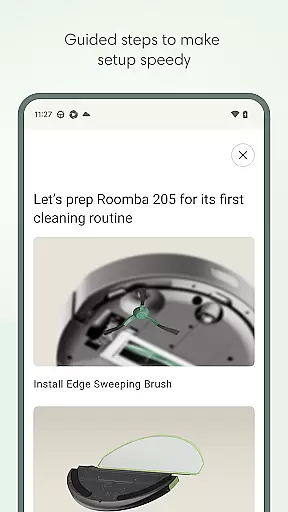
Moreover, the app includes intelligent recommendations that guide users from initial setup to daily operations. These recommendations are crafted by experts who understand the nuances of home cleaning, ensuring that users receive accurate and beneficial advice throughout their experience.
All cleaning data presented in the app, including maps and cleaning history, are sourced directly from the robot's sensors, guaranteeing accurate and reliable information. This transparency reinforces the app's position as a credible tool for managing home cleaning tasks effectively.
User-friendly interface
Advanced scheduling options
Real-time cleaning insights
Voice assistant compatibility
Proactive maintenance alerts
Limited to newer models
Requires stable Wi-Fi
Premium features may cost extra
Mapping limited to five floors
Initial setup can be time-consuming

What is my face shape? Find out your face shape from picture, see fitting frames
 3.90
3.90
Unique Dark Analog style for Wear OS watches.
4.5
Duo Watch Face (animated)
4.1
BILT interactive 3D instructions help you get the job done right
3.50
Get your life organized with My Agenda!
4.30
Spirit Communicator is a real paranormal ghost hunting app with many fun modes.
3.90
Crochet made easy: step-by-step tutorials, beginner patterns & projects
4.60
Retro animated weather with hourly forecast Watch Face for Wear OS
4.60
Vehicle ownership simplified. Get the myChevrolet® app today.
4.60
Your store’s deals, where you are.
4.80
Colorful selection floral watch face with gyro for Wear OS
4.60
The all-new Cync app. The simple, connected app for Cync and C by GE.
4.50
This app is intended to support professional EMDR therapy.
4.50
A smart Siddur with halachic times
4.50
Cute Adorable Animals now on your wrist with our Wear OS watch face!
4.40
Use your device sensors to detect energy and convert it into spoken words.
4.10
Do you want to communicate with spirits?
3.80
Take Hobby Lobby with you wherever you go!
3.40
A watch face with transparency and fluid visuals inspired by liquid glass design
4.4


User Reviews