
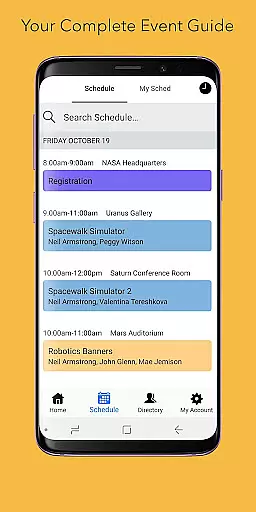
Sched is a leading platform for session registration and attendance management, designed to streamline the organization of complex multitrack events. This app allows event organizers to manage all event details in one place, offering tools for scheduling, attendee engagement, and content management.
With features like a full schedule view, personalized user experiences, speaker directories, and offline caching, Sched ensures that both organizers and attendees maximize their event experience. Whether it's for conferences, conventions, or festivals, Sched provides comprehensive solutions to make events more accessible and enjoyable.
Sched offers a robust set of features tailored for event management. Users can browse the entire event schedule conveniently, eliminating the need for physical event guides. The app supports personalization, allowing attendees to log in and modify their schedules on-the-go.
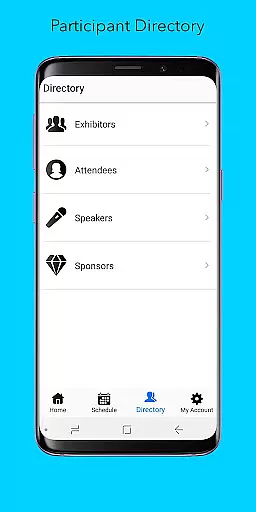
Additionally, Sched includes a directory feature with detailed profiles of speakers and exhibitors, enhancing networking opportunities. Its offline caching capability ensures users have access to their schedules even without an internet connection, providing reliability and convenience throughout the event.
Task creation and detail customization are essential features for event management platforms like Sched. This functionality allows event organizers to create detailed sessions, workshops, or meetings with specific information such as time, location, speaker details, and session descriptions.
Sched offers a comprehensive suite of tools for task creation. Organizers can easily input session details, manage attendee lists, and even integrate multimedia content to enrich the event experience. The platform supports complex multitrack events, ensuring that each session is meticulously planned and organized.
The benefits for users are significant. Attendees can browse through a full schedule conveniently from their mobile devices without needing a physical event guide. They can personalize their event experience by selecting sessions of interest and saving them to their personal schedules. This level of customization ensures that participants get the most out of the event according to their preferences and needs.
Ultimately, the ability to create and customize tasks in Sched enhances both the organizer's and attendee's experiences. It streamlines event management processes while providing attendees with a personalized and engaging event journey, making every event not just endured but truly experienced.
Reminder settings play a crucial role in ensuring that attendees do not miss important sessions at events managed through platforms like Sched. These settings allow users to receive timely notifications about upcoming sessions, changes in schedule, or important announcements.
Sched provides flexible reminder options that cater to individual preferences. Users can set reminders for each session they are interested in, choosing how far in advance they wish to be notified. This feature leverages push notifications and email alerts to keep attendees informed and engaged throughout the event.
The practical advantages of reminder settings are manifold. For attendees, it means never missing a key session or update, thus maximizing their event participation. For organizers, it boosts attendance rates and participant satisfaction, as timely reminders help maintain high engagement levels throughout the event duration.
In summary, reminder settings in Sched ensure that all participants stay on top of their schedules. By offering customizable notification preferences, the app empowers users to fully immerse themselves in the event experience, enhancing overall satisfaction and effectiveness of event management.
User-friendly interface
Comprehensive schedule management
Personalized event experiences
Reliable offline access
Enhanced networking opportunities
Limited free features
Requires account creation
Occasional sync issues
Premium pricing for advanced features
Steep learning curve for new users

The Ultimate Tournament Hub
 4.70
4.70
CUE Live utilizes ultrasonic sound waves to sync devices at CUE enabled events
4.80
Wedding planner app with wedding venues, wedding checklist, countdown & budget.
4.60
Instant photo sharing for every occasion
3.80
For weddings, parties & events
4.60
The official app of the Carmel Christkindlmarkt!
4.0
Fast Scans. Happy Fans. For Every Hometown!
4.60
Freebie Games for Epic Games, Steam, Amazon, Rockstar etc.
4.40
Buy and sell tickets to sports, concerts, theater, festivals, and comedy events
4.10
Clubs, Festivals, Discounted Tickets, Guest Lists & VIP Tables
4.90
TodayTix is the easiest way to get tickets to the best shows in your city.
4.90
Here you can choose tickets for films, performances, concerts and other events
4.60
Invitation Card Maker, Design & share wedding, birthday & party invites fast
4.40
Octrober 2025: We've updated the MyGenMobile App with a new look and feel!
4.40
The world's largest selection of tickets is now at your fingertips
3.90
Audio guide companion APP for SEE's Michelangelo's Sistine Chapel
3.50
Purchase line-skip passes, drinks, cover, and more at bars and clubs
3.50
Watch live football matches and streaming events on our Arabic TV app!
3.50
TV Garden - World Live TV : Play & cast your videos seamlessly!
3.20


User Reviews