
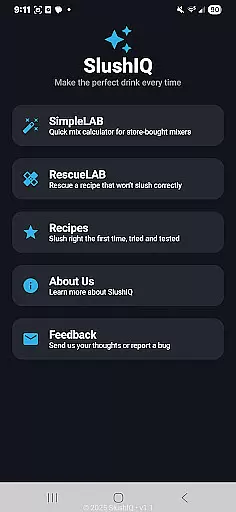
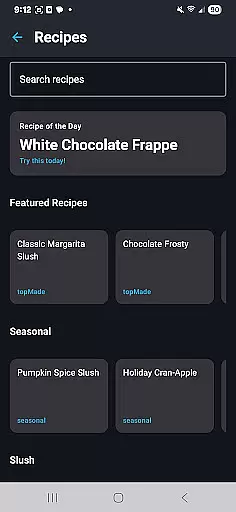
SlushIQ is a revolutionary app designed for slushie and frozen drink enthusiasts who want perfect consistency every time. The app provides precise tools to calculate Brix and ABV levels, ensuring smooth and consistent freezes tailored specifically for home slush machines like Ninja SLUSHi and Iceman Slush-Ease. Whether you're crafting margaritas, daiquiris, or mocktails, SlushIQ helps you achieve professional-quality results at home.
With its science-backed approach, the app eliminates guesswork by offering features such as live freeze prediction, recipe scaling, and instant fixes for watery or icy mixes. This makes it an indispensable tool for both casual users and serious mixologists looking to elevate their frozen drink game.
SlushIQ stands out with its comprehensive suite of features that cater to all your slushie-making needs. At its core is the Frozen Drink Calculator, which provides real-time predictions for Brix, ABV, and freeze points, ensuring optimal consistency. Additionally, the Brixley Chat assistant offers on-demand help with recipes and troubleshooting, making the process seamless even for beginners.
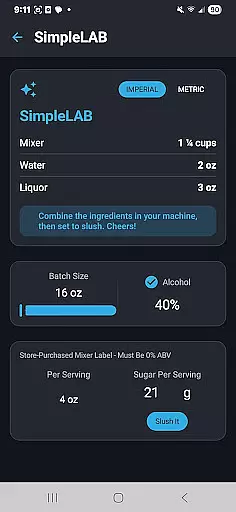
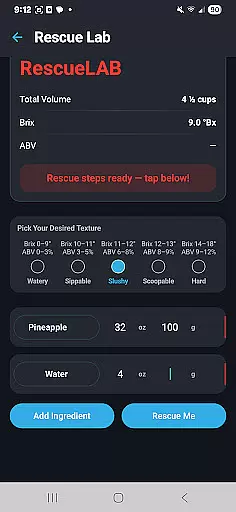
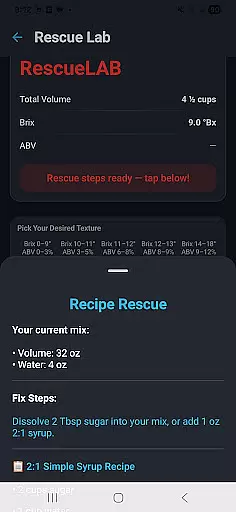
The app also includes a Recipe Library filled with tested formulas for cocktails, mocktails, and more. For those dealing with store-bought mixers, SimpleLAB allows conversion into slushie-ready batches while RescueLAB instantly corrects issues like soupy or overly icy textures. With batch scaling and compatibility across popular machines, SlushIQ ensures precision and convenience in every step of your slushie journey.
Locating the right ingredients and tools for making slushies can be a daunting task, but SlushIQ simplifies this process. The app provides a comprehensive guide to finding compatible machines and mixers, ensuring that users can easily access everything they need.
SlushIQ supports popular home slush machines like Ninja SLUSHiu2122 and Iceman Slush-Easeu2122, offering tailored advice on where to purchase these devices. This feature is crucial for users who want to ensure compatibility and optimal performance of their frozen drink equipment.
By integrating detailed product information and links to authorized retailers, SlushIQ ensures that users can confidently find and buy the best products for their needs. This not only saves time but also enhances the overall user experience by providing peace of mind regarding product authenticity and quality.
Once you have crafted the perfect slushie recipe using SlushIQ, the next step is to gather your ingredients and tools. While the app doesn't offer direct delivery services, it excels in guiding users on how to efficiently procure items through various pickup options.
SlushIQ's extensive network of suppliers and retail partners makes it easy for users to locate nearby stores where they can pick up recommended products. This feature is particularly beneficial for those who prefer a hands-on shopping experience or need their items immediately.
The app's ability to streamline the procurement process by suggesting local pickup points and compatible retailers adds significant value. Users can enjoy a seamless transition from digital recipe creation to real-world slushie production, knowing exactly where to go for the best ingredients and equipment.
User-friendly interface
Accurate Brix calculator
Wide range of recipes
Real-time troubleshooting
Batch scaling feature
Premium version required
Limited free content
Device-specific optimization
Occasional bugs
No offline mode

Order Beer, Snacks & More 24/7
 4.20
4.20
Monthly Perks. Fuel Discounts. App Exclusive Deals.
4.90
Order your Buffalo Wild Wings favorites for takeout & delivery
4.50
Sweeten the season!
4.90
Get exclusive food deals, earn rewards, fast reordering & order ahead options.
4.30
Food delivery from your favorite places. Order food, alcohol and more nearby
4.50
Order for Pickup and Delivery
4.70
Eating fresh just got a whole lot better with the new Subway app.
4.20
The ultimate app to save recipes from Instagram, TikTok, Facebook & more.
4.60
Rescue tasty unsold food from local stores for ½ price or less.
4.90
Restaurant Reservations
4.90
Fresh sandwiches and boxed lunches for delivery or pickup. Plus, track rewards!
4.80
Wings for Delivery or Carryout
4.80
Conveniently order food ahead and avoid the wait at your favorite Jersey Mike's.
4.80
Order from Gopuff and get your essentials delivered in as fast as 15 minutes
4.50
Stashcook: Keep healthy food recipes, cooklist & weekly meal plans for any diet.
4.50
Order ahead, receive points with qualifying purchase & redeem available rewards.
4.50
Real ones order on the app, earn points, score deals, and skip the line.
4.40
Order, Deals & Rewards
4.20


User Reviews