
















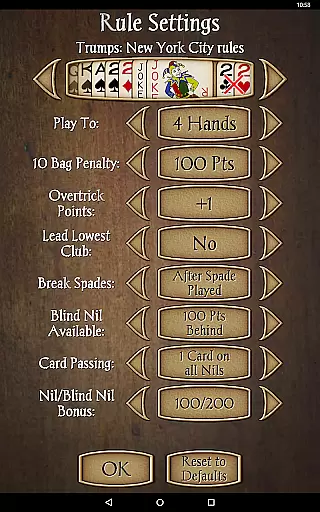

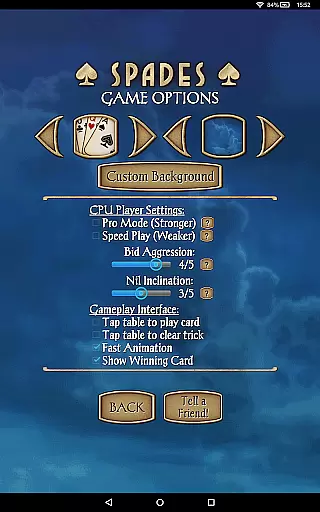

Spades Pro is a premium card game application that brings the classic 4-player Spades experience to your mobile device. Developed by a top developer recognized in 2013 and 2015, this app stands out with its advanced AI engine and sophisticated gameplay features. The app offers an authentic Spades experience with full partnership play, 21 uniquely skilled CPU opponents, and customizable gameplay options.
The app's latest update introduces a more creative bidding system, allowing for strategic plays that go beyond conventional rule-based approaches. With enhanced CPU player interactions, including speech bubbles and emotional expressions, the game creates a lively and engaging atmosphere. Whether you're a casual player or a Spades expert, this app provides a scalable difficulty level that caters to all skill levels. Its polished graphics and smooth performance make it equally suitable for both tablets and phones.
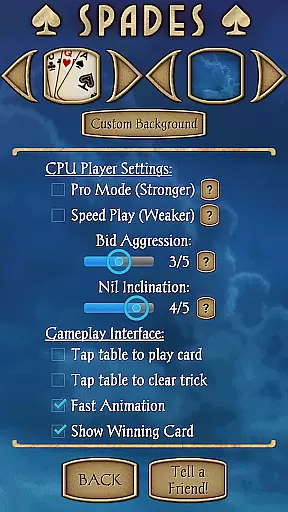
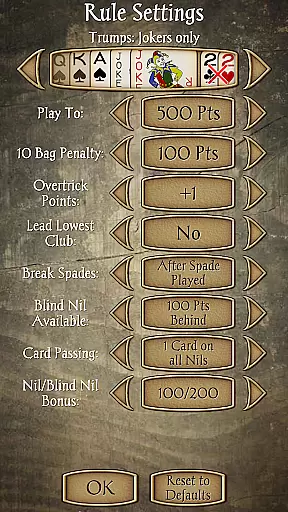
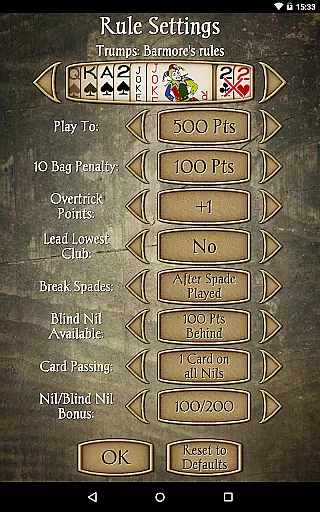
Spades Pro boasts an array of features designed to enhance your gaming experience. The app includes a robust selection of gameplay options such as Jokers, Barmore, NYC, and Deuces variants, alongside helpful tools like undo, hints, and in-game score explanations. The newly implemented bidding system allows for more creative strategies, while the 'Pro mode' option delivers stronger and more competitive play.
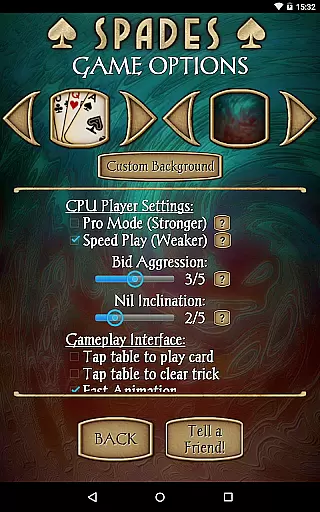
Customization is key in Spades Pro, offering players the ability to set their own names, choose partners, select from 17 different backgrounds or upload custom ones, and adjust various gameplay settings. The app also tracks detailed statistics for both human and CPU players, helping users monitor their progress. Additional features like 'Speed Play' for faster games and an 'Aggression' setting for more challenging opponents ensure a dynamic and personalized experience. The recent engine improvements focused on AI quality have elevated the app's overall performance, making it the most refined version yet.
Random Number Generation (RNG) fairness is crucial in card games like Spades Pro to ensure every player has an equal chance of receiving any card. This randomness is fundamental to maintaining the integrity and excitement of the game, preventing predictability and ensuring a fair challenge for all participants.
Spades Pro employs advanced RNG algorithms that are rigorously tested and certified to meet industry standards. These algorithms generate card distributions that mimic real-life shuffling, providing an unpredictable and equitable gaming experience. The certification process involves third-party audits to verify the randomness and fairness of each deal, giving players confidence in the game's impartiality.
For users, this means every hand dealt in Spades Pro is as random and unbiased as possible, closely replicating the experience of playing with a well-shuffled physical deck. Players can focus on their strategy and enjoyment without worrying about manipulated outcomes or unfair advantages.
The implementation of certified RNG technology not only enhances the credibility of Spades Pro but also elevates the overall gaming experience. Players can trust that their victories are earned through skill and luck, just as in traditional card games, thus preserving the spirit of competition and fun.
Control fluidity and input latency are essential factors in digital card games, impacting how responsive and smooth the gameplay feels. In fast-paced games like Spades Pro, minimizing delay between a player's action and the gameu2019s response is vital for maintaining engagement and satisfaction.
Spades Pro optimizes control fluidity by employing efficient coding practices and leveraging modern device capabilities. The game processes user inputs swiftly, ensuring actions such as playing a card or making a bid are registered immediately. This optimization reduces input latency, creating a seamless interaction between the player and the game interface.
Players benefit from this enhanced responsiveness through an intuitive and engaging experience. Quick recognition of moves allows for dynamic gameplay sessions where timing and precision matter, mirroring the pace of face-to-face card games. Such fluid controls contribute significantly to the sense of immersion within the virtual environment.
By prioritizing low input latency and smooth controls, Spades Pro delivers a polished performance that meets the expectations of both casual gamers and seasoned card enthusiasts. This attention to technical detail ensures that every session remains enjoyable and competitive, fostering a loyal player base appreciative of high-quality execution.
Advanced AI engine
Customizable gameplay
High-quality graphics
Multiple difficulty levels
Engaging user interface
No online multiplayer
Occasional bugs
Heavy on resources
Limited social features
Paid app

Play for fun, practice or get advice for 400+ VP games and over 2000 pay tables.
 4.60
4.60
Reiner Knizia's classic card game, Masters Gallery
4.60
Addictive Classic Solitaire of 2025! Relax with classic and fun card games now!
4.90
Sinister solitaire. Four cards, one fate.
4.4
Play your cards carefully in this 4 player trick-taking card game!
4.60
GWENT: Rogue Mage is a single-player expansion to GWENT: The Witcher Card Game
3.50
Learn the tricks in classic Spades offline. No Wifi, Spades always feels right!
4.90
Classic Solitaire Game - Play Original Klondike Solitaire Card Games to Relax
4.60
Defeat the Uberlich in this challenging, deck-building roguelike adventure!
4.20
Enjoy Fun and Relaxing Classic Spades Card Game with Friends!
4.90
Card-Based Farkle Fun
4.80
Play anywhere anytime the most popular card game
4.70
Restore and customize the truck exclusively to your own through Solitaire!
4.60
Easy play. Relax with daily solitaire fun!
4.60
Train your brain playing the most relaxing & addictive 2025 solitaire game !
4.60
Swipe and be the Queen!
4.60
Play the legendary Blackjack 21! Win like a pro in this exciting casino game!
4.50
Compete against the computer in this classic trick-taking game.
4.20
The classic Hand & Foot experience with a premium, easy to play, offline design.
4.10


User Reviews