
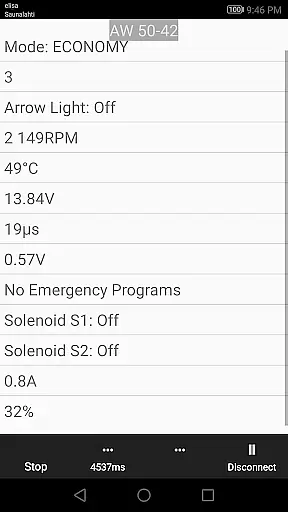
850 OBD-II is a specialized diagnostic and programming application designed for Volvo vehicles from 1996-2000, with support for P1, P2 platforms. This app works in conjunction with ELM327 Bluetooth/Wi-Fi/USB dongles to provide advanced functionalities beyond standard OBD-II capabilities. It allows users to directly read individual modules, aiding in precise problem diagnosis. The app's compatibility spans multiple Volvo models including 850/900 series, S40/V40 up to 2004, and more.
The true value of 850 OBD-II lies in its ability to reset service lights, read and clear fault codes, display real-time sensor data, and offer advanced commands for specific systems. Whether you're diagnosing ABS systems or programming parameters within vehicle modules, this app provides an all-in-one solution for Volvo owners and mechanics alike. Its comprehensive feature set makes it an indispensable tool for maintaining and troubleshooting your vehicle efficiently.
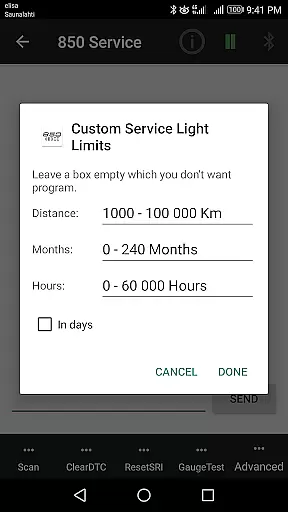
850 OBD-II stands out with its extensive range of features tailored for Volvo diagnostics. The app supports critical functions such as Service Light (SRI) reset/programming, Fault Code (DTC) Read & Clear, and live real-time sensor data monitoring. These features allow users to gain insights into their vehicle's performance metrics and health status without needing dealership assistance.
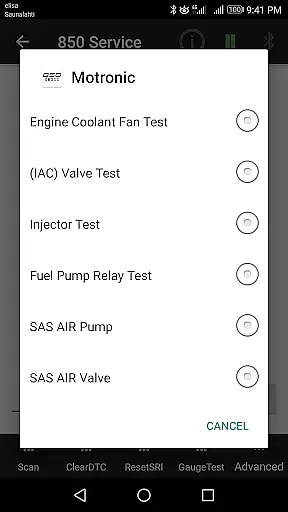
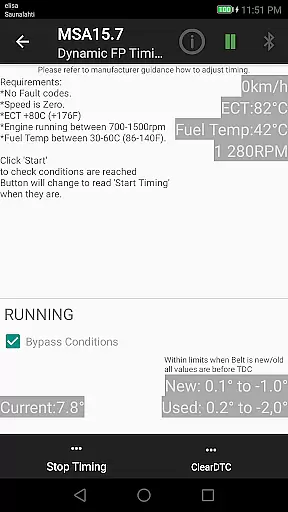
Beyond basic diagnostics, the app offers advanced commands like Injector testing for Motronic M4.4 systems, TDi Fuel pump Dynamic Timing adjustments for MSA15.7 engines, and VGLA Remote Programming. Additionally, it can read Volvo-specific DTCs across various systems including ABS, SRS, ECC, and more. With support for both older and newer CAN Bus protocols, 850 OBD-II ensures broad compatibility across different Volvo models and years.
Users also benefit from the app’s terminal functionality that lets them send custom handwritten commands via the ELM327 interface. This flexibility empowers advanced users to execute unique diagnostic routines tailored to their specific needs. Overall, 850 OBD-II transforms a smartphone into a powerful diagnostic tool capable of handling complex automotive tasks with ease.
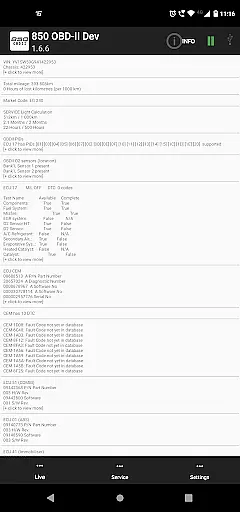
Accessing detailed vehicle information is crucial for effective diagnostics and maintenance. The 850 OBD-II app goes beyond standard OBD-II capabilities by enabling users to read individual modules directly, which helps in diagnosing specific issues with supported Volvo models. This feature provides comprehensive data such as part numbers of ECUs and configurations, allowing users to understand their vehicle's status at a granular level.
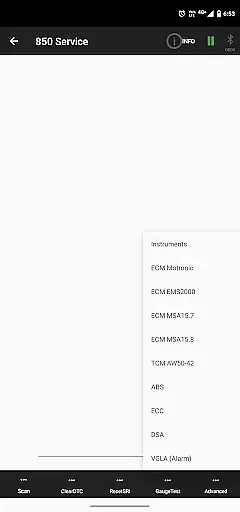
The app supports a wide range of Volvo models, including the 850/900 series, S40/V40 models up to 2004, and P2 platform vehicles from 2000 onwards. By connecting via an ELM327 Bluetooth/WiFi/USB dongle, users can access live sensor data from various systems like ABS, SRS, and automatic gearboxes. This real-time information empowers car owners and mechanics to make informed decisions about necessary repairs or adjustments.
For advanced users, the app offers specialized commands that allow programming and adjusting module parameters. These include functions like Injector testing for Motronic M4.4 engines and TDi Fuel pump Dynamic Timing for MSA15.7 systems. Such detailed insights into vehicle subsystems ensure that users can perform precise diagnostics and even execute minor programming tasks without visiting a dealership.
Price transparency in automotive diagnostics tools is essential for user trust and satisfaction. The 850 OBD-II app provides clear information regarding its requirements and limitations, ensuring users understand what they need before making a purchase. It explicitly states the necessity of an ELM327 dongle (V1.4b or greater) and highlights potential compatibility issues arising from firmware discrepancies.
Users are informed about the appu2019s capabilities through detailed descriptions on its Google Play Store page and within the app itself. This includes listing supported models and clearly stating which systems are not reachable by the ELM327 interface, such as Yazaki dashboards and certain engine control modules. By setting these expectations upfront, the app ensures there are no hidden surprises related to functionality or costs.
Additionally, the app offers extensive support resources, including a website with the latest updates and more information. Users can leverage these resources to troubleshoot common problems and optimize their diagnostic processes. With transparent communication about both the appu2019s features and limitations, 850 OBD-II fosters a trustworthy relationship with its users, enhancing overall satisfaction and reliability.
User-friendly interface
Comprehensive diagnostic tools
Real-time data monitoring
Advanced programming options
Wide model compatibility
Requires compatible ELM327 adapter
Limited by firmware quality
No support for certain systems
Potential connection issues
Complex for beginners

Theme for Car Launcher
 4.4
4.4
OBD diagnostics, Live Data, DPF regeneration for BMW
4.00
A full featured, real-time transit locator system
4.30
Instant diesel savings. No credit checks or fees. Nationwide growing network.
4.40
Automotive Electrical Wiring Diagrams
4.40
Mobile Phone Parking - So easy to park
3.70
Your go-to app for car, truck & SUV parts, DIY tools, and expert repair help.
4.70
Marathon ARCO Rewards members earn rewards & apply the rewards for fuel savings!
4.80
Easy connect & control your cars from afar. Remote Lock & unlock car and carplay
4.60
Trip computer+car diagnostic tool with widest variety of features and dashboard!
4.70
View your car’s service records and find out when maintenance is due.
4.70
Autolist - The Largest Selection of Local Used Cars and Trucks
4.50
Secure mobile payments & fuel savings at Phillips 66®, Conoco® and 76® stations
4.40
A smarter way to park and reserve your spot ahead of time.
4.40
By enthusiasts, for enthusiasts
4.00
Wonder how much horsepower and torque your car/truck makes? Look no further.
3.40
Club Car Wash Mobile App—the fast lane to managing your wash membership.
3.30
Monitor specific TOYOTA parameters by adding this plugin to Torque Pro.
2.00
Attention! This is the theme for the Car Launcher app
4.0


User Reviews