

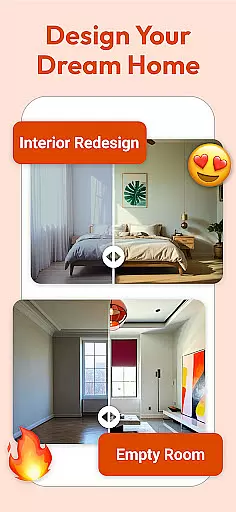



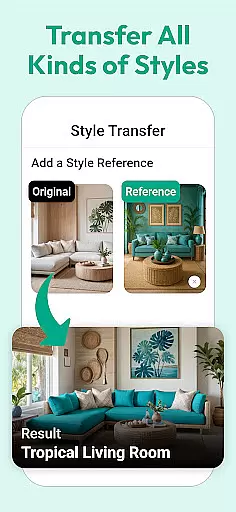
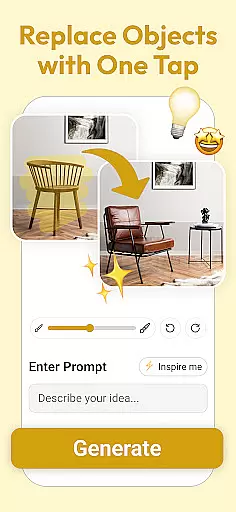

Interio is an advanced AI-powered interior design application that helps users transform their living spaces with personalized design suggestions. The app leverages cutting-edge technology to provide tailored recommendations based on current trends and individual preferences, making it suitable for both beginners and experienced designers.
One of the standout features of Interio is its ability to generate realistic 3D visualizations of redesigned spaces. This allows users to preview their dream home transformations before committing to any physical changes. Additionally, the app offers a curated selection of furniture and decor items that align with various styles, ensuring a seamless blend of aesthetics and functionality.
Whether you're redesigning a single room or planning a complete home makeover, Interio simplifies the process by combining smart AI technology with an intuitive user interface. This makes it an ideal tool for homeowners, renters, and design enthusiasts who want to bring their creative visions to life effortlessly.
Interio stands out in the House & Home category due to its innovative use of AI technology to deliver personalized design solutions. The app's AI engine analyzes user inputs and preferences to suggest customized interior design options that match current trends, ensuring each recommendation feels both modern and personal.
A key feature of Interio is its powerful 3D visualization tool. This functionality enables users to see lifelike representations of their redesigned spaces, helping them make informed decisions about layout, color schemes, and furniture placement. The app also includes a marketplace of handpicked furniture and decor items, allowing users to shop for pieces that perfectly complement their chosen style.
Usability is another strong point of Interio. Its user-friendly interface ensures that even those new to interior design can navigate the app with ease. Advanced features like sharing designs for feedback further enhance collaboration possibilities, whether you're seeking input from friends, family, or professional designers.
In the realm of home improvement and interior design, having authentic and reliable sources is crucial. AI Interior Design ensures that all its design suggestions and property listings are meticulously curated to reflect genuine options available to users. This commitment to authenticity means that every piece of furniture, decor item, or design recommendation you receive is not only stylish but also attainable in the real world.
The app employs advanced algorithms to cross-reference current market offerings with user preferences, ensuring that the suggested items are up-to-date and sourced from verified suppliers. This process guarantees that users can seamlessly transition from virtual design to reality without encountering discrepancies or unavailability issues.
For users, this dedication to accuracy translates into a trustworthy design experience where their creative visions can be reliably realized. Whether planning a minor refresh or a complete overhaul, knowing that each suggestion is rooted in actual products enhances confidence and satisfaction in the design journey.
Beyond just offering design ideas, AI Interior Design incorporates comprehensive home management features that streamline the entire renovation process. The app provides an intuitive interface for organizing your design projects, tracking progress, and managing resources efficiently. This holistic approach ensures that users can maintain control over every aspect of their home makeover, from initial concept to final implementation.
One standout feature is the ability to visualize changes in 3D before any physical alterations occur. This tool allows users to experiment with different layouts, color schemes, and furniture arrangements without committing to permanent changes. Additionally, the app's project management capabilities enable users to set budgets, create timelines, and monitor expenses, ensuring that renovations stay on track and within financial limits.
By integrating these sophisticated home management tools, AI Interior Design empowers users to take charge of their renovation projects confidently. The combination of visualization technology and practical project management features makes the app an invaluable companion for anyone looking to enhance their living space effectively and efficiently.
User-friendly interface
Realistic 3D previews
AI-driven suggestions
Curated shopping options
Easy sharing tools
Limited free features
Requires stable internet
Premium subscription cost
Furniture availability varies
Steep learning curve

Design house plans in 2D & 3D, style furniture, and preview renovation layouts
 3.70
3.70
Universal TV Remote for TV, control all Smart TVs with your mobile phone.
4.1
This Fire TV Remote control's your Fire TV Device and Insignia Fire TV Remote
3.70
Smart AI plant care schedules, Real plant experts, support & Thriving community!
4.20
Plants, Beauty, Collectibles
4.60
Your guide to apartments & rental homes. Find your next place to rent with AG.
4.60
Control your thermostat, comfort, and home monitoring from your phone
4.30
3D House Design and AI Room Planner - from floor plans to full interior design.
4.40
An easier way to make payments and maintenance requests from anywhere.
3.50
Real estate app to find homes for sale or rent in the right neighborhood for you
4.70
Find your next home, house, apartment, condo, casa, flat, rental, studio, or bed
4.70
SmartRent - Opening Doors To A Smarter World
4.40
Control your Vivint Smart Home with the next generation Vivint App.
4.30
Turn your phone into a wifi cam with smart features and umlimited reach.
4.20
Schlage Lock Company LLC
4.00
IP camera view and playback, for your WiFi cam or home security cctv system.
3.70
Use Home by ShowingTime to easily manage showings, tours, feedback and more
3.60
Unlock AI-based barcode scanning and support the development of Grocy Android
4.2
PRO Version of GLB AR Viewer
4.3


User Reviews