
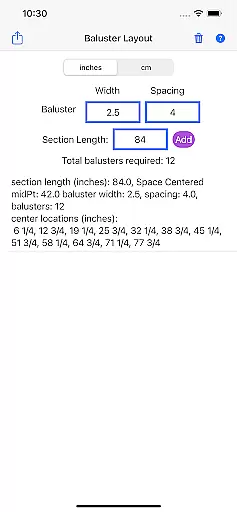
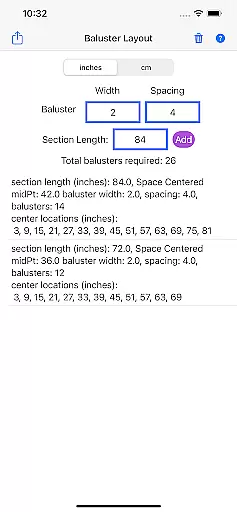
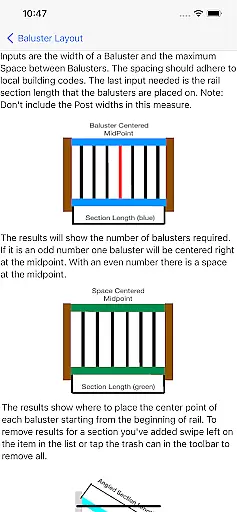
Baluster Layout is a specialized application designed for deck and stair builders who need precise calculations for baluster spacing. The app ensures compliance with building codes by calculating the optimal number of balusters and their exact placement based on user inputs such as railing length, baluster width, and desired spacing.
One of the standout features of Baluster Layout is its ability to handle complex projects involving multiple railing sections, each with unique dimensions. This makes it an invaluable tool for both professional builders and DIY enthusiasts looking to create safe, stable, and visually appealing structures without the hassle of manual calculations.
By using Baluster Layout, users can avoid costly mistakes and ensure that their installations meet necessary safety standards, ultimately saving time and effort while delivering professional-quality results.
Baluster Layout offers a range of features that cater specifically to the needs of those involved in baluster installation projects. Its precision spacing algorithm calculates the optimal distance between balusters, ensuring full compliance with relevant building codes and regulations.
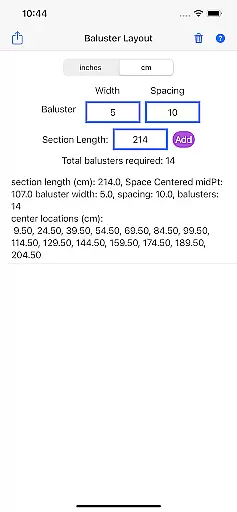
In addition to handling simple installations, the app excels in managing complex projects with multiple rail sections. Each section can have its own unique dimensions, allowing for accurate calculations across varied project requirements. Users also benefit from unit flexibility, being able to choose between inches or centimeters depending on their project specifications.
The detailed results provided by Baluster Layout include a comprehensive breakdown of the number of balusters needed for each section and their exact placement, making it easier than ever to execute projects with accuracy and confidence.
In the realm of home improvement and construction, having reliable measurements and calculations is essential for ensuring that all components fit perfectly and meet safety standards. Baluster Layout offers a dependable solution for calculating baluster spacing with precision, providing assurance that your project will comply with building codes. The app employs algorithms designed to deliver accurate results based on user inputs such as railing length, baluster width, and desired spacing.
By using Baluster Layout, users gain access to features like multiple rail sections handling, which allows them to work on complex projects involving various dimensions. This ensures that each section of a deck or stair railing is calculated independently, leading to increased accuracy in baluster placement. Furthermore, the ability to choose between inches or centimeters caters to the specific needs of different projects, enhancing the authenticity of the property listings created within the app.
The value of authentic property listings cannot be overstated when it comes to planning and executing construction projects. With Baluster Layout, users can trust that their baluster spacing calculations are not only precise but also tailored to meet the unique requirements of their project. This level of detail and customization supports builders in delivering structures that are both visually appealing and structurally sound, ultimately contributing to the overall integrity of property listings generated through the app.
Effective home management extends beyond mere aesthetics; it encompasses the organization, safety, and compliance of structural elements within a living space. Baluster Layout contributes significantly to this aspect by offering detailed results on the number of balusters needed for each railing section and their exact placement. These features empower users to manage their home improvement projects with greater efficiency and confidence, knowing that they are adhering to necessary building regulations.
The app's core functionality revolves around simplifying what would otherwise be a complex process. By inputting specific parameters, users can avoid manual calculations that are prone to error, thus saving time and reducing hassle. This streamlined approach to home management ensures that even those new to deck or stair building can achieve professional-grade results without the need for extensive expertise in baluster installation.
Beyond just calculating spacing, Baluster Layout aids in creating a visually appealing and code-compliant structure. This dual focus on aesthetics and compliance is crucial for homeowners looking to enhance their property while maintaining safety standards. As a result, users can enjoy peace of mind, knowing that their home management efforts are supported by an app designed to prevent costly mistakes and ensure the stability of their deck or stair railings.
Ensures code compliance
Saves calculation time
Handles complex projects
Offers unit flexibility
Provides detailed results
Limited to baluster projects
No visual interface
Requires manual input
Premium version needed
Occasional bugs

Use Home by ShowingTime to easily manage showings, tours, feedback and more
 3.60
3.60
B-hyve Pro App for landscape irrigation professionals
4.70
Schlage Lock Company LLC
4.00
Night Owl Protect helps you secure, protect, and connect your world!
4.60
Fire & Power Safety
4.50
Universal Tv Remote Control for all Tv. Cast for chromecast & all Tv Controller
4.20
Samsung remote app helps control all Samsung Smartthings TVs. Fast and Stable!
4.10
A Smarter Home in Seconds
4.70
Find homes for sale and apartments for rent in the best neighborhood.
4.70
Houses for Sale & Homes for Rent: Buy Homes, Rent Apartments & Sell Real Estate
4.80
Search for Homes, Rentals, Agents & Schools
4.70
Innovative and budget-friendly housing options
4.60
Looking for the perfect apartment finder app? Find beautiful rental homes here!
4.60
SmartRent - Opening Doors To A Smarter World
4.40
Control your Vivint Smart Home with the next generation Vivint App.
4.30
USHUD.com helps you find the best homes for sale in your area
4.00
Floor Plan Creator Home Design with 2D interior design and 3d view.
3.90
Our app allows Sunrun customers to monitor systems, pay bills, and get support.
3.80
IP camera view and playback, for your WiFi cam or home security cctv system.
3.70


User Reviews