
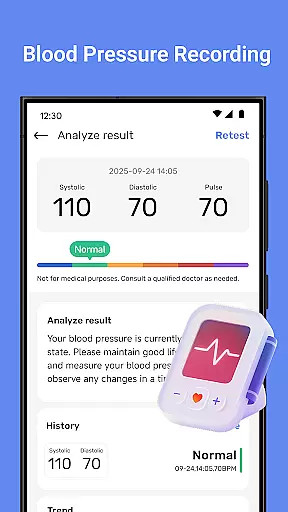
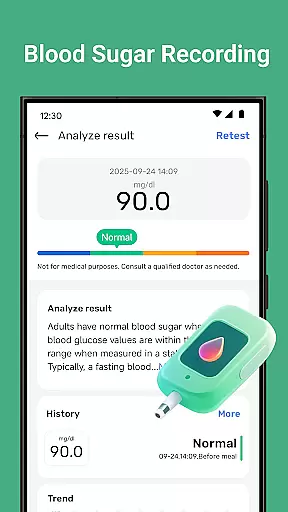
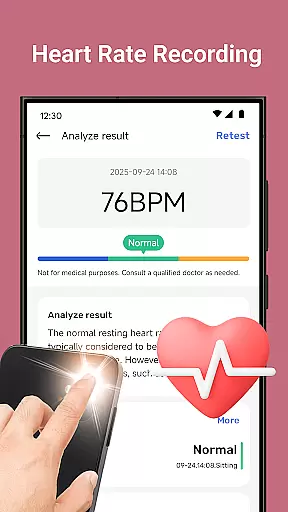
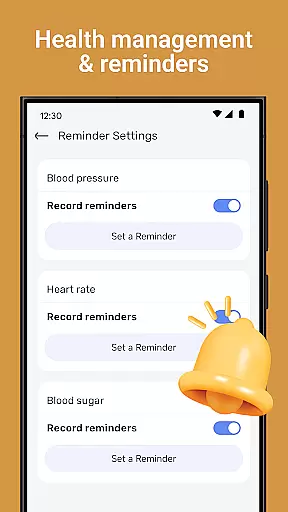
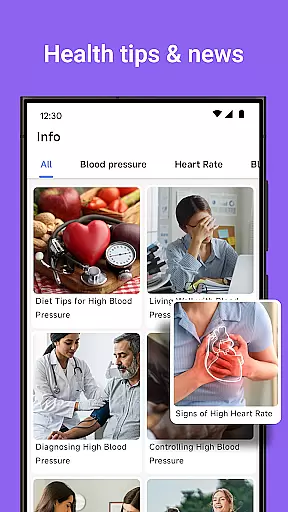
Blood Pressure Tracker is a comprehensive health companion app designed to help users monitor and manage their heart rate, blood pressure, and blood sugar levels. The app provides smart trend analysis through visual charts, allowing users to easily understand their health patterns over time.
In addition to vital sign tracking, the app offers wellness reminders for hydration, exercise, and rest, along with weight management tools and nutrition tips. It also includes mindfulness features such as guided meditation and breathing exercises to help reduce stress. With personalized recommendations and daily health insights, Blood Pressure Tracker aims to be an essential tool for those looking to maintain a healthier lifestyle.
Blood Pressure Tracker stands out with its all-in-one approach to health monitoring. Users can log their heart rate, blood pressure, and blood sugar readings effortlessly, with the app's intuitive interface making it easy to track fluctuations over time.
The app's smart trend analysis feature uses visual charts to provide instant clarity on health patterns, helping users make informed decisions about their well-being. Personalized recommendations based on unique health metrics offer tailored advice, while the inclusion of wellness reminders, weight management tools, and mindfulness exercises ensures a holistic approach to health.
With its user-friendly design suitable for all ages, Blood Pressure Tracker simplifies the process of maintaining comprehensive health records and provides an accessible way for users to take control of their personal health data.
Personalized planning in health applications refers to the ability to create tailored health strategies based on individual user data. Blood Pressure Tracker exemplifies this by offering personalized recommendations that stem from the unique health metrics recorded by users.
The app allows you to log heart rate, blood pressure, and blood sugar levels, which it then uses to identify trends and patterns specific to your body's responses. This functionality is crucial for users who need to monitor their cardiovascular and metabolic health closely.
By analyzing daily fluctuations and long-term trends, Blood Pressure Tracker provides insights that help users make informed decisions about their lifestyle choices. These include dietary adjustments, exercise routines, and stress management techniques that are most beneficial for their personal health conditions.
Ultimately, the personalized planning feature empowers users to take proactive steps towards managing their health. With tailored advice and curated daily tips, users can better understand how different factors affect their well-being and work towards sustainable health improvements.
Progress visualization is a critical component of any fitness or health app, allowing users to see their advancements over time clearly. Blood Pressure Tracker incorporates this feature through smart trend analysis, presenting users with visual charts that depict their health patterns.
Users of Blood Pressure Tracker can effortlessly record various health metrics such as heart rate, blood pressure, and blood sugar levels. The app then translates this data into easy-to-understand graphs and charts, providing instant clarity on how these vital signs evolve.
This form of data representation is not only informative but also motivational. Seeing tangible evidence of improvement or consistency in their tracked metrics can encourage users to maintain healthy habits or make necessary changes to their routines.
Moreover, progress visualization aids in making the information more digestible and actionable. By grasping wellness trends at a glance, users can quickly identify areas of concern or success, leading to more focused health management and an enhanced understanding of one's health status.
User-friendly interface
Comprehensive health tracking
Personalized recommendations
Smart trend analysis
Wellness reminders
No direct measurement
Limited medical use
Premium features cost
Data entry manual
Internet required

Insanity blocks of intense physical activity, short breaks of 30 seconds.
 4.2
4.2
a fun app full of surprises :)
4.70
Period Tracker, the easiest way to track your periods!
4.50
Beauty Care, Makeup & Skin Care Scanner | Pregnancy App For A Mom | Healthy Baby
5.00
3D Body Measurement System
3.60
Your portable blood pressure tracker. Record, monitor, and analyze BP anytime.
4.30
The most accurate heart rate app to monitor and track your heart rate & pulse.
4.40
Easy to use step counter, calorie counter helps lose weight, count steps offline
4.80
Control your blood pressure, heart rate and blood sugar in a fast way.
4.00
Weight loss app: home workout for women to lose weight & burn calories.
4.80
Step Counter, track steps when you walk or run
4.70
Memory, mind & logic exercises. Puzzle games, IQ & brain test for kids & adults
4.50
See what's really going on inside your head! Real time EEG graphs from your Muse
4.40
Get alert about getting out of desired heart rate zone.
4.10
Enjoy the Gluten Free living with the best app. SCAN the barcodes & SEARCH.
3.60
HRV4Training helps you optimize goals and improve performance. No sensors needed
3.30
The Sleep Miracle Sound Machine: Soothes baby to sleep with a gentle "Shhh"
3.00
Using Recognise™ has been shown to reduce pain and improve performance.
4.3
Optimization for TRT & Enhanced Athletes
4.2


User Reviews