
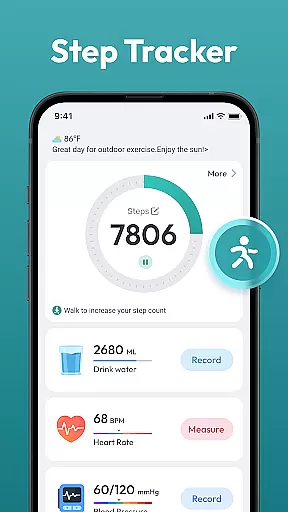
Step Counter - Pedometer App is a comprehensive health and fitness tool designed to help users track their daily physical activity. This app automatically counts steps, measures walking or running distance, and supports various health tracking features without requiring any wearable devices.
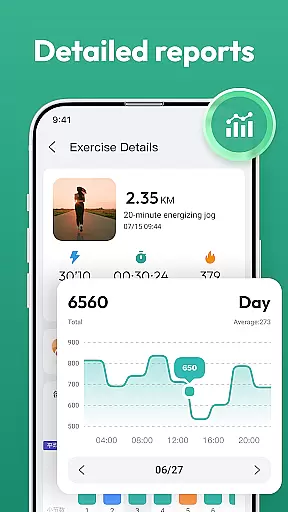
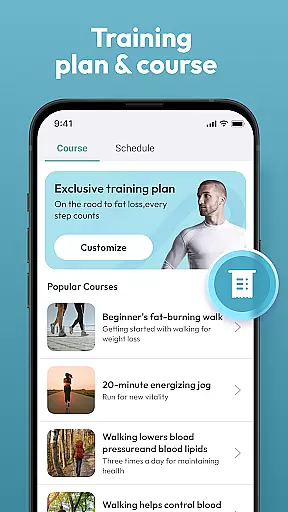
The app provides detailed activity reports through daily, weekly, and monthly charts, allowing users to monitor their progress over time. With additional features like training courses and plans, it serves as an all-in-one solution for individuals aiming to maintain an active lifestyle and reach their fitness goals.
Whether you're looking to lose weight, stay healthy, or achieve the recommended 10,000 steps per day, this user-friendly app makes it easy to track your achievements and stay motivated. Simply carry your phone in your pocket or bag, and let the app do the rest.
Step Counter - Pedometer App offers a variety of features that make it stand out as a top choice for fitness tracking. The automatic step counting function works seamlessly with most Android devices, ensuring accurate tracking without the need for additional hardware.
In addition to basic step counting, the app tracks multiple health metrics and presents them through intuitive charts. Users can access detailed insights into their activity patterns, set personalized goals, and follow structured training programs tailored to their fitness levels.
The app's interface is designed for ease of use, making it accessible for people of all ages. Its ability to operate without wearables ensures convenience while delivering reliable performance. These features collectively create a powerful tool for anyone committed to improving their health and fitness.
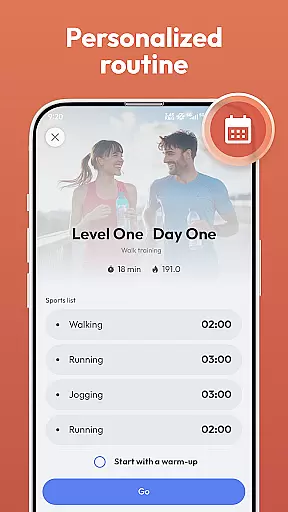
Personalized planning is a crucial feature for any fitness app, and Step Counter - Pedometer App excels in this area. The app offers tailored training programs that adapt to your individual goals, whether you're aiming to lose weight, stay healthy, or reach a daily step goal of 10,000 steps.
The app's automatic step counting and health data tracking provide the foundation for creating personalized plans. By analyzing your daily, weekly, and monthly activity data, the app can suggest realistic and achievable targets that evolve as you progress.
Users benefit from the app's ability to support various health metrics without requiring any wearable devices. This accessibility ensures that anyone can engage with their personal fitness journey using just their Android device. With features like training courses and plans, users receive structured guidance that keeps them motivated and on track.
Visualizing progress is essential for maintaining motivation and tracking improvements over time. Step Counter - Pedometer App provides detailed charts that display daily, weekly, and monthly activity data, allowing users to see their achievements at a glance.
The app automatically tracks steps and distance covered during walks or runs, presenting this information in an easy-to-understand format. These visual representations help users understand their performance trends and identify areas where they can improve or set new goals.
With its user-friendly interface, the app makes it simple for individuals of all ages to interpret their progress. The clear and engaging visuals not only enhance user experience but also encourage continued use by highlighting milestones and accomplishments, keeping users inspired to maintain an active lifestyle.
User-friendly design
Accurate step tracking
No wearables required
Detailed progress charts
Free to use
Limited to Android
Drains battery
No live coaching
Basic social features
Occasional glitches

For Absolute Novices to Strength Training. Simple. Effective.
 4.40
4.40
Sync your activities of the most popular sports tracking services
2.70
HRV4Training helps you optimize goals and improve performance. No sensors needed
3.30
A simple way to calculate peptide doses and also to convert different units.
4.5
Walk. Earn: Get rewarded for every step! Walk, move, and earn real rewards.
4.70
Dexcom G7 Continuous Glucose Monitoring
3.70
GloryFit is a companion app for the smart bracelet.
3.60
Workouts for everyone
4.70
Control your blood pressure, heart rate and blood sugar in a fast way.
4.00
sobriety counter app to help and motivate people to stop drinking alcohol.
4.90
Protect your healthy sleep
4.80
Chair Workout: Women's Edition for safe, flexible, and personalized fitness.
4.40
50 HD sounds to help you relax during the day and sleep great at night!
4.40
Track heart rate & HRV in 30s! Get live health insights and anomaly alerts
4.40
Your personal BP tracking companion, focus on helping you achieve wellness goal.
4.10
Histamine intolerance, low FODMAP diet and irritable bowel syndrome (IBS)
4.00
beat yesterday.
4.00
Focus on BP & Health
3.80
Use your watch as a bike computer, heart rate monitor and cycling power meter
2.50


User Reviews