
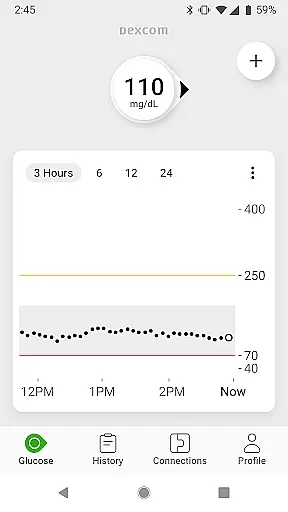
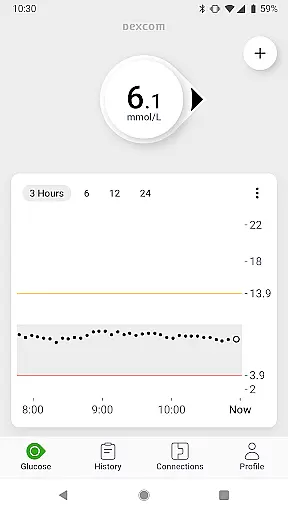
The Dexcom G7 app is a vital tool for diabetes management, providing real-time glucose monitoring without the need for fingersticks. Its continuous glucose monitoring system updates every 5 minutes and offers customizable alerts to warn users of high or low glucose levels.
Designed for seamless integration into daily life, the app supports remote monitoring, allowing loved ones and healthcare teams to stay connected with the user's glucose data. The low-profile wearable sensor ensures comfort while delivering accurate readings directly to compatible devices.
This empowers users to make informed treatment decisions in consultation with their healthcare providers. With features like Clarity Clinic integration and Quick Glance functionality, it enhances both immediate and long-term diabetes care.
Dexcom G7 stands out with its advanced features tailored for comprehensive diabetes management. Users can share their glucose data with up to 10 followers via the Dexcom Follow app, ensuring that family and healthcare professionals are kept in the loop.
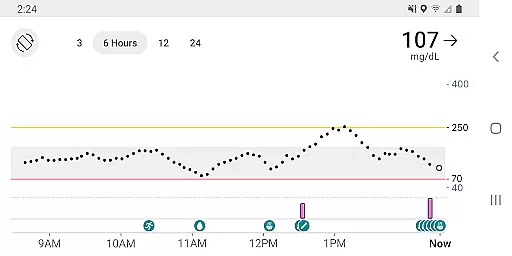
The app also integrates with third-party health apps and lifestyle devices, offering a holistic view of the user's health on the trend graph. This includes estimated fasting glucose logging which helps identify trends over time.
With Clarity summary insights now integrated within the app, users have access to both real-time and retrospective glucose insights. Quick Glance allows for easy monitoring right from the lock screen, making it convenient to keep track of glucose levels anytime.
The Dexcom G7 Continuous Glucose Monitoring (CGM) System offers personalized planning by providing real-time glucose data every 5 minutes, enabling users to make informed decisions about their diabetes management. This empowers individuals to adjust their treatment based on accurate and timely information.
Customizable alerts are a key feature of the Dexcom G7 app, warning users of high or low glucose levels. These alerts can be tailored to individual needs, ensuring that each user receives notifications that are most relevant to their health management strategy.
With the ability to log estimated fasting glucose directly in the app, users can track trends over time. This function supports personalized planning by allowing both the user and their healthcare team to identify patterns and make necessary adjustments to their diabetes care plan.
By integrating with third-party health apps and lifestyle devices, the Dexcom G7 app enhances personalized planning. Users can share their glucose data across platforms, creating a comprehensive view of their health that informs better decision-making.
Progress visualization is central to the Dexcom G7 CGM System, offering users clear insights into their glucose trends through an intuitive trend graph. This visual tool helps users understand their glucose fluctuations over time, supporting better diabetes management.
Dexcom Clarity summary insights are now integrated into the G7 app, allowing users to access both real-time and retrospective glucose insights from a single platform. This combination provides a complete picture of the user's glucose history and current status, aiding in effective progress tracking.
Quick Glance functionality enables users to view their glucose data directly on the lock screen of their smart device. This immediate access to critical information ensures that users can stay informed about their glucose levels without needing to open the app.
Sharing glucose data with followers via the Dexcom Follow app adds another layer to progress visualization. Up to 10 followers, including loved ones and healthcare professionals, can monitor the user's glucose trends, fostering a supportive network for managing diabetes effectively.
Real-time glucose data
Customizable alerts
Remote monitoring options
Integrated Clarity insights
Quick Glance functionality
Device compatibility limited
Fingerstick required for discrepancies
Internet needed for sharing
Region-specific features
Potential connectivity issues

Text notifications, button control, heart monitor & more for your Amazfit.
 2.40
2.40
The simplest way to track your 21 Day Program containers, exercises, and water.
4.50
Build Healthy Habits!
4.60
Period Tracker, the easiest way to track your periods!
4.50
Optimization for TRT & Enhanced Athletes
4.0
Measure your Pupil Distance for Eyeglasses and VR headsets in 3 quick steps.
4.70
Turn your steps into cash, gift cards & rewards with our step counting pedometer
3.80
Download MadMuscles to start your positive body transformation!
4.30
beat yesterday.
4.00
Show your support for the development of FitNotes - Gym Workout Log
4.90
sobriety counter app to help and motivate people to stop drinking alcohol.
4.90
Easy to use step counter, calorie counter helps lose weight, count steps offline
4.80
Step Counter, track steps when you walk or run
4.70
For Absolute Novices to Strength Training. Simple. Effective.
4.40
The most accurate heart rate app to monitor and track your heart rate & pulse.
4.40
Enjoy the Gluten Free living with the best app. SCAN the barcodes & SEARCH.
3.60
Use your watch as a bike computer, heart rate monitor and cycling power meter
2.50
Insanity blocks of intense physical activity, short breaks of 30 seconds.
4.4
Using Recognise™ has been shown to reduce pain, and improve performance.
4.2


User Reviews