
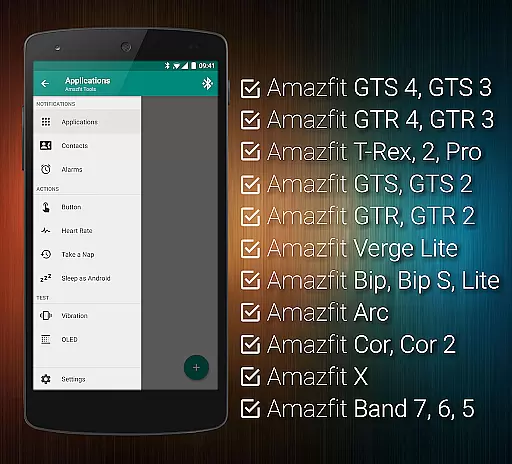
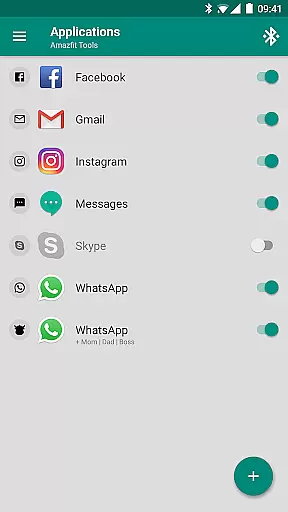
Tools & Amazfit is a comprehensive utility application designed to maximize the functionality of your Amazfit smart bracelet. This app allows users to set up personalized notifications for calls and apps, customize button controls, and configure detailed health monitoring features such as continuous heart rate monitoring and sleep tracking. With support for advanced features like Tasker and full compatibility with various Amazfit models, it ensures an enhanced user experience.
The app also offers unique capabilities such as power nap features, idle alerts, and missed notifications, ensuring that users never miss important updates even when they are away from their phones. Its integration with other health apps and customizable widgets make it a versatile tool for managing both personal productivity and health metrics efficiently.
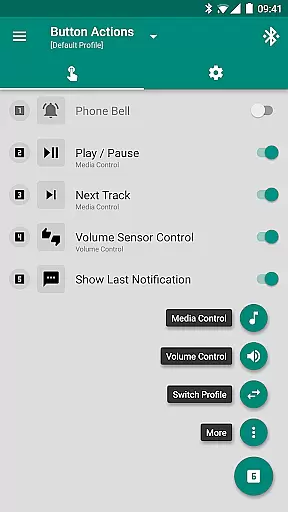
Tools & Amazfit boasts an array of sophisticated features tailored to enhance the usability of Amazfit smart bracelets. Users can enjoy Display Text Support, which shows caller contact names and full notification contents directly on their device. The Button Control feature allows assignment of specific actions to button presses, while Sensor Control enables hand movements to manage media playback.
Additionally, the app provides extensive customization options including Notification Content Filters, Multiple Notifications management, and fully customizable widgets for fitness goals and health stats. Advanced settings offer further personalization, allowing users to disable non-interactive notifications or activate shake-to-dismiss functions. These robust functionalities ensure a highly personalized and efficient user experience.
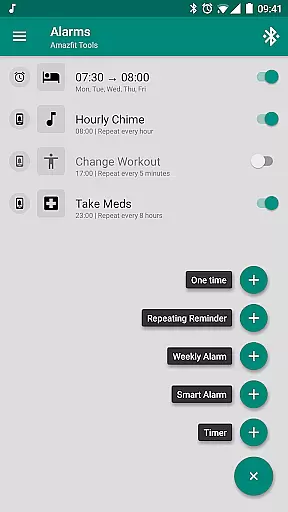
Personalized planning in health and fitness applications refers to the ability to tailor workout and wellness routines specifically to individual user needs. Amazfit Tools excels in this area by offering features like continuous heart rate monitoring, customizable notifications, and personalized reminders.
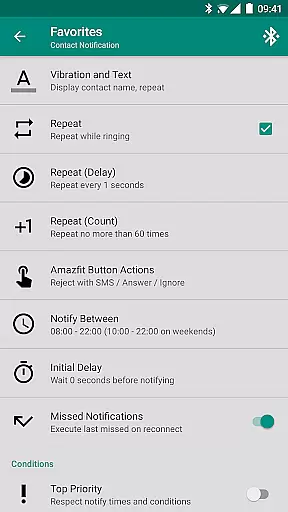
The application allows users to configure custom patterns for each notification, ensuring that alerts for incoming calls, messages, or app notifications are aligned with personal preferences. This level of customization ensures that users receive only the most relevant information, reducing distractions and enhancing focus on fitness goals.
Additionally, advanced settings such as idle alerts and power nap features contribute to a personalized experience. Users can set thresholds for inactivity and be reminded to move, or activate a short rest mode that wakes them up with vibrations after a brief nap. These features help users maintain an optimal balance between activity and rest.
By integrating with other apps like Sleep as Android and supporting devices like Amazfit GTS and GTR series, the app provides a comprehensive ecosystem for managing health metrics. This interconnectedness enables users to fine-tune their daily plans according to real-time data, promoting better health outcomes.
Progress visualization is crucial for maintaining motivation and tracking improvements over time. Amazfit Tools offers robust features that allow users to see their fitness journey through detailed charts and progress indicators.
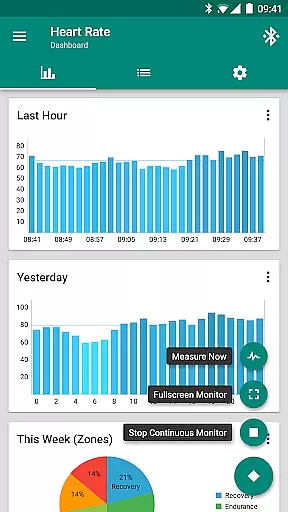
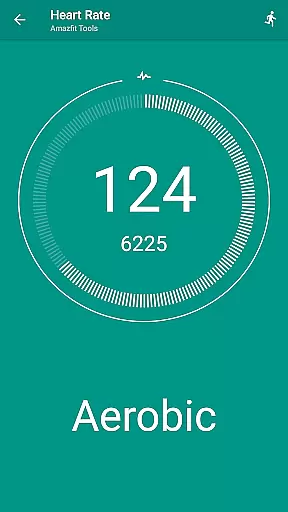
One standout feature is the configurable heart rate dashboard charts. Users can monitor their heart rate trends continuously, receiving notifications when rates exceed or fall below set thresholds. This visual feedback helps individuals understand how different activities impact their cardiovascular health.
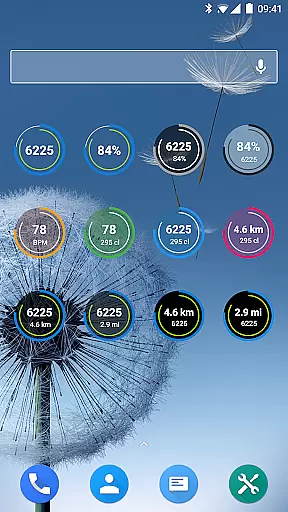
Furthermore, fully customizable widgets display daily fitness goal progress, bracelet battery status, current heart rate, and more. These widgets serve as constant reminders of ongoing achievements and areas needing attention, fostering a proactive approach to personal health management.
Export/Import settings functionality adds another layer of convenience, allowing users to back up their data and visualize long-term trends across different devices. With these tools, users gain clear insights into their fitness progress, empowering them to make informed decisions about their health routines.
User-friendly interface
Extensive customization options
Advanced health monitoring
Compatibility with multiple devices
Regular updates and improvements
Requires compatible device
Some features may be complex
Premium version needed for full access
Occasional bugs reported
Limited iOS support

“Overcoming pain based on EMDR” helps you to alleviate chronic pain and stress.
 4.10
4.10
Chair Workout: Women's Edition for safe, flexible, and personalized fitness.
4.40
For Absolute Novices to Strength Training. Simple. Effective.
4.40
Build Healthy Habits!
4.60
The Sleep Miracle Sound Machine: Soothes baby to sleep with a gentle "Shhh"
3.00
Download MadMuscles to start your positive body transformation!
4.30
The most accurate heart rate app to monitor and track your heart rate & pulse.
4.40
Raccoon AI Calorie Counter. Intermittent Fasting & Timer. Macro, Carb, Protein
4.50
Drink water reminder app. Track water intake. Smart simple hydration tracker.
4.70
Home workouts for fitness & fast bodybuilding at home - no equipment needed.
4.90
Easy access to health benefits
4.70
You deserve easy access to important insurance information. Download for FREE.
4.70
Personal Measurements - Track your gains!
4.50
Walk, track, and burn calories with step counter & GPS walking tracker
4.20
Your Health Assistant
3.90
3D Body Measurement System
3.60
Your plan in your pocket 24/7
3.00
Sync your activities of the most popular sports tracking services
2.70
The Wear OS BeechBand app is designed to alleviate anxiety and other conditions
4.1


User Reviews