
Cheogram is a communication app that connects users to a global network, emphasizing cross-network connectivity including SMS-enabled phone numbers. It offers a free one-month trial of the JMP.chat service.
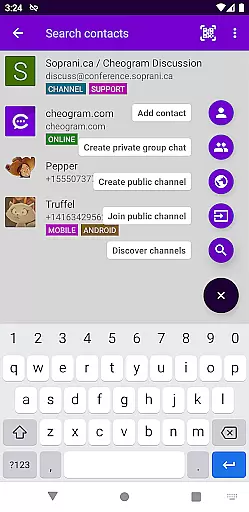
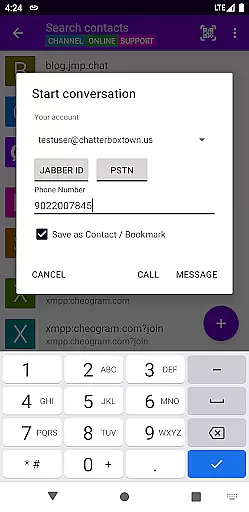
Key features include multimedia messaging, contact integration, threaded conversations, and sticker packs. The app also integrates with gateways' add contact flows and the native Android Phone app when using a phone network gateway.
Ideal for users seeking seamless interaction across different messaging platforms, Cheogram enhances connectivity by bridging various networks into one cohesive communication tool.
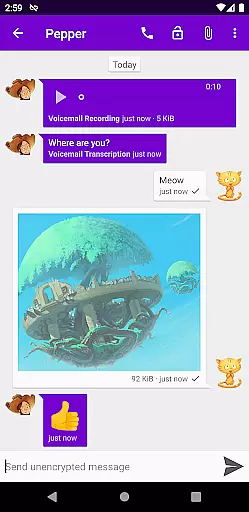
Cheogram stands out with its robust feature set tailored for versatile communication needs. The app supports messages combining media and text, including animated content, ensuring dynamic interactions.
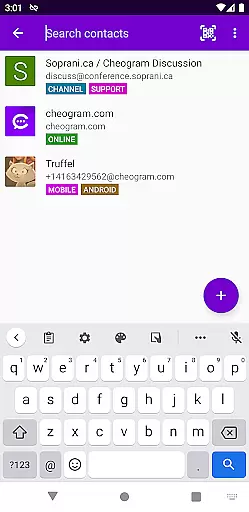
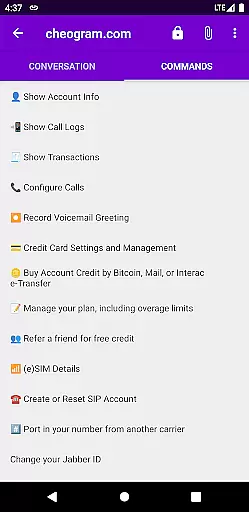
It provides practical functionalities such as unobtrusive subject line displays, address book integration, and tagging capabilities for organizing contacts and channels. Additionally, it offers lightweight threaded conversations and command UI for streamlined navigation.
By integrating with external services like Jabber and offering features like sticker packs, Cheogram delivers an enriched user experience focused on connectivity and ease of use.
Real-time messaging speed and reliability are crucial for any communication app, ensuring that messages are delivered instantly and consistently. Cheogram excels in this area by providing a seamless experience where users can send and receive messages without delay. The app leverages the Jabber service to maintain high standards of message delivery.
The architecture of Cheogram is designed to handle both text and media messages efficiently. This includes animated media, which often poses challenges for real-time delivery due to larger file sizes. By optimizing data transmission protocols, Cheogram ensures that all types of content reach their destination quickly and reliably.
For users who rely on gateways to connect with other networks, such as SMS-enabled phone numbers, Cheogram integrates smoothly with these systems. This integration enhances the overall reliability of message delivery across different platforms. As a result, users can trust that their communications will be received promptly, regardless of the recipient's network.
Media sharing support is an essential feature for modern communication apps, allowing users to exchange various forms of content beyond plain text. Cheogram offers robust capabilities in this domain, enabling users to share images, videos, and other media formats effortlessly. This functionality enriches conversations and makes them more engaging.
In addition to basic media sharing, Cheogram supports advanced features like animated media. This means users can send GIFs or short video clips that play automatically within the chat interface. Such dynamic content adds a layer of expressiveness to conversations, making interactions more lively and personal.
Cheogram also ensures that shared media retains its quality during transmission. By employing efficient compression techniques, the app minimizes data loss while maintaining fast upload and download speeds. Users benefit from clear visuals and smooth playback, enhancing their overall experience when exchanging multimedia content through the platform.
User-friendly interface
Free trial available
Cross-platform support
Rich media messaging
Address book integration
Limited standalone functionality
Requires Jabber account
No direct call feature
Dependent on third-party services
Interface may feel dated

فیلتر شکن قوی پرسرعت کلید جدید برای اندرویدسریع ترین وی پی ان برای همه اپراتورها
 4.70
4.70
Identify unknown numbers, block spam calls, customize calls with cool themes.
4.60
Messenger, an MMS & SMS messages app with Blockers, Driving mode & Private box
4.60
Experience real private browsing without tracking, surveillance, or censorship.
4.50
Fast, Simple And Secure Application That Provides SMBv3 Server On Your Device
3.30
A softphone with crystal clear SIP Calling & Reliable VoIP dialer
4.00
Manage Phone Calls, call history, and contacts easily with Phone Pro.
4.2
Auto Reply SMS, Text Messaging, Away SMS Response, Busy SMS messages, Block Text
3.10
Useful. Social. Expressive.
4.70
Fast internet with AI, Adblock & VPN. Browse on a safe, incognito web browser.
4.70
Manage your mobile phone plan, check unlimited 5g data usage and track rewards
4.50
Phone Dialer with Caller ID, Address Book & Contacts Manager.
4.30
Simplify texting with Messages SMS, offline messaging, themes & smart tools!
4.30
2nd Phone Number Line for Anonymous Texting, Calling, and Picture Messages
4.30
BE PRIVATE
Anonymous. No Trace. Fast.
4.20
Fast Dialer & Contact Manager with Caller ID and Spam Protection
4.00
Quickly and easily identify and block unknown callers
3.70
Weargram is an unofficial Telegram Client for Wear OS.
3.50
An app dedicated solely to marriage, not dating, and supported by a rigorous verification mechanism to ensure seriousness.
4.2


User Reviews