
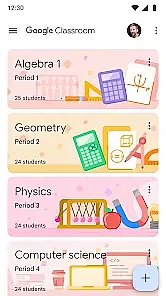
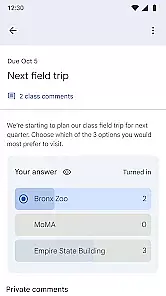
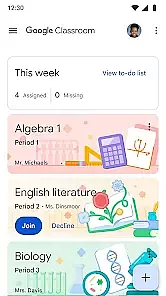
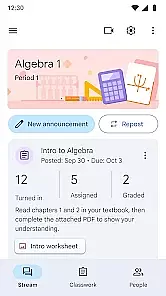
Google Classroom is an educational app designed to help teachers and students streamline the learning process. This platform enables seamless communication between educators and learners, allowing for easy assignment distribution, real-time feedback, and classroom discussions.
The app integrates with Google Workspace (formerly G Suite) tools like Google Docs, Sheets, and Drive, making it simple to manage documents and collaborate on projects. Whether in a physical classroom or engaging in remote learning, Google Classroom provides a centralized space for organizing coursework and enhancing student engagement.
One of the standout features of Google Classroom is its ability to integrate seamlessly with other educational tools. Teachers can create, distribute, and grade assignments all in one place, while students can easily track their progress and receive timely feedback.
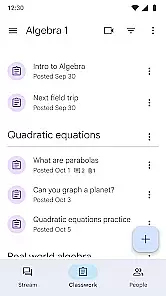
Additionally, the app supports multimedia content sharing, including videos, images, and links, which enriches the learning experience. With features like automatic organization, where each assignment is filed into corresponding folders, users can maintain a clutter-free digital workspace. The collaborative nature of Google Classroom fosters a more interactive and efficient learning environment.
In the realm of educational applications, content authority and curriculum alignment are crucial for ensuring that learning is both effective and relevant. Google Classroom, as an Educational app, excels in these areas by providing a platform where educators can design and distribute assignments that align with established educational standards.
Google Classroom integrates seamlessly with other Google services like Google Docs and Google Drive, allowing teachers to create authoritative content that is easily accessible to students. This integration ensures that all materials provided through the platform are credible and vetted by educators, thus maintaining high content authority.
The app's functionality supports curriculum alignment by enabling teachers to organize their instructional content according to specific learning objectives and timelines. This structured approach helps ensure that students receive a coherent learning experience that matches their educational institution's curriculum.
For users, this means access to quality educational resources that are designed to meet specific learning goals. The assurance of content authority and curriculum alignment enhances the overall value of Google Classroom as an essential tool for digital education.
Gamification in learning has been shown to increase engagement and motivation among students. Google Classroom addresses this by incorporating features that bring elements of gamification into the educational process, making learning more interactive and enjoyable.
While Google Classroom may not have traditional game-like features such as points or badges, it does offer functionalities that mimic gamified experiences. For instance, the ability to provide timely feedback on assignments can serve as a motivator for students, similar to how instant feedback in games keeps players engaged.
Moreover, the platform allows teachers to create diverse and engaging activities that cater to different learning styles. By varying assignment types and using integrated apps for quizzes and surveys, educators can simulate the dynamic environments found in gamified learning platforms.
This innovative blend of traditional teaching methods with modern digital engagement tools exemplifies how Google Classroom enhances the educational experience through thoughtful gamification-learning integration, ultimately leading to improved student outcomes.
Easy integration with Google Workspace
Streamlined assignment management
Real-time feedback capabilities
Supports multimedia content sharing
Free to use for educational institutions
Limited functionality without Google Workspace
Occasional syncing issues
Not ideal for non-Google users
Basic grading system
Requires internet connection

Woof! The very first official Hey Duggee app for CBeebies' new favourite show.
 3.70
3.70
Enjoy the fun kid's hospital play game with Cocobi, the little dinosaurs!
4.00
Dress up, Makeover, and Party! Design a Wonder World!
3.90
Fun dentist game with Cocobi friends!
4.10
Toddler Learning Games, Learn: Colors, Shapes, Puzzles, ABC ... ►NoAds!◄
4.50
A cube building game for small (and large) builders.
4.40
Fun step-by-step drawing & coloring app to learn and create art!
4.4
Build your own BRIO railway!
4.30
Fun phonics & alphabet tracing game for toddlers, preschool & kindergarten kids!
4.60
Pro Doctor Dentist for PetsGame
4.60
Learn numbers, letters, and shapes playing toddler balloon pop games ►NoAds◄
4.60
Kids coloring games for boys! Fun drawing, painting & learning book for kids.
4.60
Play virtual baby daycare simulator & be a babysitter, take care of cute babies!
4.60
This will quickly become your kids' favorite animals game!
4.40
Fun drawing games with coloring book, glow and paint by numbers! Color for kids.
4.20
Practice Early Literacy Skills and Build Vocabulary with Elmo & Cookie Monster!
3.90
Help your child improve their number literacy with Numberblocks: Card Fun!
2.60
Get points, learn Spanish, repeat. Speedrun your way to knowledge.
4.5
A logic puzzle game for 1 - 3 players
4.5


User Reviews