

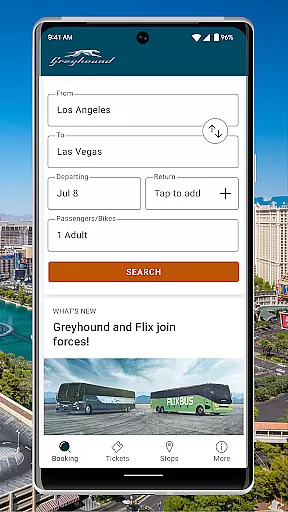
Greyhound is a premier travel application designed to provide users with the ability to book low-fare bus tickets with enhanced flexibility and options. The app offers an intuitive platform where travelers can access schedules from multiple carriers, including Greyhound and FlixBus, ensuring competitive pricing and increased travel options.
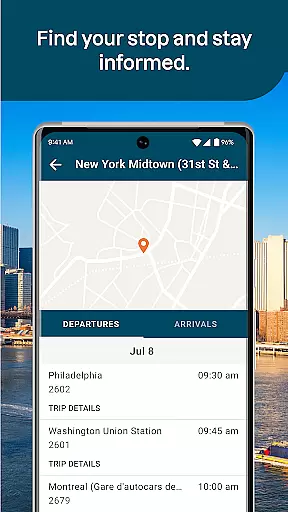
One of the standout features of Greyhound is its seat selection capability, allowing passengers to choose their preferred seating on the bus for a fee, or opt for an automatic assignment. Additionally, the app streamlines the ticketing process by enabling digital ticket display, removing the need for physical printouts. With real-time trip updates and exclusive in-app discounts, Greyhound enhances the travel experience, making it seamless and cost-effective for over 1900 routes across North America.
The Greyhound app boasts a variety of robust features tailored to meet the needs of modern travelers. Users can view comprehensive bus trip schedules from both Greyhound and FlixBus, providing more options and ensuring the best available fares for their journeys. This dual-carrier support significantly broadens travel possibilities.
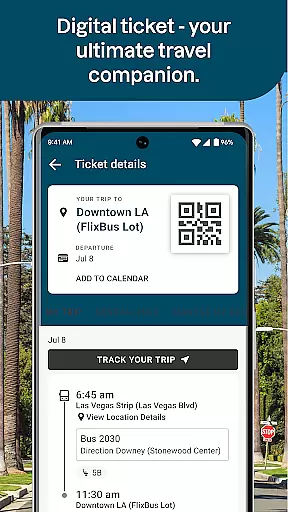
Another key feature is the seat assignment option, which allows passengers to select their preferred seats—whether it be a window or aisle seat—adding a layer of comfort and personalization to the travel experience. Furthermore, the app's digital ticketing system simplifies travel by displaying tickets directly within the app via QR codes, eliminating the need for paper tickets. Real-time trip updates and exclusive app-only discount offers further enhance user convenience and savings, making Greyhound a versatile tool for efficient and economical travel.
When it comes to booking bus tickets, Greyhound ensures complete authenticity and reliability. The app provides verified schedules for both Greyhound and FlixBus carriers, giving users confidence in the accuracy of their reservations.
The booking process is transparent, with all available options clearly presented. Users can view real-time seat availability and make informed decisions about their travel plans. This level of transparency helps prevent overbooking and ensures that each passenger's seat is secured.
Additionally, Greyhound offers digital tickets directly through the app, eliminating the need for physical printouts. The QR code system streamlines the boarding process, providing a seamless experience from booking to departure.
With these features, passengers can trust that their bookings are legitimate and that they will receive timely updates regarding their trips, enhancing overall peace of mind during travel.
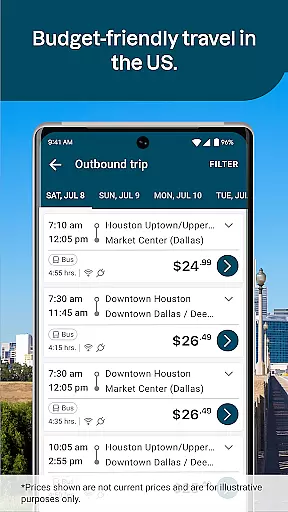
Greyhound excels in providing clear and upfront pricing for its bus services. The app displays all available fare options, including any additional fees for preferred seating, ensuring customers understand the total cost before finalizing their purchase.
This transparency extends to special promotions and discounts exclusive to app users. By subscribing to email notifications, travelers can take advantage of limited-time offers and save on their journeys without hidden surprises at checkout.
Moreover, the app allows users to compare prices across different routes and times, empowering them to find the most economical travel options. This feature is particularly beneficial for budget-conscious travelers seeking affordable transportation solutions.
Overall, Greyhound's commitment to price transparency not only builds trust but also enables users to plan their trips more effectively, knowing exactly what they will pay for their travel needs.
User-friendly interface
Multiple carrier options
Real-time updates
Exclusive app discounts
Digital ticketing
Seat selection fee
Limited international routes
Occasional app glitches
Customer service delays
Dependent on internet connectivity

Locate and navigate to local holiday displays
 4.4
4.4
Every Diners, Drive-in & Dives location in one place! Your guide to Flavortown!
3.00
The mobile panorama panel. Works offline - worldwide!
4.40
Book neighborhood dog boarding, dog walking, pet sitting, and doggy day care.
4.60
It drives. You ride.
4.90
Streamline your U.S. entry
4.90
Guest how you guest when you book one of our 6,800+ hotels and earn rewards.
4.90
Find the perfect vacation rental. Search from over 2 million properties.
4.80
Examine the planet
3.80
One app, 300,000+ travel experiences, tours, and tickets you’ll remember.
4.90
All-in-one delivery and taxi app. Ride, food, & grocery delivery app.
4.80
Save on gas and convenience with the earnify™ App
4.70
Bus tickets at unbeatable prices with routes across the US. All aboard FlixBus!
4.70
Frontier’s Android app makes travelling easier than ever before!
4.70
The best way to book travel
4.60
Discover the power of one-way location tracking. Share your location securely.
4.50
Earn hotel and travel rewards, find hotel offers, and access your Digital Key.
4.50
Explore our parks like never before with the completely reimagined Six Flags app
4.30
Managing your travel should be easy. With the Amtrak app, it is.
4.30


User Reviews