
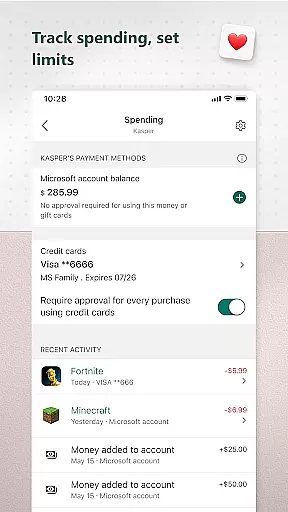
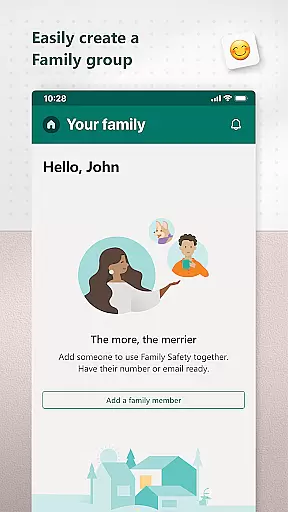
Microsoft Family Safety is a comprehensive parenting app designed to help families develop healthy digital habits while ensuring children's safety online. The app allows parents to set up parental controls, manage screen time, and filter inappropriate content across multiple devices including Android, Xbox, and Windows.
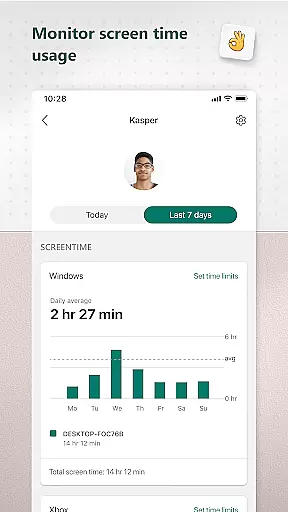
One of the key features is its activity reporting system, which provides weekly summaries of children's screen time and app usage. This helps parents better understand their family's digital behavior and initiate meaningful conversations about online safety. Additionally, the app offers web filtering for kid-friendly browsing on Microsoft Edge and enables blocking of inappropriate apps and games.
This app is particularly useful for modern families who want to balance digital freedom with necessary safeguards. By giving children some independence while maintaining parental oversight, Microsoft Family Safety creates a safer digital environment for kids to learn and grow.
Microsoft Family Safety stands out with its robust feature set tailored for both parents and children. For parents, the app offers detailed activity reports that track screen time and app usage, delivered through weekly email summaries. These reports help monitor digital habits and encourage healthier usage patterns.
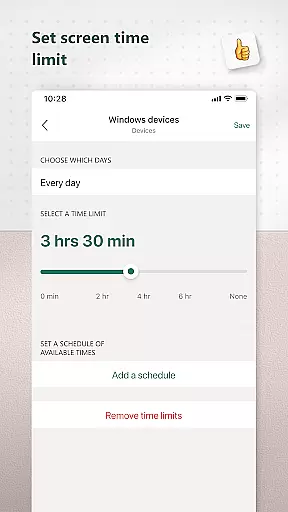
The app excels in screen time management, allowing parents to set specific time limits for individual apps, games, or entire devices. It works seamlessly across multiple platforms including Xbox, Windows, and Android devices. Parents can also establish content filters that ensure safe browsing experiences by restricting access to inappropriate websites and apps.
What sets this app apart is its focus on privacy and transparency. Microsoft provides clear information about data collection and offers meaningful choices regarding how user data is utilized. With proper consent, the app uses accessibility permissions to monitor and control app usage, creating a safer digital space without compromising user privacy.
When it comes to parenting apps, content credibility is paramount. Microsoft Family Safety ensures that all information and guidance provided are backed by child development experts and tech specialists. The app's features are designed based on proven methodologies to support both parents and children in navigating the digital world safely.
The app offers parental controls that are not only comprehensive but also endorsed by online safety advocates. These controls allow parents to filter inappropriate content across apps, games, and websites. By setting up kid-friendly browsing options on Microsoft Edge, parents can rest assured that their children are accessing age-appropriate material.
Microsoft takes privacy seriously, ensuring that all data collected through Family Safety complies with strict privacy standards. This commitment provides users with confidence in the reliability of the app's content and its adherence to protecting family data. With meaningful choices about data collection, parents can tailor the app's functionality to suit their family's needs.
By using accessibility permissions and device admin services, the app can monitor app usage and manage screen time effectively. This level of oversight is crucial for maintaining a safe digital environment for kids. Parents receive weekly email summaries that help them understand their children's digital habits, fostering open conversations about online activity.
Growth tracking in Microsoft Family Safety is an essential feature that allows parents to monitor their children's digital growth and development accurately. The app provides detailed activity reports that give insights into screen time and online usage patterns, helping parents guide their children toward healthier digital habits.
With screen time limits that can be set across Xbox, Windows, and Android devices, parents have precise control over their children's digital consumption. These limits ensure that kids develop a balanced approach to technology use without becoming overly reliant on digital entertainment.
Parents receive notifications when their child requests more screen time, allowing for real-time adjustments to usage limits. This immediate feedback loop helps maintain accurate growth tracking and enables parents to make informed decisions about extending or restricting access as needed.
Moreover, the app's ability to block unauthorized apps and games adds another layer of accuracy to growth tracking. By preventing access to unsuitable content, Microsoft Family Safety supports parents in fostering an environment where children can learn and grow responsibly within the digital space.
User-friendly interface
Cross-platform support
Comprehensive activity reports
Robust parental controls
Strong privacy protection
Limited iOS functionality
Requires Microsoft account
Some features need premium subscription
Occasional syncing issues
Complex initial setup

All-In-One Pregnancy Tracker, Your Baby's Milestones, Growth Stages & Parenting
 4.70
4.70
Educational resource for parents to inspire creativity in their children.
4.00
The Baby’s Bounty App is your hub to register for our diaper banks in Nevada
3.70
Live Location, Alerts & 2-Way Voice for Kids and Adults with Special Needs
4.60
Join over 1MM parents & professionals who've used OFW to navigate co-parenting
4.40
SemLog aims to raise awareness among families and their children
3.40
Screen Time, App and Web Block & Monitoring, Location Tracker
3.60
Track baby’s development & growth week by week with BabyCenter’s pregnancy app!
4.90
FamilyAlbum helps you share, save, and remember your child's special moments.
4.80
Track Pregnancy, Baby Feeding, Sleep, Diaper Changes, Postpartum Health & More!
4.80
SENSORYSOOTHE and SENSORSAFE: Making car seats smarter and families safer.
4.70
Family GPS locator app — child location tracker. GPS kids tracker, family safety
4.70
GPS phone tracker: find kids on map. Location tracking and parental control.
4.50
Reliable phone tracker by number & locate phone app. Protect your family.
4.50
App/Game blocker & GPS tracker
4.50
Parental control: child monitoring app, screen time control, GPS child tracker
4.40
Fake call application designed for parents and adults to discipline their children through the children's police.
4.20
Watching baby, helping parents
4.10
Save money on diapers. Get the Pampers Rewards app.
3.90


User Reviews