
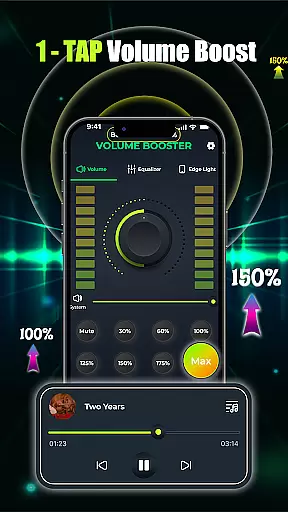
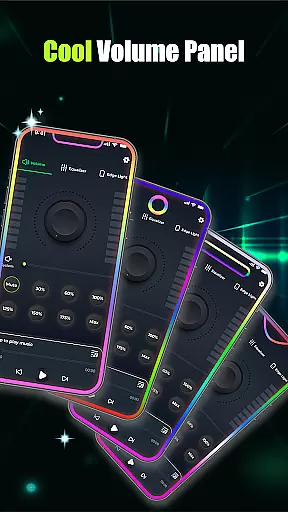
Volume Booster - Music & Sound is a powerful audio enhancement application designed to maximize your listening experience across various devices. This app allows users to amplify volume levels significantly beyond the standard limit, making it ideal for music playback, movie streaming, and even conference calls.
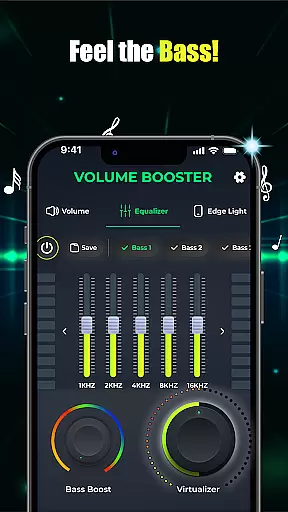
The core functionality lies in its one-tap volume boost feature, which instantly increases audio output without distortion. Additionally, the app provides advanced equalizer settings, customizable bass boost options, and 3D virtualization effects that deliver studio-quality sound. Whether you're using Bluetooth headphones or external speakers, this app ensures every sound is crisp, clear, and perfectly tailored to your preferences.
This makes Volume Booster especially useful during social gatherings where louder audio is needed, or when users require enhanced sound clarity while watching videos on mobile devices. By offering both simplicity and depth in its features, the app caters to casual listeners as well as audiophiles seeking precise control over their audio output.
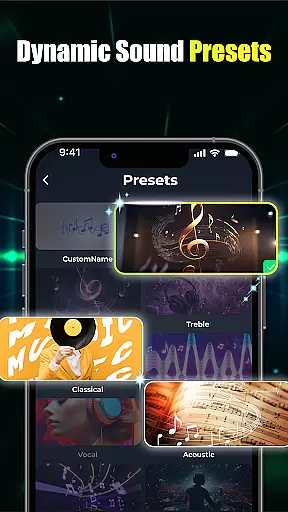
One of the standout characteristics of Volume Booster - Music & Sound is its comprehensive suite of audio tools. The app includes an intuitive slider interface that lets users adjust volume levels with precision, alongside customizable equalizer presets that adapt to different types of audio content. These presets range from flat equalizers for natural sound reproduction to specialized band settings for specific genres like rock or classical music.
In addition to basic volume boosting, the app offers advanced bass enhancement features. Users can activate deep bass modes that add richness and depth to low-frequency sounds, creating an immersive listening experience. Another notable feature is the built-in music player, which consolidates multiple audio sources into a single interface, allowing seamless switching between apps based on user preference.
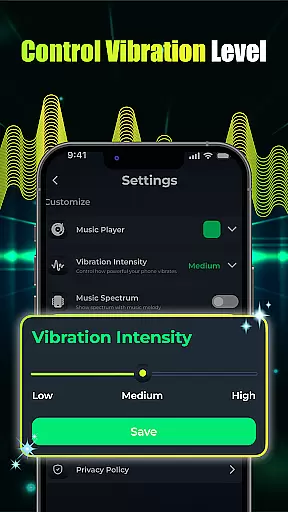
What sets this app apart is its attention to detail in visual and functional customization. Users can personalize edge light effects by adjusting parameters such as color, speed, and radius. Furthermore, the app integrates smoothly with device operating systems, ensuring uninterrupted playback and easy access to controls. This combination of powerful audio processing and user-friendly design delivers exceptional value for anyone looking to elevate their sound experience.
When it comes to music applications, the size and authenticity of the music library are crucial factors. Volume Booster - Music & Sound offers an extensive collection of songs, ensuring users have access to a wide variety of audio content. This vast library caters to diverse musical tastes and preferences.
The app guarantees the legitimacy of its music collection by strictly adhering to copyright laws. Each track is verified for proper licensing, providing users with peace of mind while enjoying their favorite tunes. This commitment to copyright compliance ensures a legal and uninterrupted listening experience.
Moreover, the application's integration with various music platforms enhances its library size and diversity. Users can explore different genres and discover new artists without worrying about copyright infringement issues. This feature enriches the overall user experience, making it a go-to choice for music enthusiasts.
Audio quality is paramount for an immersive listening experience, and Volume Booster - Music & Sound excels in this aspect. The app provides multiple audio quality options, allowing users to customize their sound settings according to their preferences. Whether you're using high-end headphones or standard speakers, the app optimizes audio output for the best possible experience.
One of the standout features is the advanced equalizer, which includes customizable presets and precise control over bass and treble levels. This enables users to fine-tune their audio, achieving studio-quality sound that brings out the nuances in every track. The app also supports 3D virtualization, adding depth and clarity to the audio playback.
In addition to these features, the app ensures that volume boosting does not compromise sound quality. With just one tap, users can enhance their audio experience without introducing distortion or noise. This dedication to maintaining high audio standards makes Volume Booster - Music & Sound a top choice for audiophiles seeking exceptional sound fidelity.
Instant volume boost
Customizable equalizer
Advanced bass options
User-friendly interface
Multi-device support
Battery consumption
Premium features cost
Occasional glitches
Limited free presets
Interface complexity

Equalizer, Bass Booster and Volume Booster (Eq & Bass) improve sound quality
 4.30
4.30
Taal player that lets you sing any Indian & Western song with Tabla & Tanpura
4.60
DJ Music Mixer - DJ Remix: remix songs, make beat music & record mix of DJ.
4.40
Visualize the guitar fretboard, master scales & play through changes like a pro!
4.50
Bass Booster Pro takes auto-equalizing to the next level!
4.30
Bass Booster & Volume Equalizer Pro improves your music and video sound quality
4.60
The alternative folder based music player.
4.20
Simple mp3 and mp4 player with advanced features.
3.40
A complete sound package for the sound engineer or enthusiast
4.60
Performance-Synthesizer & Multi-Track-Sequencer, polyphonic + multi timbral!
4.70
Walkout Song DJ is the most intuitive app to manage your sports music.
4.70
Pay Once, no monthly payment
4.60
Offline Music Player&MP3 Player with themes, equalizer, lyrics, music play mode
4.60
Fun & Easy Voice Changer – Record, Edit & Add Hilarious Effects!
4.50
Formerly known as Spotistats! View your top tracks, artists, albums and more!
4.40
10-Band Audio Equalizer, Sound / Bass Booster for Spotify Users & Music Players
4.40
Time Guru will strengthen your internal sense of musical time via random muting.
4.30
Time Trainer: accurate metronome w tools to help you develop your internal time!
4.20
Versatile MP3 recorder with auto-backup to Dropbox and Google Drive
4.10


User Reviews