
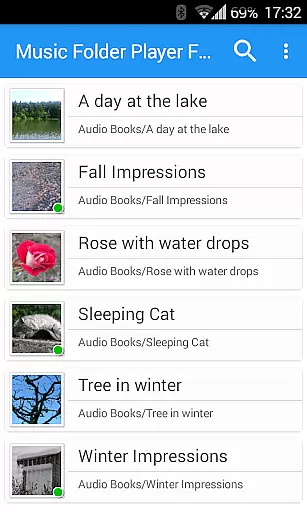
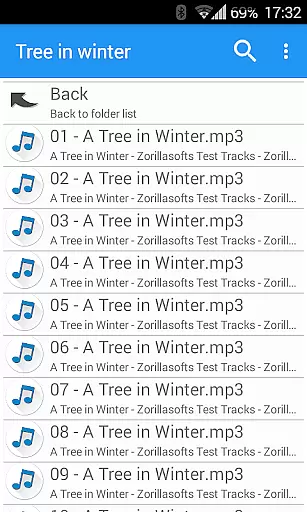
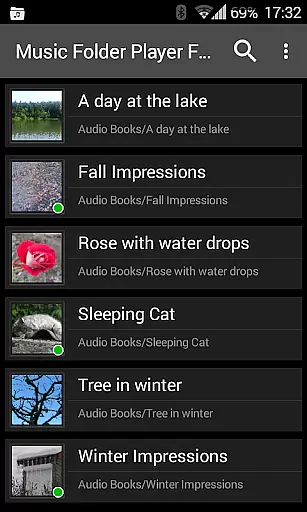
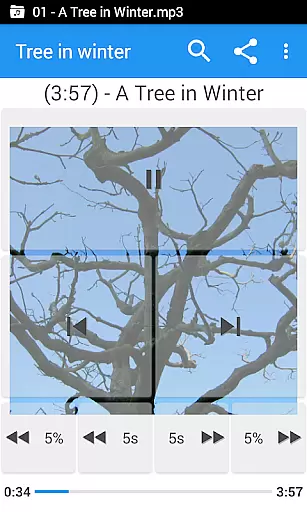
Music Folder Player Full is a specialized audio player designed for users who prefer organizing their music files in folders rather than traditional categories like artist or album. The app offers a unique folder-based playback experience, making it ideal for those with custom file organization systems.
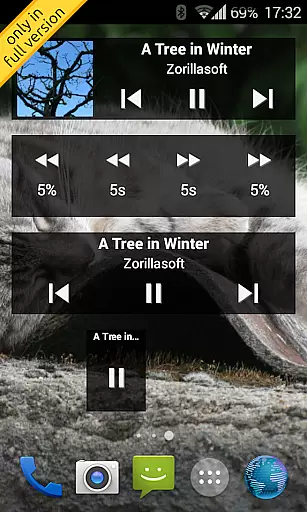
In addition to its core functionality, the app provides advanced features such as homescreen widgets, resume playback where you left off, and multiple display options for different collection sizes. Its support for equalizer settings, speed control with pitch correction, and virtual room effects make it a versatile tool for audiophiles and podcast enthusiasts alike.
The application's user-friendly interface includes Material Design elements and innovative controls like two-finger gestures for volume adjustment. With additional functionalities like sleep timer, Last.fm scrobbling, and file management options, Music Folder Player Full delivers a comprehensive audio playback solution that caters to various listening preferences and organizational needs.
Music Folder Player Full stands out with its extensive feature set tailored for both casual listeners and audio enthusiasts. The app's signature capability lies in its sophisticated folder management system, allowing users to navigate their music libraries through customizable folder hierarchies and flat lists.
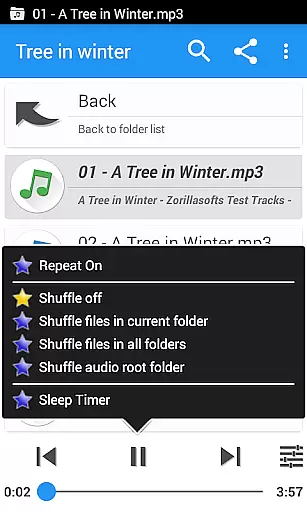
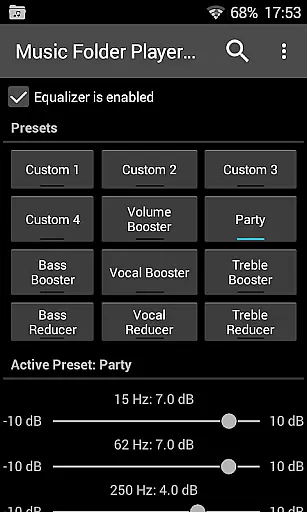
Among its notable features are four configurable seek buttons for precise navigation during podcasts or audiobooks, an advanced equalizer with 8 preset configurations, and speed control with pitch correction for optimal playback of spoken content. The inclusion of virtual room effects and 432 Hz playback mode demonstrates the app's commitment to providing high-quality audio experiences.
Additional conveniences include three distinct homescreen widget options, car/sports mode with enlarged controls, and innovative gesture-based volume management. The app also supports Last.fm scrobbling, file sharing capabilities, and comprehensive search functions, while maintaining essential music player functions like shuffle, repeat, and playlist creation.
Music Folder Player Full offers a unique approach to music organization by allowing users to manage their audio tracks through folders rather than traditional artist or album categories. This method provides an extensive personal music library that is only limited by the device's storage capacity.
The app supports various audio formats, ensuring that users can include all their legally acquired music files without compatibility concerns. By organizing music in folders, it inherently respects copyright authenticity as users are expected to manage their own collections responsibly.
This folder-based system enables users to maintain a comprehensive and personalized music library while ensuring that all content remains legitimate and properly licensed. The absence of advertisements in the full version further enhances the user experience.
One of Music Folder Player Full's standout features is its advanced audio quality options. The app includes a robust equalizer with four customizable settings and eight predefined options such as Bass Booster and Vocal Booster, allowing users to fine-tune their listening experience across different genres and preferences.
For audiobook and podcast enthusiasts, the speed control feature with pitch correction enables precise playback rate adjustment without affecting audio quality. Additionally, the pre-amplifier function helps boost low-level recordings, particularly useful for older or poorly recorded tracks.
The app also offers unique modes like 432 Hz playback, which some believe provides a more natural listening experience. These comprehensive audio quality options make Music Folder Player Full a versatile choice for discerning listeners who demand control over their audio playback experience.
User-friendly folder organization
Advanced equalizer settings
Speed control with pitch correction
Material Design interface
Comprehensive widget options
Lacks automatic library organization
No built-in streaming service
Complex for basic users
Separate free version available
Requires Android 2.3+

Performance-Synthesizer & Multi-Track-Sequencer, polyphonic + multi timbral!
 4.70
4.70
Gorgeous UI, Powerful music Search and Equalizer, the great choice for you!
4.70
A High-Precision Audio Spectrum Analysis App
4.20
More downloads than any other metronome. Includes drum machine & tempo trainer.
4.80
Visualize the guitar fretboard, master scales & play through changes like a pro!
4.50
Voice recorder - Audio recorder. Best recorder for recording
4.90
Sheet music reader, piano & music note player. Play music score & learn to read.
3.90
Full featured mp3 and audio player with Chromecast and Android Auto support.
4.40
Sing, record, and create music together — enhanced by smart voice tools.
4.00
24,000 free audio books and no ads!
4.90
Play your hearts out on TouchTunes jukeboxes & connect with fellow music lovers.
4.80
Responsive piano with great sounds, graphics, and songs
4.80
Unleash your creativity! Turn simple prompts into full fledged songs.
4.70
The best music and audio player, with beautiful UI, music search and equalizer.
4.60
Let your Android device with the sound effects you want
4.50
DJ Music Mixer Pro is a real DJ controllers and DJ Music Studio to remix DJ.
4.40
DJ Music Mixer - DJ Remix: remix songs, make beat music & record mix of DJ.
4.40
MilkDrop for Android TV
3.00
Music Streaming suite for Ampache, Nextcloud Music and compatible backends.
4.0


User Reviews