



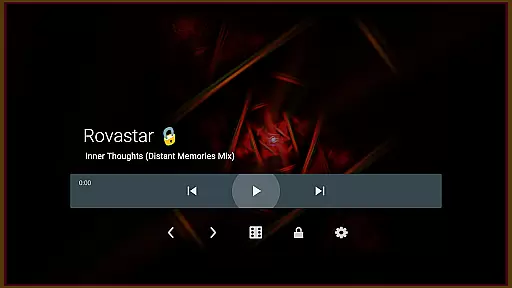

projectM Music Visualizer TV is a cutting-edge music visualization app designed specifically for Android TV. It transforms your audio experience by generating stunning visual effects that sync with the music you play. With over 200 unique presets, projectM offers an immersive journey through sound and visuals.
The app supports seamless integration with popular music players like Spotify, Pandora, and Google Music. You can control playback directly from the app interface, eliminating the need to switch between apps. Built as a modernized version of MilkDrop, projectM brings advanced graphics rendering and customizable settings to deliver a smooth 60 FPS performance.
Whether you're hosting a party or simply enjoying music at home, projectM enhances the atmosphere with its responsive and dynamic visualizations. The configurable graphics options allow users to optimize performance based on their device capabilities.
projectM stands out with its extensive feature set tailored for audiophiles and visual enthusiasts alike. The app boasts over 200 visual effects presets, providing endless variety in graphical content. These presets are fully compatible with MilkDrop (.milk) files, preserving legacy support while introducing new possibilities.
Performance-wise, projectM delivers 60 FPS pixel-shaded rendering, ensuring buttery-smooth animations synchronized with your music. The app's sophisticated audio analysis algorithms respond accurately to different genres and sound patterns. Users can fine-tune their experience through adjustable texture size and mesh settings.
Additional functionality includes integrated music player controls for various streaming services. This feature enables play/pause functionality and track skipping without leaving the visualizer interface. The combination of these features makes projectM an essential companion for any Android TV music enthusiast.
projectM Music Visualizer TV offers an extensive library of over 200 visual effects, ensuring a rich and diverse audio-visual experience. This vast collection provides users with a wide array of visual styles that cater to every musical genre and personal preference.
The application is not just about quantity but also quality. Each preset is crafted with precision, utilizing modern technologies to deliver 60 FPS Pixel Shaded Rendering. This high frame rate guarantees smooth and fluid animations that are visually stunning and responsive to the music being played.
Compatibility with MilkDrop (.milk) presets further extends the creative possibilities for users. This feature allows for importing custom visual presets, enhancing personalization and creativity within legal boundaries. Users can trust that these presets are authentic and respect copyright laws.
By providing such a comprehensive and legally compliant library, projectM ensures that users have access to top-tier visual content without concerns about copyright infringement. This commitment to authenticity and variety enriches the overall user experience.
One of the standout features of projectM Music Visualizer TV is its configurable graphics quality settings. Users can fine-tune their experience by adjusting parameters like texture size and mesh size under the settings menu. These adjustments allow for optimal performance based on individual device capabilities.
The ability to modify texture size directly impacts the clarity and detail of visual effects. For those seeking higher quality visuals, increasing the texture size results in more intricate and detailed animations. Conversely, reducing texture size can improve performance on less powerful devices without sacrificing too much visual fidelity.
In addition to texture adjustments, configuring mesh size offers another layer of control over graphical output. When texture modifications alone aren't sufficient, tweaking mesh size can further enhance or streamline the visual complexity. This dual-layer approach ensures that all users can achieve their desired balance between quality and performance.
By offering these robust audio-visual customization options, projectM empowers users to tailor their experience precisely as they wish. Whether prioritizing breathtaking visuals or seamless performance, projectM delivers unparalleled flexibility and control over audio quality settings.
Stunning visual effects
Seamless music integration
High performance rendering
Customizable graphics settings
User-friendly interface
Requires powerful hardware
Limited mobile device support
No real-time effect editing
Preset loading occasional lags
Complex settings for beginners

Formerly known as Spotistats! View your top tracks, artists, albums and more!
 4.40
4.40
Next generation modular control surface
4.10
Super Sound Editor, Song Maker & Mixer, Vocal Remover, Voice Recorder & Changer!
4.60
Enjoy singing any song, no matter how high or low it is
4.30
No wifi music app. Mp3 offline. Tuner radio, young radio music. Music downloader
4.20
Manage your Sonos system directly from your home-screen!
4.40
The iconic iOS metronome app is now on Android.
3.70
Responsive piano with great sounds, graphics, and songs
4.80
Customize Your Favorite Songs and Videos with booster.
4.70
Tune in to the greatest hits on UK Radio | The home of Capital, Smooth & Heart.
4.90
Full-featured, High-Quality Groovebox Workstation, perfect for Live Performance!
4.80
More downloads than any other metronome. Includes drum machine & tempo trainer.
4.80
Ultimate Sonos Controller
4.70
Learn the notes on the guitar fretboard fast with this easy and fun app
4.60
Guzheng Master supports many playing techniques as an acoustic Guzheng
4.50
Time Guru will strengthen your internal sense of musical time via random muting.
4.30
Advanced 10-Band Audio Graphic Equalizer Sound Booster Pro
4.30
Versatile MP3 recorder with auto-backup to Dropbox and Google Drive
4.10
The Minimalistic Premium Music Player. Handmade with passion for music
2.20


User Reviews