
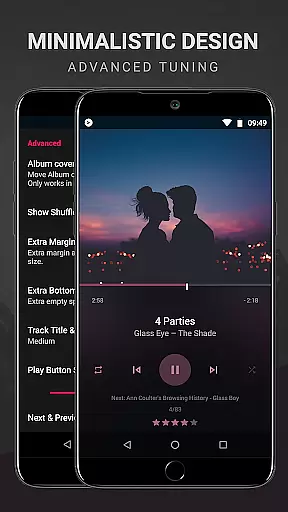
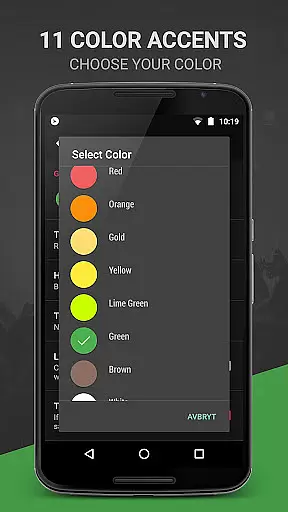
BlackPlayer EX is a premium music player tailored for audiophiles who appreciate both quality and customization. This advanced version removes ads while offering exclusive features such as Chromecast support, customizable crossfading, and an array of aesthetic enhancements like light themes, color accents, and widget customizations.
Designed for Android users, BlackPlayer EX supports standard audio formats including MP3, FLAC, and WAV. It combines essential playback capabilities with innovative tools like the 'Zap' function for discovering music quickly, detailed tag editing, gapless playback, and even visualizer options. Its versatility makes it ideal for organizing extensive music libraries while enjoying high-quality sound.
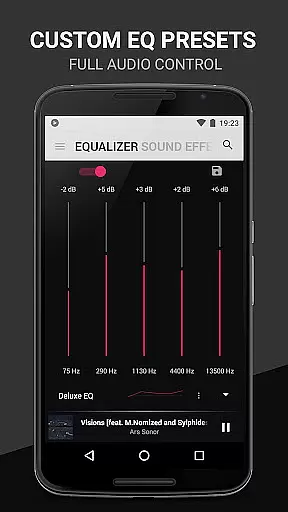
The app's true value lies in its ability to provide complete control over the listening experience. From adjustable equalizer settings to personalized library views, BlackPlayer EX ensures that every user can tailor their interface according to their preferences. Whether you're managing playlists or exploring new tracks, this app delivers a seamless blend of functionality and style.
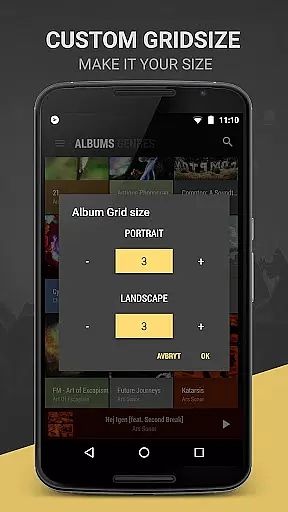
BlackPlayer EX stands out through its comprehensive feature set designed to enhance music playback and organization. One notable aspect is its deep level of customization; users can modify grid sizes for artists and albums, apply custom colors across action bars and popup windows, and even manually assign artist images. These options allow for a highly personalized interface unmatched by many competitors.
In addition to visual personalization, the app offers practical functionalities such as grouping tracks by year or composer, tracking monthly played tracks, and creating floating window controls for convenience. The inclusion of advanced audio features—such as customizable equalizers, bass boost, virtualizers, and gapless playback—ensures superior sound quality. Furthermore, unique innovations like the Zap function enable rapid discovery of music within your library.
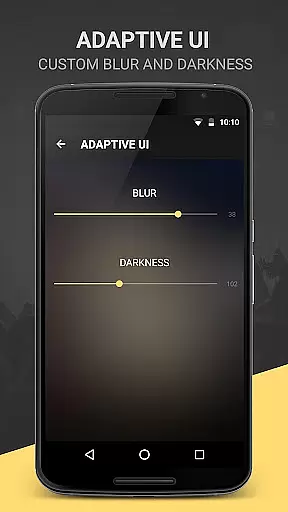
Finally, BlackPlayer EX provides numerous extras not commonly found in other players: chromecast integration, lockscreen blur effects, multiple text animations, and transition effects elevate the overall experience. With frequent updates ensuring early access to new features, this app continues to evolve, making it a top choice for discerning listeners seeking flexibility and performance.
BlackPlayer EX offers an extensive music library that supports various formats including MP3, FLAC, and WAV files, ensuring users can access a wide range of audio content. The application focuses on copyright authenticity by allowing users to play locally stored music files, thus avoiding any legal issues associated with streaming services.
The app's dedication to copyright compliance is further demonstrated through its support for personal music collections, empowering users to manage their legally acquired tracks. With features like the tag editor, users can organize and edit metadata for their music files, enhancing the management of oneu2019s personal library while respecting copyright laws.
Moreover, BlackPlayer EX provides tools such as the ability to manually search and set artist images, which not only enriches the user experience but also ensures that all content is properly attributed to its creators. This respect for intellectual property enhances the credibility of the music library within the app.
Audio quality in BlackPlayer EX is treated with utmost importance, offering users a variety of options to enhance their listening experience. The built-in Equalizer, BassBoost, and Virtualizer allow for customized sound profiles, catering to individual preferences and ensuring optimal audio output.
In addition to sound customization, the app supports gapless playback, a feature cherished by audiophiles for maintaining the integrity of live or classical music recordings. This attention to detail in audio reproduction underscores the app's commitment to delivering high-quality sound.
Furthermore, the inclusion of a Left/Right sound balance feature provides users with even more control over their audio settings, accommodating different listening environments and setups. These comprehensive audio quality options make BlackPlayer EX a top choice for discerning listeners who demand the best from their music player.
Highly customizable
Gapless playback
Chromecast support
Regular updates
Premium aesthetics
No cloud streaming
Complex UI
Heavy on resources
Limited codec support
Costly upgrade

Turn your phone into a musical instrument from the future!
 3.90
3.90
Tune in to the greatest hits on UK Radio | The home of Capital, Smooth & Heart.
4.90
DJ Music Mixer Pro is a real DJ controllers and DJ Music Studio to remix DJ.
4.40
Recording studio w/ 10k beats, pro vocal FX and a network of 20M rappers & fans!
4.60
Listen radio AM / FM Stations. Live AM / FM Radio App Station. Radio Com.
4.70
The official Sonos app
4.10
Offline Music Player&MP3 Player with themes, equalizer, lyrics, music play mode
4.60
The iconic iOS metronome app is now on Android.
3.70
Customize Your Favorite Songs and Videos with booster.
4.70
24,000 free audio books and no ads!
4.90
Your song collections with lyrics and chords on Android smartphones and tablets.
4.80
More downloads than any other metronome. Includes drum machine & tempo trainer.
4.80
Simple & Intuitive Metronome
4.70
Unleash your creativity! Turn simple prompts into full fledged songs.
4.70
Learn the notes on the guitar fretboard fast with this easy and fun app
4.60
A synth that really lets you shape your sounds!
4.50
Guzheng Master supports many playing techniques as an acoustic Guzheng
4.50
Offline Tunes, Unlimited Vibes
3.90
Powerful beat maker & DJ mixer to remix tracks, make music, & perform DJ mix
3.70


User Reviews