
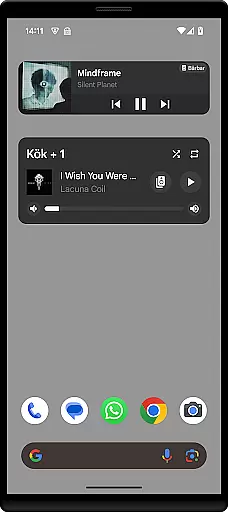
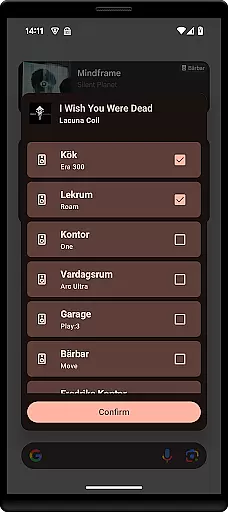
Sonos Widget is a powerful tool for managing your Sonos system directly from your home screen. This app provides two different widget options, Compact and Enhanced, allowing users to choose the layout that best suits their needs. With features like volume control, grouping, playback controls, and modes support, it offers comprehensive control over your Sonos devices.
The app displays relevant metadata for the currently playing track, enhancing the user experience by providing useful information at a glance. Whether you want to adjust the volume, skip tracks, or manage grouped speakers, Sonos Widget makes it easy to do so without opening the full Sonos app. Its intuitive design ensures quick access to essential functions, making it an ideal choice for music enthusiasts who value convenience and efficiency.
Sonos Widget stands out with its two distinct widget styles: Compact and Enhanced. The Compact widget offers a minimalist design, perfect for users who prefer a clean home screen, while the Enhanced widget provides more detailed information and controls. Both options display relevant metadata, such as song titles and artist names, ensuring you always know what's playing.
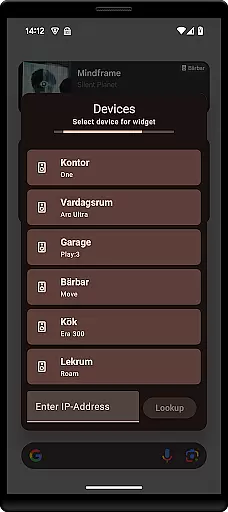
In addition to metadata display, Sonos Widget includes robust functionality like volume control, grouping of speakers, and playback controls (Play, Pause, Next, Previous). It also supports playback modes such as Shuffle and Repeat, giving users complete control over their listening experience. The setup process is straightforward; simply select a Sonos Widget from your 'Widget'-drawer and follow the on-screen instructions to connect to your Sonos system.
This application is not endorsed by or associated with Sonos, Inc., but it serves as a convenient third-party solution for managing your Sonos devices efficiently. For any questions or issues, users can reach out via email at contact@freddroid.com.
Sonos Widget offers a unique approach to managing your music library directly from your home screen. While the app itself does not host a music library, it provides seamless integration with your existing Sonos system, allowing you to access and control your entire music collection.
The application supports various music sources that you've already added to your Sonos system, ensuring that all your content is accessible through the widget interface. This includes streaming services, local files, and any other integrated platforms, making it easy for users to enjoy their preferred tracks without worrying about copyright restrictions.
By leveraging the capabilities of the official Sonos app, Sonos Widget ensures that all music content is authentic and legally available for playback. Users can trust that they are accessing legitimate audio content, as the setup requires connection to an established Sonos system which inherently manages licensing agreements with music providers.
This streamlined access to a vast music library enhances user experience by providing quick controls and metadata display right on the home screen, thus eliminating the need to open the main Sonos app for basic operations.
One of the standout features of Sonos Widget is its ability to maintain high audio quality while offering convenient control options. The widget supports volume adjustments and playback controls, ensuring that users can manage their listening experience without compromising sound fidelity.
Through the Enhanced widget option, users have access to detailed metadata and playback modes such as Shuffle and Repeat. These features allow for a more customized listening session while preserving the original audio quality set by the Sonos system.
The application's integration with the Sonos ecosystem means that it benefits from the same advanced audio processing technologies found in the official app. This ensures consistent sound output whether you're using the widget or the full Sonos interface.
Additionally, the compact widget provides essential controls like play, pause, next, and previous track, all while maintaining optimal audio performance. This combination of convenience and quality makes Sonos Widget an excellent tool for audiophiles who demand both functionality and fidelity in their music management solutions.
User-friendly interface
Comprehensive controls
Two widget options
Quick access to features
Enhanced metadata display
Not officially endorsed
Limited customization
Requires Sonos system
No official support
Potential compatibility issues

Fun & Easy Voice Changer – Record, Edit & Add Hilarious Effects!
 4.50
4.50
Simply convert wav to mp3. Clear. Reliable. Safe.
4.4
The Skullcandy App Experience
3.20
Over 100 million tracks available for high quality streaming and download
4.60
DJ Music Mixer - DJ Remix: remix songs, make beat music & record mix of DJ.
4.40
Bass Booster & Volume Equalizer Pro improves your music and video sound quality
4.60
Make songs with AI! Any genre, custom lyric, song generator for music creation!
4.80
The official Sonos app
4.10
Play your music offline without limits
4.80
Listen radio AM / FM Stations. Live AM / FM Radio App Station. Radio Com.
4.70
Simple & Intuitive Metronome
4.70
Recording studio w/ 10k beats, pro vocal FX and a network of 20M rappers & fans!
4.60
Guzheng Master supports many playing techniques as an acoustic Guzheng
4.50
Full featured mp3 and audio player with Chromecast and Android Auto support.
4.40
The Music Journey in Your Hands
4.30
Bass Booster Pro takes auto-equalizing to the next level!
4.30
No wifi music app. Mp3 offline. Tuner radio, young radio music. Music downloader
4.20
VB-AUDIO Software / VBAN-Receptor allows listening to any VBAN Streams
4.10
Simple mp3 and mp4 player with advanced features.
3.40


User Reviews