
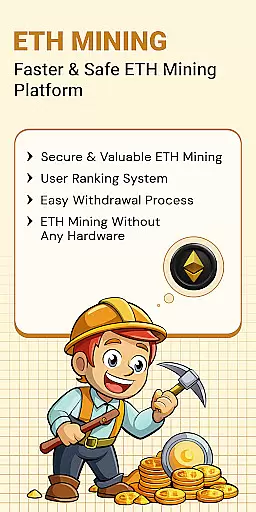
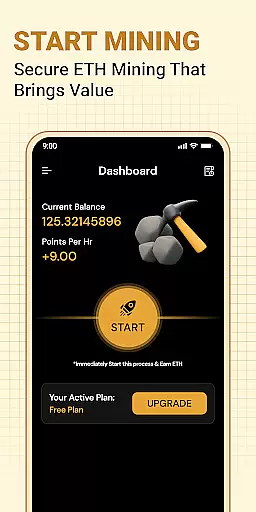
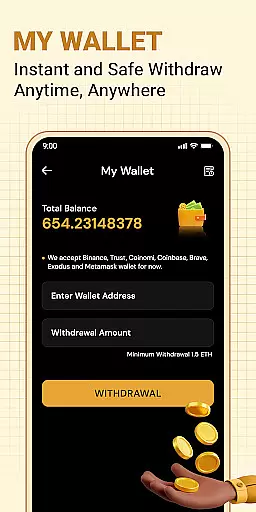


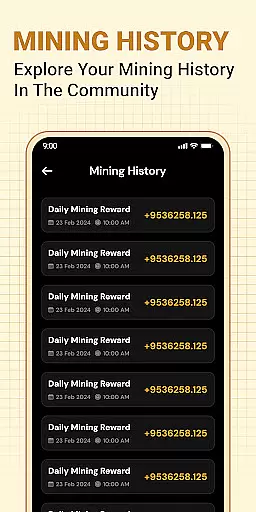
ETH Cloud Miner is a convenient mobile application designed for users who participate in cloud-based Ethereum mining. The app allows you to monitor your mining performance, including key metrics like hashrate, uptime, and estimated daily rewards, all from your mobile device. It connects to third-party cloud mining providers, giving you real-time access to your Ethereum mining stats without requiring any local hardware usage.
This app is particularly useful for both beginners and experienced crypto miners who want to keep track of their mining activities on the go. By providing an easy-to-navigate dashboard, ETH Cloud Miner ensures that users can view their session data and overall mining efficiency anytime, anywhere. This makes it simpler to manage cloud mining investments effectively.
The true value of ETH Cloud Miner lies in its ability to simplify the monitoring process. Since no actual mining takes place on your phone, the app is lightweight and doesn't drain your device’s resources. Instead, it focuses purely on displaying critical information from your existing cloud mining accounts, making it an essential tool for anyone involved in Ethereum cloud mining.
One of the standout features of ETH Cloud Miner is its seamless integration with various cloud mining providers. Users can log in to their accounts directly through the app and instantly retrieve detailed mining performance data. This includes live updates on hashrate, uptime statistics, and projected earnings, ensuring that users have a clear picture of their mining operations at all times.
In addition to real-time data tracking, the app offers a user-friendly interface that simplifies navigation. The dashboard is designed to display all essential mining information in one place, allowing users to quickly assess their mining activity without needing to sift through complex menus or settings. Furthermore, the app is optimized for both Android and iOS platforms, ensuring broad compatibility across devices.
Another notable feature is the app's commitment to resource efficiency. Unlike traditional mining software, ETH Cloud Miner does not utilize your phone’s CPU, GPU, or battery for mining tasks. Instead, it serves as a monitoring tool that provides valuable insights into your remote mining activities. This design choice ensures that users can track their Ethereum mining progress without worrying about device performance or battery life.
Task creation and detail customization are essential features for users who need to manage their Ethereum mining activities effectively. ETH Cloud Miner provides a seamless way to create tasks that allow you to monitor your cloud-based mining stats with precision.
This app enables users to customize details such as hashrate, mining session data, and uptime. By tailoring these parameters, miners can optimize their operations to ensure maximum efficiency and profitability. The level of detail available for customization ensures that both novice and experienced users can tailor the app to their specific needs.
With ETH Cloud Miner, users gain the ability to set up detailed monitoring of their mining performance. This includes real-time updates on critical metrics like estimated daily rewards and overall mining activity. Such detailed insights empower users to make informed decisions about their mining strategies.
The value of task creation and customization in ETH Cloud Miner lies in its ability to transform complex mining data into actionable insights. Users can easily track their mining progress, adjust settings as needed, and ultimately enhance their mining output without needing advanced technical knowledge.
Reminder settings play a crucial role in ensuring that users never miss important updates about their Ethereum mining activities. ETH Cloud Miner offers robust reminder functionalities that keep users informed about key events and changes in their mining status.
This feature allows users to set up notifications for various aspects of their mining operations, such as when there is a significant change in hashrate or when maintenance is required. By configuring reminders, users can stay on top of their mining performance without constant manual checks.
ETH Cloud Miner's reminder system is designed to be flexible and user-friendly. Users can choose the frequency and type of reminders they wish to receive, ensuring that they get the right information at the right time. This flexibility helps users maintain optimal mining performance while balancing other responsibilities.
Ultimately, the reminder settings in ETH Cloud Miner provide peace of mind by keeping users informed and proactive. Whether itu2019s alerting them to potential issues or reminding them to check their earnings, this feature ensures that users remain engaged and in control of their mining activities.
User-friendly interface
Real-time mining stats
No device resource usage
Broad platform support
Easy account integration
Limited to cloud mining
Third-party dependent
No direct mining
Premium service costs
Requires stable internet

Manage all your events, leads, ticketing, payments and check-ins.
 4.30
4.30
PheedLoop Go! is the mobile event app for events powered by PheedLoop.
4.40
The Ultimate Tournament Hub
4.70
Listen Full Quran MP3 Offline - Qibla Compass, Salah Timing & 99 Names of Allah
4.60
Wedding planner app with wedding venues, wedding checklist, countdown & budget.
4.60
Digital Income Wallet of the Final Libertadores 2025
4.2
Soft Proxy for Your Online World
4.3
Events, Meetings, Photo Shoots
4.50
RAISE-365 makes fundraising easy and fun!
3.20
Find Live Event Ticket Deals to Sports, Concerts, Festivals, & Comedy For Less!
4.80
Fast Scans. Happy Fans. For Every Hometown!
4.60
Everything you need for the Best Thursday Ever.
4.40
Buy tickets for any event!
3.90
Instant photo sharing for every occasion
3.80
Purchase line-skip passes, drinks, cover, and more at bars and clubs
3.50
TV.Garden is a video player to play your own TV streams from around the world!
3.40
The Official App
4.4
TV Garden is a video player to play your own TV streams from around the world!
4.1
The official app of the Carmel Christkindlmarkt!
4.0


User Reviews