

Look Up - Pop Up Dictionary Pro is an innovative offline dictionary application designed for book lovers and language enthusiasts who require instant word definitions without relying on internet searches. The app supports seven major languages including English, Italian, Spanish, German, Portuguese, and French, making it a versatile tool for both casual readers and language learners.
The application stands out with its seamless integration capabilities, working perfectly with popular e-reader apps like Moon Reader and learning tools such as Anki Flashcards. Its unique three-way word lookup feature allows users to search definitions through copy-paste, dedicated lookup button, or sharing the selected word directly to the app. With its comprehensive offline Wordnet database of 0.22 million words and phrases, Look Up ensures users have access to reliable information anytime, anywhere.
This app is particularly useful for students, professionals, and avid readers who frequently encounter unfamiliar words in their reading materials. By providing quick access to definitions, translations, and contextual notes, Look Up enhances vocabulary acquisition and improves overall reading comprehension.
Look Up - Pop Up Dictionary Pro offers an impressive array of features that cater to various user needs. The app's core functionality revolves around its extensive offline database containing 0.22 million words and phrases from seven different languages. This comprehensive collection ensures users can find definitions and translations even without an internet connection.
One of the app's most notable features is its multiple lookup methods. Users can choose between three convenient ways to search for words: copying text (for Android versions below 9.0), using the dedicated lookup button after selecting a word (Android 6.0 and above), or sharing the selected word directly to the Lookup App. The application also supports advanced functionalities like Anki Flashcard integration for vocabulary building and MoonReader support for enhanced e-reading experience.
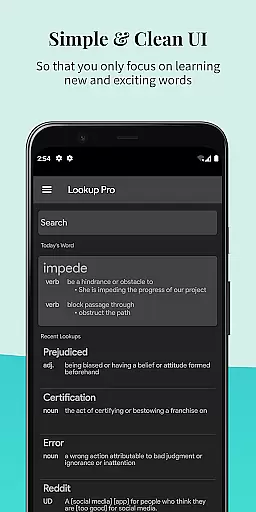
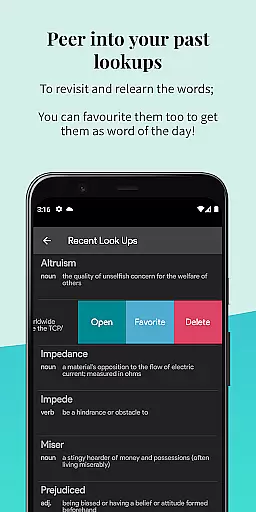
Additional features include Google Drive synchronization for backup purposes (which can be disabled), word starring for personal reference, recent search history, note-taking capabilities for contextual learning, and a visually pleasing dark mode for comfortable nighttime reading. The app even incorporates text-to-speech functionality and provides daily word notifications to help users expand their vocabulary systematically.
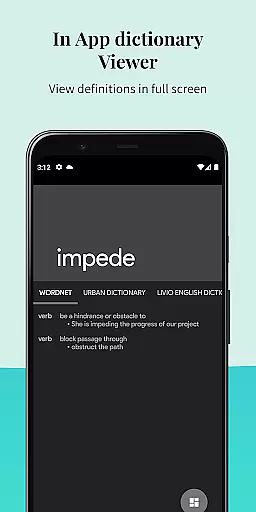
Look Up - Pop Up Dictionary Pro offers an extensive offline word database that enhances the reading experience for book lovers. With over 0.22 million words and phrases available, users can instantly access definitions without the need for an internet connection.
The dictionary supports multiple languages including English, Italian, Spanish, German, Portuguese, and French, making it a versatile tool for linguists and language learners alike. This multilingual support is bolstered by partnerships with reputable sources like Urban Dictionary, Google Define, Vocabulary.com, Wikipedia, and Cambridge.
By providing such a comprehensive and authenticated collection of words, Look Up ensures that users have a reliable resource at their fingertips, thus enriching their understanding and appreciation of various texts.
One of the standout features of Look Up is its ability to integrate seamlessly with other applications, enhancing its utility as a reference tool. It supports Moon Reader Dictionary, allowing users to look up words directly from their e-books without disrupting the flow of reading.
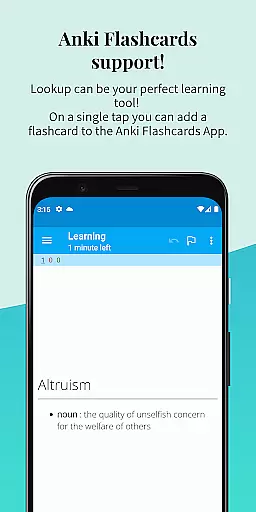
In addition to e-book integration, Look Up also works with Anki Flashcards, enabling users to create flashcards directly from the app for effective vocabulary building. The app's compatibility extends to different Android versions, offering multiple ways to search for words depending on the device's operating system.
Whether you're using an older version of Android or the latest, Look Up adapts to your needs, ensuring that no matter how you choose to select and share text, you'll receive quick and accurate definitions.
Comprehensive offline database
Multi-language support
Seamless third-party integrations
Three convenient lookup methods
User-friendly interface design
Limited advanced grammar tools
No built-in pronunciation guide
Premium version required for full features
Occasional sync issues reported
Interface may feel complex to beginners

The Psalms for singing
 4.5
4.5
Read the KJV Bible with Strong’s offline: reading plans, audio Bibles, and more.
4.70
Read the romance stories on the go. Take my breath away, The Spoiled Girl
4.30
Improve your vocabulary and grammar with the 15 biggest Oxford Dictionaries.
4.30
Find, discuss, and organize your world of books and shows.
4.60
Personalized Chat with Bible
4.80
Read unlimited novels, audiobooks, stories & Unlock ebooks, fanfiction and more!
4.70
My Bible offers a comprehensive app by providing offline access, daily verses.
4.80
A KJV Bible with Apocrypha and precept-based study concordance
5.00
"When tweetle beetles fight, it's called a tweetle beetle battle."
4.90
Offline dictionary for learning Cantonese as a second language
4.90
Bible Study App with Audio Book, Verse of the Day, and Devotionals.
4.80
Read and study the Bible and other content in over 1,000 languages.
4.80
The dynamic dictionary/reference app for piano chords and scales!
4.80
Research your family history to explore ancestors and search for your heritage
4.50
The ultimate military vehicle identification (Equipment ID) guide.
4.40
Manage collectibles, survey and treasure maps in Elder Scrolls Online.
4.40
Cute bedtime story for kids
4.30
Prime novels await! Fantasy & Romance on JoyRead. Immersive reads!
4.20


User Reviews