
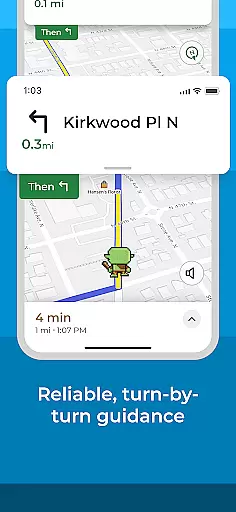
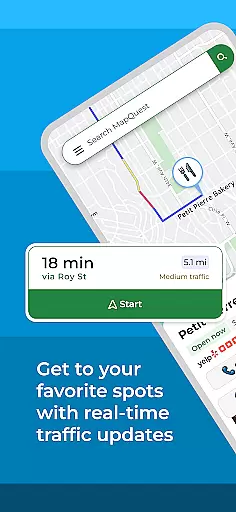



MapQuest is a comprehensive GPS navigation app that provides turn-by-turn directions for both driving and walking. The app offers up-to-date satellite imagery, real-time traffic updates, and optimized routing to help users save time and fuel costs. With features like speedometer display, favorites storage for quick access to frequent locations, and alternative route suggestions, it ensures efficient navigation across the United States and Canada.
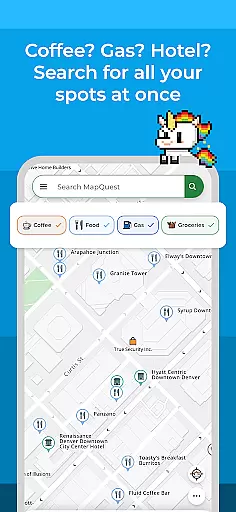
Beyond basic navigation, MapQuest allows users to explore nearby points of interest such as restaurants, hotels, and gas stations. It also integrates additional services like hotel booking, food ordering through GrubHub, and on-demand roadside assistance. These features make it not just a navigation tool but a complete travel companion.
Whether planning a trip or navigating daily commutes, MapQuest's robust feature set helps users make informed decisions, avoid traffic bottlenecks, and discover new places with ease. Its intuitive interface and reliable performance provide significant value to anyone needing accurate mapping and navigation tools.
MapQuest stands out with its rich feature set tailored for modern travelers. The app provides detailed maps with satellite imagery and turn-by-turn voice navigation for both driving and walking directions. Real-time traffic updates ensure users are aware of congestion and can choose faster routes. Optimized routing helps conserve fuel and time, while the built-in speedometer lets drivers compare their current speed against posted limits.
In addition to navigation, MapQuest offers practical tools like Favorites for storing frequently visited locations, alternate route options, and multipoint routing for trips with multiple stops. Users can customize route settings to avoid highways or toll roads, making it adaptable to various travel preferences. The app also supports advanced planning by allowing routes to be created from locations other than the user's current position.
MapQuest goes beyond navigation by integrating lifestyle services. Users can search for nearby points of interest, book hotels, browse restaurant menus, and even order food via partnerships with OpenTable and GrubHub. Weather updates and roadside assistance further enhance its utility, ensuring users have all necessary information at their fingertips for seamless travel experiences.
Map accuracy is a crucial feature for any navigation app, and MapQuest excels in this area. The application provides up-to-date satellite imagery and maps, ensuring that users have access to the most current geographic data available.
With detailed maps covering the United States and Canada, MapQuest allows users to navigate with confidence. The app's commitment to accuracy means that users can trust the information displayed on the map, whether they are planning a simple commute or an extensive road trip.
The benefit of such precise mapping is clear: users can avoid getting lost, find their destinations more easily, and explore points of interest without worrying about outdated or incorrect map data. This level of reliability enhances the overall user experience.
Ultimately, MapQuest's dedication to maintaining high standards of map accuracy translates into time saved and a reduction in travel-related stress for its users, making it an invaluable tool for both everyday and occasional travelers.
Route planning is another standout feature of MapQuest, offering users multiple options to reach their destinations efficiently. The app provides turn-by-turn voice navigation for both walking and driving directions, ensuring users can keep their eyes on the road while being guided to their destination.
In addition to basic routing, MapQuest offers optimized routing which helps save time, gas, and money by suggesting the fastest routes based on real-time traffic updates. Users also have the ability to customize their journey by avoiding highways, toll roads, or setting specific waypoints.
This flexibility in route planning empowers users to make informed decisions about their travel plans. Alternate route choices provide a sense of security, knowing there are other viable paths if unexpected obstacles arise.
By integrating advanced features like speedometer readings and multipoint routes, MapQuest ensures that users not only get from point A to B but do so in the most efficient manner possible, enhancing both safety and convenience during travels.
User-friendly interface
Real-time traffic alerts
Comprehensive POI database
Integrated travel services
Customizable route options
Battery consumption is high
Limited offline functionality
Occasional inaccuracies
Ads in free version
Regional limitations

GPX Viewer PRO shows tracks, routes and waypoints from gpx and kml files.
 4.60
4.60
Route tracker, Speedometer, Odometer, Fuel, HUD mode, save route as .GPX
4.40
Track accurate speed & distance with GPS Speedometer. Check speed limit & time.
4.50
Navigate confidently with our precise Digital Compass app & Direction Compass!
4.70
Explore Live Earth Map with 3D World Map & locate cites, mountains real time.
3.80
Explore offline maps with radar, satellite view, and real-time alerts.
3.60
Get route, find shortest path, near by places and weather update
3.90
Route Planner is travel map to get turn by turn navigation & driving directions
3.90
Use GPS Maps and GPS Voice Navigation to find your way and get directions
4.10
Order a cab online. An affordable taxi ride and driver in no time. What a bolt!
4.80
Find EV & Tesla charging stations with PlugShare
4.70
Explore with GPS Navigation with GPS offline, voice GPS, speed camera radar
4.60
Navigate MTA, NJ Transit, MBTA, SEPTA, BART, MARTA, CTA & 900+ cities
4.60
The fastest and most convenient way to pay for parking on our lots.
4.40
"Balad" is a map and navigator with a Persian voice assistant and a complete city guide
4.40
Get matched with a nearby driver — you’ll be on your way in minutes.
4.30
GPS phone tracker, family locator, secure location sharing app
4.20
Get route map navigation with 3D satellite view, and live earth camera streaming
3.70
Offline maps for phone and smart watch: topographic maps, satellite images...
3.30


User Reviews