
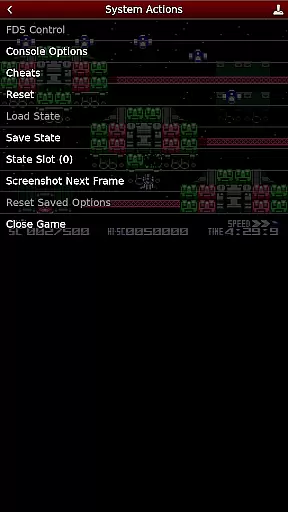
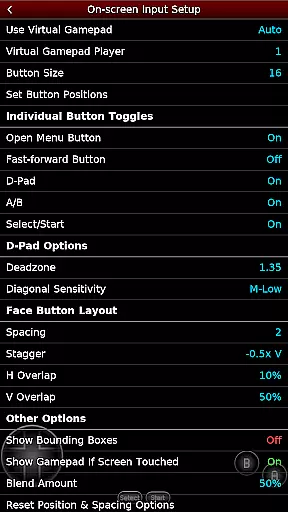
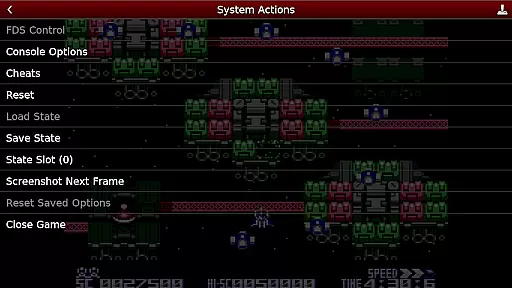
NES.emu is an advanced open-source NES emulator that brings the classic gaming experience to modern devices. Known as Famicom in Japan, this emulator focuses on delivering low audio and video latency while maintaining a minimalist user interface. It supports a wide range of devices from older models like the Xperia Play to contemporary ones such as the Nvidia Shield and Pixel phones.
With its compatibility with various file formats including .nes, .unf, and .fds, NES.emu offers users the ability to enjoy their favorite games across different platforms. The inclusion of features like VS UniSystem support and Zapper/Gun functionality enhances the interactive experience, making it a versatile choice for retro gaming enthusiasts.
This emulator is not just about playing games; it's about reliving the nostalgia with enhanced performance. Whether you're at home or on the go, NES.emu ensures that your gaming sessions are smooth and responsive, providing an authentic NES experience on your mobile device.
NES.emu stands out with its comprehensive feature set tailored for retro gaming aficionados. One of its key features is the support for multiple file formats such as .nes, .unf, and .fds, which can be optionally compressed with ZIP, RAR, or 7Z. This flexibility allows users to manage their game library efficiently without worrying about format compatibility.
The emulator also boasts Famicom Disk System emulation and VS UniSystem support, enabling unique gaming experiences like inserting coins in arcade-style games. Additionally, it provides robust controller options, including configurable on-screen controls and support for Bluetooth/USB gamepads and keyboards, ensuring that any HID device recognized by the OS can be utilized effectively.
Another notable feature is the Zapper/Gun support, where users can interact with games through touch controls. These innovations not only enhance gameplay but also offer a customizable experience that caters to individual preferences, making NES.emu a top choice for those seeking an immersive retro gaming experience.
Arcade authenticity and nostalgia are crucial elements for any emulator aiming to recreate the classic gaming experience. NES.emu, as an advanced open-source NES emulator, excels in delivering this by accurately emulating a wide range of devices from the original NES systems to Famicom and even arcade-style VS UniSystem games.
The app supports multiple file formats including .nes, .unf, and .fds, ensuring that users can enjoy a vast library of games just as they were originally released. This compatibility extends to compressed files, making it convenient for users to manage their game collections without needing to extract files manually.
One standout feature is the support for peripherals like Zapper/Gun, which allows users to engage with light gun games through touch controls. This recreates the excitement and challenge of arcade-style shooting games right on modern devices, enhancing the nostalgic experience.
By focusing on low audio/video latency and providing a minimalist UI, NES.emu ensures that the essence of arcade gamingu2014quick reflexes and immersive gameplayu2014is preserved, offering users a genuine trip down memory lane while enjoying the advancements of contemporary technology.
Control responsiveness is a key factor in delivering an authentic and enjoyable gaming experience, especially for action-packed arcade games. NES.emu addresses this need by offering highly configurable on-screen controls that cater to different play styles and preferences.
Users can customize the layout and size of the virtual buttons, ensuring that the controls fit perfectly on their device screens. This flexibility not only enhances comfort but also improves precision during gameplay, allowing players to execute complex maneuvers effortlessly.
In addition to touch controls, NES.emu supports Bluetooth and USB gamepads, including popular models like Xbox and PS4 controllers. This compatibility with HID devices recognized by the OS ensures that players can use their preferred physical controllers, resulting in a seamless and responsive gaming experience.
By combining customizable on-screen controls with broad peripheral support, NES.emu delivers exceptional control responsiveness. This makes it possible for gamers to fully immerse themselves in their favorite NES classics, experiencing the tight feedback and intuitive controls that are essential for high-quality arcade emulation.
Low audio/video latency
Wide device compatibility
Supports multiple file formats
Customizable controls
Active development and support
No ROMs included
Requires technical knowledge
Limited user interface
Occasional crashes
Device-specific issues

Play retro games with ease – NES, SNES, PSX, PSP & more supported
 4.4
4.4
Flip the bottle! Do tricks and don't let the bottle fall!
4.50
Fruit is waiting to be sliced, ninja. Play the hit mobile game !
4.50
Mine & Craft Block Mini World! Survival Crafting and Building & Creative Online.
4.30
Cool car builder & racing simulator: make a car to win the obstacle course race!
4.60
Suck the other’s blood and be the longest surviving mosquito!
4.40
Create your restaurant story & make food on a crazy kitchen in this cooking game
4.70
Millions of crafters have smashed billions of blocks! Now you can join the fun!
4.40
Merge bowmasters to win the bow and arrow war! Play the fun archery game!
4.60
This is an emulator for a certain 64 bit console with online cloud backup.
4.80
Absorb, or be absorbed...
4.70
Catch ghosts, shoot monsters and defeat bosses in this RPG idle shooting game.
4.70
Hit as hard as you can and make the penguin learn to fly! Arcade jumping game
4.50
PC Engine/TurboGrafx-16 Emulator
4.50
Three awesome new levels for The Impossible Game.
4.30
A Ball Bouncer With Depth
4.00
This app is a very fast emulator
3.40
BallStack is a vibrant match-3 game where you stack and match colorful balls!
4.0
Infinite Arcade
4.1


User Reviews