





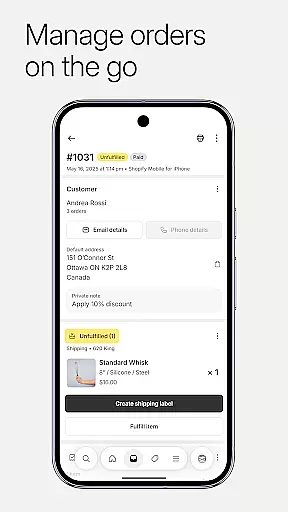


Shopify is the ultimate commerce platform for entrepreneurs, enabling businesses to sell online and in person across multiple channels. With its innovative suite of AI tools, users can start and manage their ecommerce business from anywhere without requiring coding or design skills.
The app allows merchants to process orders, track inventory, analyze sales, and launch marketing campaigns on the go. It also supports dropshipping, product management, quick order processing, real-time business insights, and powerful marketing tools that help reach customers across various platforms like Instagram, Facebook, and Messenger.
Whether you're running a local store or managing global sales, Shopify's comprehensive features ensure seamless operations and optimized performance, making it an indispensable tool for modern entrepreneurs.
Shopify offers an extensive range of features designed to streamline business operations. The app provides robust product management capabilities, allowing users to upload product photos, set pricing, organize collections, and adjust inventory by scanning barcodes.
Order processing is simplified with options to fulfill, refund, or archive orders quickly. Users can buy and print shipping labels effortlessly while tracking conversion details to enhance business efficiency. Real-time business insights enable monitoring live sales and visitor traffic, receiving instant order notifications, and communicating seamlessly with teams.
Additionally, Shopify supports multi-channel selling, integrating with social media platforms and synchronizing inventory across all channels. Its financial management tools help organize finances, apply for funding, monitor cash flow, and make secure transactions, empowering businesses to operate smoothly and efficiently.
Effective collaboration is essential for modern businesses, and Shopify excels in providing robust collaborative work features. The platform allows business owners and their teams to manage various aspects of their online store from anywhere, ensuring seamless teamwork.
Shopify's app enables real-time communication and coordination among team members. Whether it's processing orders, tracking inventory, or launching marketing campaigns, users can perform these tasks collaboratively. This ensures that every team member is on the same page, enhancing productivity and efficiency.
Moreover, Shopify offers tools for customer relationship management, allowing teams to view and manage customer segments, edit customer details, and communicate directly with customers through the app. These features ensure that customer interactions are smooth and personalized, leading to better customer satisfaction and retention.
By integrating with popular platforms like Instagram, Facebook, and Messenger, Shopify extends its collaborative capabilities even further. Teams can manage their store's presence across multiple channels, ensuring consistent and synchronized operations. This comprehensive approach to collaboration empowers businesses to operate more cohesively and effectively.
Task management is a critical component of running a successful business, and Shopify provides an array of tools to help entrepreneurs stay organized and efficient. With Shopify, users can manage their entire business on the go, streamlining various operational tasks.
The platform simplifies order processing by enabling users to fulfill, refund, or archive orders with just a few taps. Additionally, purchasing and printing shipping labels is hassle-free, allowing business owners to focus more on growth rather than logistics. These streamlined processes save time and reduce errors, contributing to a more efficient workflow.
Shopify also offers real-time business insights, empowering users to make informed decisions. By watching live sales and visitor traffic as they happen, entrepreneurs can quickly adapt their strategies to optimize performance. Instant new order notifications ensure that no sales opportunity is missed, keeping the business agile and responsive.
Furthermore, Shopify's task management extends to marketing efforts. Users can launch Google Smart Shopping campaigns and create Facebook and Instagram ads directly from the app. Tracking results and optimizing for better performance becomes straightforward, ensuring that marketing efforts yield maximum impact. Overall, Shopify's task management features provide a comprehensive solution for managing a thriving ecommerce business efficiently.
User-friendly interface
Comprehensive ecommerce solution
Multi-channel selling support
Real-time business analytics
Robust customer relationship management
Subscription fees required
Limited free themes
Transaction fees apply
Steep learning curve
Occasional app glitches

Create curriculum vitae, a professional cover letter creator and resume designer
 4.80
4.80
Earn crypto with secure cloud mining. Monitor, track & withdraw easily
4.40
Windows App allows you to connect to remote PCs and virtual apps.
3.70
The MyWalmart App is available for all associates in stores.
4.70
Finance, Investing, Stocks, Trading and Stock news
4.60
Use Generative Summary to understand your rental or insurance docs in seconds.
4.70
Delivery Track App - Tracking with Fedex, USPS, UPS, DHL. Monitor your Orders.
3.20
view, manage, and share every PDF file you have
3.60
Job search app that finds jobs for you! Takes the work out of looking for a job!
4.90
TurboScan turns your phone into a full-featured PDF document scanner.
4.80
Your employer must have UKG Ready software configured for Mobile.
4.60
Paychex Flex - Save Time and Stay Connected
4.60
Ship, Track, Find a Location or Get a Quote with UPS. Anytime. Anywhere.
4.60
One marketplace. Hundreds of services. Unlimited possibilities. All on Fiverr.
4.40
All Your Gig Work. One App.
4.30
VSD Viewer - Visio Drawings Viewer for Android Preview VSD, VDX, VSDX drawings
4.10
On the go? Take FedEx with you.
4.00
Roadie connects people with stuff to send with drivers already going that way.
3.50
Access All PDF Files
3.40


User Reviews