
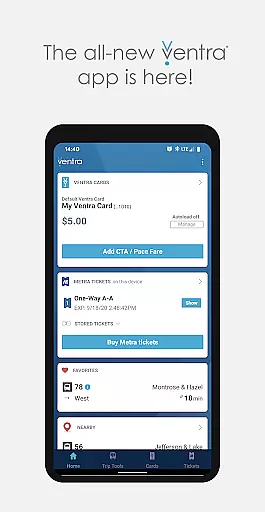
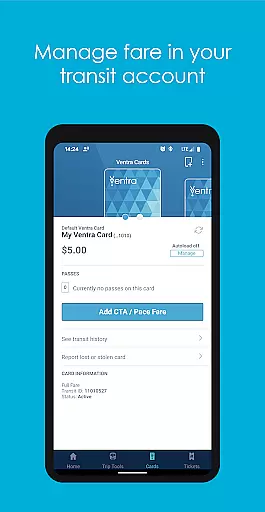
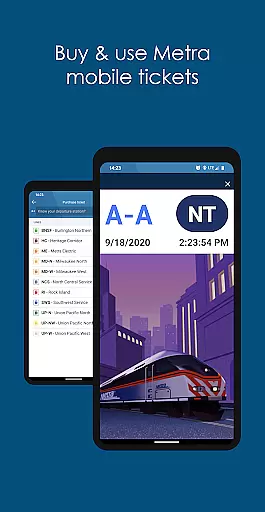
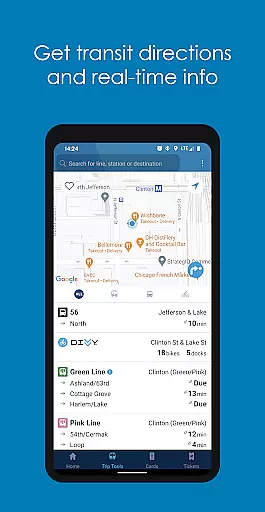
Ventra is the ultimate transit companion for navigating Chicago's public transportation system. This comprehensive app allows users to manage and pay fares across CTA, Metra, and Pace buses and trains effortlessly. With features like mobile ticketing for Metra trains, real-time account notifications, and instant loading of transit value or passes, Ventra ensures a seamless travel experience.
Whether you're commuting daily or visiting Chicago, Ventra simplifies your journey by providing essential tools such as balance checking, pass management, and real-time arrival/departure information from multiple transit services in one convenient location. Its user-friendly interface and robust functionality make it an indispensable tool for efficient urban travel.
Ventra stands out with its extensive feature set tailored for Chicago commuters. The app provides real-time account notifications, ensuring users are always informed about their fare status and can reload funds or purchase tickets before they run out. This proactive approach saves time and prevents inconvenience during travel.
Another key feature is the ability to buy and use Metra mobile tickets directly within the app. This eliminates the need for physical tickets and streamlines the process of boarding trains. Additionally, Ventra offers real-time arrival and departure information for CTA, Metra, and Pace services, allowing users to plan their routes efficiently and minimize wait times at stops.
Map accuracy is a critical feature for any navigation app, and Ventra excels in this area. The app provides real-time arrival and departure information for CTA, Metra, and Pace buses and trains, ensuring that users have the most up-to-date transit data at their fingertips.
Ventra's map accuracy is enhanced by its ability to display service information from multiple transit agencies within a single platform. This comprehensive approach allows users to plan their journeys more effectively, whether they are picking a specific stop, using favorites, or checking services near their current location.
The precision of Ventra's mapping capabilities ensures that commuters in and around Chicago can rely on the app for accurate transit details. By integrating real-time notifications, users are alerted when it's time to load more fare or purchase additional tickets, further enhancing the overall user experience.
Route planning is made simple and efficient with the Ventra app, which supports all major transit options in Chicago, including CTA, Metra, and Pace buses and trains. Users can effortlessly manage and pay their fares, making daily commutes and travel seamless.
The app offers mobile ticketing for Metra trains, allowing users to buy and use tickets directly from their smartphones. This feature streamlines the process of traveling across different transit modes, providing a cohesive and integrated route planning experience.
Ventra also enables users to check their balance, load value or passes, and switch autoload settings for transit value or passes. These functionalities contribute to a robust route planning system that helps users optimize their travel plans while ensuring they always have the necessary fare loaded on their Ventra Card.
User-friendly interface
Comprehensive transit coverage
Real-time notifications
Mobile ticketing convenience
Instant fare loading
Limited to Chicago area
Occasional bugs reported
Requires stable internet
No offline functionality
Initial setup complexity

This app is military GPS coordinate systems helper. (MGRS, UTM & DMS Maps)
 4.80
4.80
"Balad" is a map and navigator with a Persian voice assistant and a complete city guide
4.40
Find radar maps, GPS coordinates, altitude, offline maps, location, travel route
4.40
Phone Tracker and GPS Location Sharing
4.20
NJ TRANSIT information and ticketing at your fingertips
3.70
Drive safe with real-time speed camera radar, police, and traffic alerts
3.80
ParkWhiz, an Arrive Mobility brand, part of the Arrive Network
4.30
Off-Roading Navigation App With Trails, Public Lands, & Private Property Info
3.30
Get matched with a nearby driver — you’ll be on your way in minutes.
4.30
Offline maps & GPS for hiking, travel, fieldwork & outdoor adventures
4.70
Find shortest way and save energy . Distance and area calculator.
4.70
Ride or drive at YOUR price
4.70
GPX Viewer PRO shows tracks, routes and waypoints from gpx and kml files.
4.60
Navigate seamlessly with Real-Time Traffic, Offline Maps, and Voice Navigation.
4.10
Discover over 800 points of interest along the canal.
3.70
Live Satellite view app for find GPS navigation Direction and live location map
3.70
Explore Earth with live GPS, satellite view & street navigation
3.60
Offline maps for phone and smart watch: topographic maps, satellite images...
3.30
All of NHSA's trail information at your fingertips for the 2025-2026 season
4.2


User Reviews