
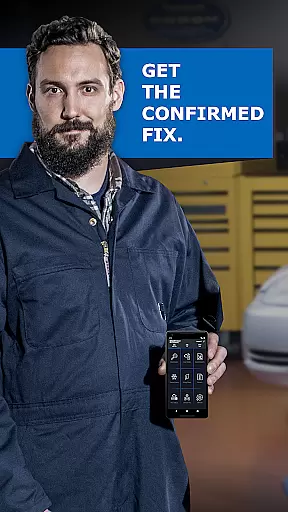
BlueDriver OBD2 Scan Tool is a professional-grade automotive diagnostic application that transforms your smartphone or tablet into an advanced scan tool. Designed for both professional mechanics and DIY enthusiasts, it pairs wirelessly with the BlueDriver Bluetooth Sensor to provide comprehensive vehicle diagnostics.
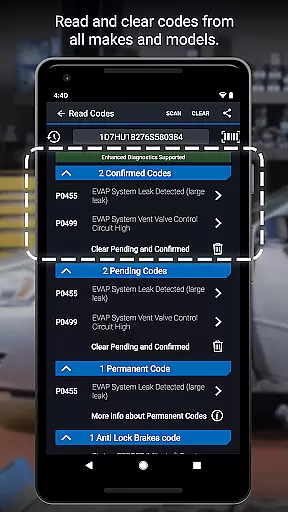
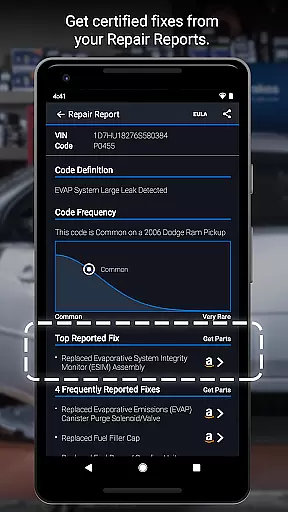
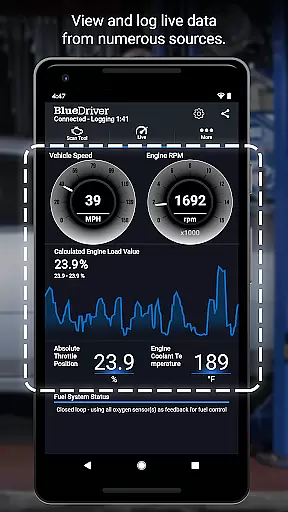
The app allows users to read and clear trouble codes across multiple systems including engine, ABS, airbag, and transmission. It also generates detailed Repair Reports specific to your vehicle's make, model, and year, helping you understand issues and make informed repair decisions. With features like Mode 6 test results, smog readiness checks, and live data graphing, BlueDriver offers a complete diagnostic solution without the need for physical cables or subscriptions.
BlueDriver stands out with its extensive diagnostic capabilities and user-friendly features. The wireless Bluetooth connection eliminates the need for cumbersome cables, providing a seamless experience when scanning vehicles. Its multi-system coverage includes check engine lights, ABS, airbag, transmission codes, and more, making it suitable for a wide range of vehicles from major manufacturers.
One of the key innovations is the ability to generate professional-grade Repair Reports based on your exact vehicle specifications and trouble codes. These reports can be saved and shared easily. The app also provides access to Mode 6 test results and freeze frame data, while the live data graphing feature lets users monitor multiple parameters in real-time. Additionally, users can preview Repair Reports by entering their VIN and trouble code, even without the sensor.
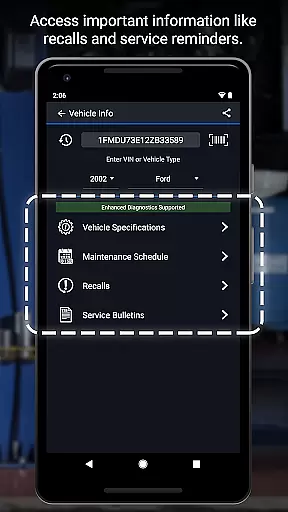
Accessing detailed vehicle information is crucial for effective diagnostics and repairs. BlueDriver OBD2 Scan Tool provides comprehensive data specific to your vehicle's make, model, and year.
The app reads and clears trouble codes from various systems including ABS, airbag, transmission, and more. It also generates professional-grade Repair Reports tailored to your exact vehicle specifications.
Users benefit from advanced features like Mode 6 on-board monitoring, smog readiness checks, and freeze frame data. These capabilities ensure mechanics and DIYers can make informed decisions based on accurate vehicle information.
With support for enhanced diagnostics across multiple brands, BlueDriver ensures users have the necessary tools to understand their vehicle's condition thoroughly.
Price transparency in automotive tools helps users understand the true cost of diagnostics and repairs. BlueDriver offers a subscription-free model, making it an affordable choice for both professional mechanics and DIY enthusiasts.
The app itself is free to install, allowing users to explore its features without any initial investment. The only required purchase is the BlueDriver Bluetooth Sensor, which is sold separately.
This straightforward pricing structure enables users to budget effectively for their diagnostic needs. There are no hidden fees or recurring costs, providing peace of mind during vehicle maintenance.
Additionally, users can preview Repair Reports by entering their VIN and trouble code, offering valuable insights before committing to sensor purchase.
Comprehensive diagnostics
User-friendly interface
No subscription fees
Wireless functionality
Detailed repair reports
Sensor sold separately
Limited to compatible devices
Requires Bluetooth connection
Some features need sensor
Not all cars supported

Monitor specific TOYOTA parameters by adding this plugin to Torque Pro.
 2.00
2.00
Listings of Tesla's with FSD - Included package
4.60
* This app needs an adapter cable and a certain OBD2 adapter to work *
4.20
Oil change service & coupons for car maintenance at Valvoline Instant Oil Change
4.70
Control maps, media and messaging, with the Google Assistant while you drive
4.10
View your car’s service records and find out when maintenance is due.
4.70
Instantly redesign your car with AI. From sporty to futuristic, try it all.
4.50
Marathon ARCO Rewards members earn rewards & apply the rewards for fuel savings!
4.80
A smarter way to park and reserve your spot ahead of time.
4.40
Practice the drills within MotoJitsu Master Riding Program Volume 1 & 2!
4.80
Buy and sell your boat
4.70
MySubaru: Download. Connect. Love.
4.70
DMV Test Pro offers all the updated FREE DMV tests online.
4.60
By enthusiasts, for enthusiasts
4.00
Blink Charging Mobile app makes finding an EV charger an intuitive experience.
3.80
Read and delete OBD codes with any ELM327 OBD scanner. Coding functions included
3.40
Better fuel to help keep you on the road
3.20
Earn and save with Fuel Rewards®
3.20
Easily notify car owners in urgent situations, safe, fast, multilingual.
4.0


User Reviews