
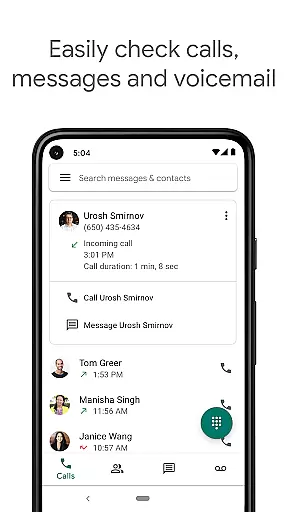
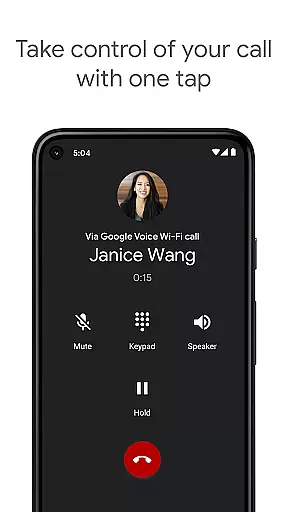
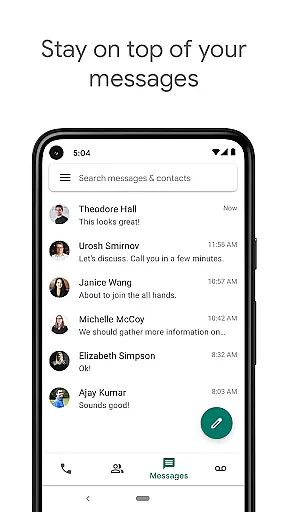
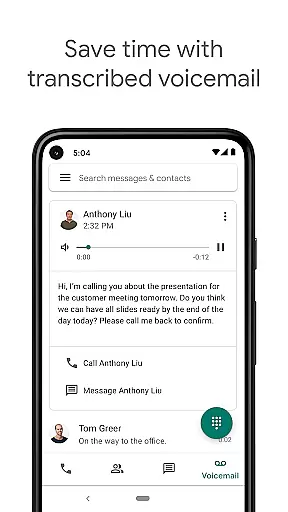
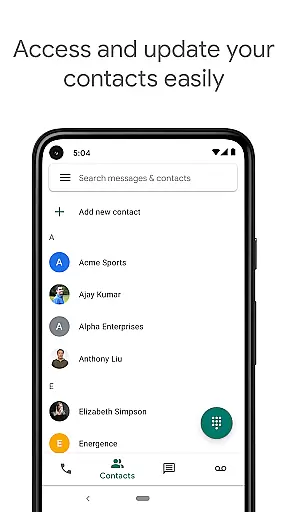
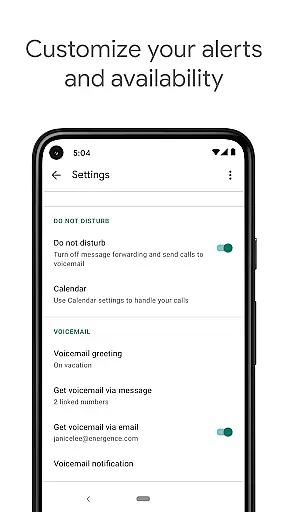
Google Voice is a communication app that provides users with a dedicated phone number for calling, text messaging, and voicemail services. The app seamlessly syncs across multiple devices including smartphones and computers, allowing users to stay connected regardless of location. With features like spam filtering, personalized call settings, and voicemail transcription, it offers a comprehensive communication solution.
The app's standout feature is its ability to store and back up all calls, messages, and voicemails, making them easily searchable. This ensures users never lose important information and can access their communication history at any time. Additionally, Google Voice supports sending and receiving SMS messages from all linked devices, providing flexibility and convenience for both personal and professional use.
For individuals who make international calls, Google Voice offers competitive rates, helping users save on expensive international calling fees. While primarily available in the US, the app does support select international markets through Google Workspace accounts. Whether you're at home, in the office, or traveling, Google Voice keeps you connected with its robust set of features designed to enhance your communication experience.
Google Voice stands out with its advanced communication capabilities tailored for both personal and business use. One of its key features is automatic spam filtering and the ability to block unwanted numbers, ensuring users only receive calls and messages from contacts they care about. Personalized settings allow users to manage how calls, texts, and voicemails are forwarded, giving them complete control over their communication preferences.
Another significant feature is the app's ability to transcribe voicemails. Users can read their voicemail messages directly within the app or have them sent to their email, making it easier to stay informed without needing to listen to lengthy audio recordings. Additionally, Google Voice stores all communication data, including calls, texts, and voicemails, in a secure and searchable format, ensuring users can easily retrieve past conversations.
Google Voice also excels in cross-device functionality, enabling users to send and receive individual and group SMS messages from any of their linked devices. This feature is particularly useful for those who switch between smartphones, tablets, and computers throughout the day. Moreover, the app offers cost-effective international calling rates, allowing users to make international calls without worrying about excessive charges from their mobile carriers.
Real-time messaging speed and reliability are crucial for seamless communication in any messaging app. Google Voice ensures that messages are delivered instantly across all your devices, whether you're using a smartphone, tablet, or computer.
The app leverages Google's robust infrastructure to maintain high-speed message delivery even during peak usage times. This means you can send and receive individual and group SMS messages without worrying about delays or interruptions.
For users, this translates into efficient communication, allowing them to stay connected with friends, family, and colleagues without missing a beat. The reliability of message delivery also ensures that important information is conveyed promptly, enhancing productivity and personal interactions.
Moreover, the synchronization across devices means you can start a conversation on one device and seamlessly continue it on another, providing flexibility and convenience in managing communications.
Media sharing support is an essential feature for modern communication apps, enabling users to share photos, videos, and other files effortlessly. Google Voice allows users to send and receive various media formats, enriching the communication experience beyond plain text messages.
The app supports common file types, ensuring compatibility and ease of use when sharing media. Whether you need to send a quick snapshot or a detailed video, Google Voice handles these tasks smoothly, integrating media sharing into the messaging interface.
This functionality benefits users by making conversations more engaging and expressive. Visual content often conveys emotions and information more effectively than text alone, leading to richer interactions and better understanding among participants.
In addition, the ability to share media across synchronized devices ensures that users have access to their shared content wherever they go, further enhancing the flexibility and utility of the app in both personal and professional contexts.
User-friendly interface
Voicemail transcription
Spam filtering
Cross-device syncing
Cost-effective international calls
Limited international availability
No MMS support
Dependent on internet connection
Occasional transcription errors
Restricted to select Google Workspace markets

Adblock & VPN Browser: Blocks banners, pop-ups and video ads, fast downloader!
 4.60
4.60
Enjoy secure messaging & calling. Safe Messenger: group chats, calls, messages.
4.20
Block spam calls & scam - no more annoying calls with the call blocker function
4.30
Welcome to the future of phone service.
4.60
RemoteHams.com Android RCForb Client Pre-Release
4.30
TeamSpeak - Secure Chat for Gaming & Business
3.10
Threema is the messenger with the most consistent focus on security and privacy.
4.00
SMS Messenger is a lightning-fast messaging app.
4.20
BE PRIVATE
Anonymous. No Trace. Fast.
4.20
We’re taking the yada yada out of wireless—now we’ve taken it out of your app.
4.70
Save 10% automatically on your first international mobile top up.
4.60
Smart and simple anti-wiring application - IMSI-catchers catcher
4.40
Manage your data, talk & text - affordable phone plans & data usage made simple
4.30
Simplify texting with Messages SMS, offline messaging, themes & smart tools!
4.30
HD Video Meeting app is a fast & unlimited video conferencing app across world.
4.30
Messages is Private SMS Messenger 2023 with text message, instant messaging.
4.00
This app enables the phone to receive and send FT8 traffic!
3.80
Secure Messaging App to Enhance Messenger Texting Experience and Organize SMS.
3.50
Fast, Simple And Secure Application That Provides SMBv3 Server On Your Device
3.30


User Reviews