
Lithium Pro is a premium upgrade for the Lithium app, designed to enhance your reading experience. This app unlocks advanced features in the free version when installed alongside it. Key functionalities include Google Drive sync for data backup across devices, custom themes for personalized display settings, and extended highlight colors for better content organization.
The app is particularly useful for avid readers who want to maintain consistency in their reading environment across multiple devices. By upgrading to Lithium Pro, users can enjoy a more customized and seamless reading experience, ensuring their preferences are preserved and their libraries are always up-to-date.
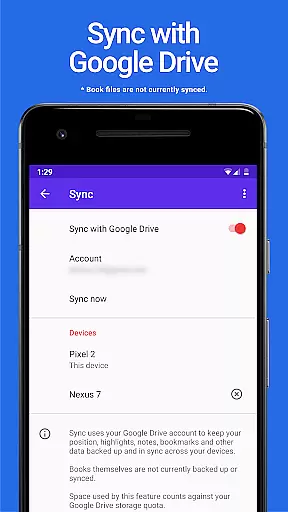
Lithium Pro offers several distinctive features that set it apart from standard reading apps. The most notable is its synchronization capability through Google Drive, allowing users to keep their reading progress and notes consistently updated across all devices. While book files themselves aren't synced, this feature ensures that important metadata and user-generated content remain accessible.
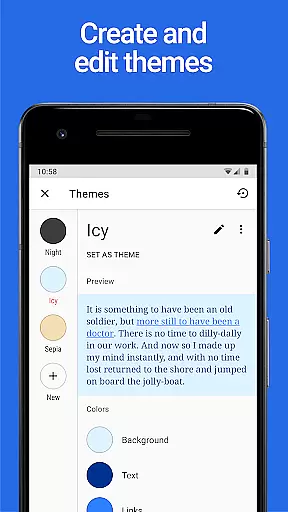
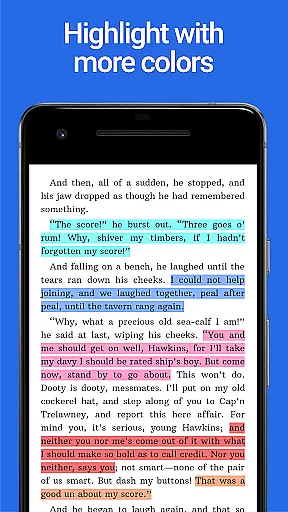
Another standout feature is the custom themes functionality. Users can personalize their reading interface by adjusting background colors, text colors, and link colors. This level of customization helps create an optimal reading environment tailored to individual preferences. Additionally, the app provides more highlight color options, enabling better organization and categorization of important text passages.
When it comes to e-books, the size of the library and the authenticity of copyrights are crucial factors for any avid reader. Lithium Pro ensures that users have access to a vast collection of e-books, all verified for copyright authenticity. This provides peace of mind, knowing that your reading materials are legally obtained and supports the authors and publishers who create quality content.
The app leverages Google Drive to keep your data backed up and in sync across multiple devices, ensuring that your library is always up-to-date and accessible wherever you are. Although book files themselves aren't currently included in backups or syncs, the convenience of having your settings and other data synchronized can't be overstated.
By upgrading to Lithium Pro, users gain access to an extensive library with assurance of copyright compliance, enhancing their reading experience while supporting the ecosystem of writers and creators.
Format compatibility is essential for readers who switch between devices or prefer flexibility in how they consume content. Lithium Pro excels in this area by offering support for various e-book formats, making it easy for users to read regardless of file type. Whether you're dealing with EPUB, PDF, or other popular formats, this app ensures that your books open seamlessly and look great on any device.
In addition to its broad format support, Lithium Pro allows users to customize their reading experience through advanced theme options. After upgrading, tap the three-dots under Theme in display settings to access custom themes where you can adjust page background color, text color, and link colors according to your preference.
This combination of versatile format compatibility and personalized theming makes Lithium Pro a top choice for readers seeking both convenience and customization in their digital library.
Advanced sync capabilities
Highly customizable themes
Extended highlight colors
Seamless integration with free app
Regular feature updates
Requires separate free app
No book file backup
Premium price tag
Limited to Google Drive
Complex setup process

University of North Carolina Herbarium presents the flora of TN, AL, & MS.
 4.2
4.2
Read the KJV Bible with Strong’s offline: reading plans, audio Bibles, and more.
4.70
Read the romance stories on the go. Take my breath away, The Spoiled Girl
4.30
8 Dr. Seuss short stories in 1 app!
4.70
Discover, track, and share your reading with friends & our community of readers
4.60
Build family tree & discover DNA, family history heritage, origins and ancestors
4.60
A KJV Bible with Apocrypha and precept-based study concordance
5.00
Premium reader for ePub, PDF, and more. TTS and translation. Great on any screen
3.50
A Comprehensive Restoration of Sacred Scripture
4.50
Offline dictionary for learning Cantonese as a second language
4.90
Daily rosary and gospel reflections for catholic
4.90
The Original Tropical Freshwater Aquarium Fish And Plant Care Guide
4.80
Track your Star Wars book collection across Canon & Legends
4.80
Enjoy daily devotionals, Bible verses, audio courses, and more.
4.80
Translate into 100+ languages with the world’s most accurate AI translator.
4.70
Master AKC Rally signs with in-depth hints, diagrams, and expert guidance.
4.50
WebNovel - Read Solo Leveling novel and comic
4.10
Sea tide predictions for all coastal U.S. locations.
4.0
Fast loot guide for ARC Raiders. Simple tips, stats, maps, and item details.
4.2


User Reviews