
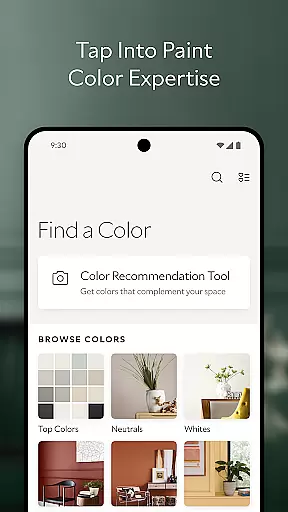
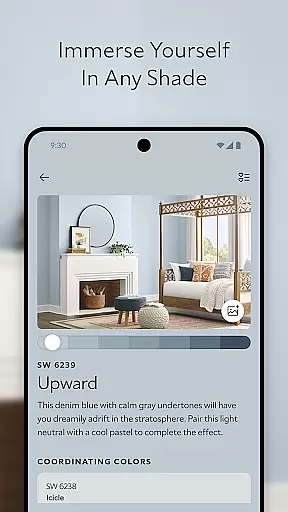
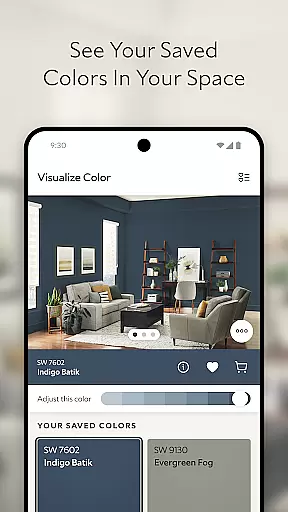
Sherwin-Williams Color Expert is a powerful home design app that helps users find the perfect paint color for their spaces. The app offers advanced tools like the Color Visualizer, which allows users to instantly see how different colors will look in their home by uploading photos. This feature eliminates guesswork and provides confidence when selecting paint shades.
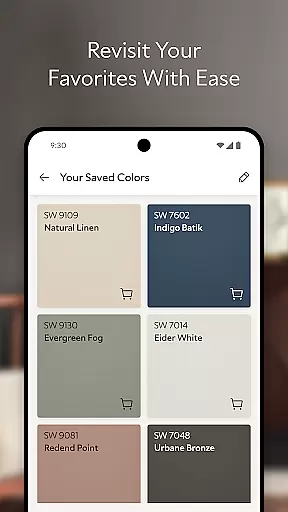
Another standout tool is the Personal Color Recommendation feature. By analyzing photos of your space, the app suggests complementary colors tailored to your home's unique aesthetic. Users can also save favorite colors, order physical samples, and explore Sherwin-Williams' extensive color collections. Whether planning a full renovation or a simple refresh, this app makes the process seamless and inspiring.
The Sherwin-Williams Color Expert app boasts several innovative features designed to simplify home color selection. Its Color Visualizer lets users upload images of their rooms and apply any Sherwin-Williams paint shade virtually. This interactive tool ensures users can experiment with various hues without committing to a purchase, making it ideal for those who want precision in their design choices.
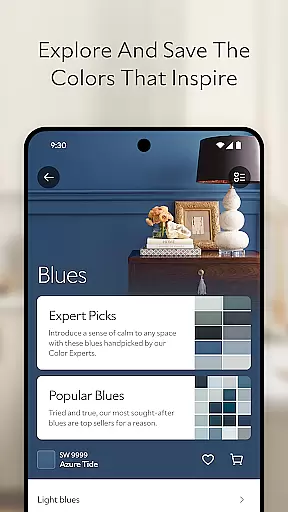
In addition to visualization, the app includes a Personal Color Recommendation tool. This intelligent feature analyzes user-uploaded photos and recommends colors that harmonize with existing decor. For planning purposes, users can save their favorite shades and order physical samples directly through the app. With an extensive library organized by color families, collections, and trends, the app caters to both novice decorators and seasoned designers seeking inspiration.
When it comes to home improvement and design, having authentic and reliable information is crucial. The Sherwin-Williams Color Expert app ensures property listing authenticity by providing users with genuine color options directly from the Sherwin-Williamsu00ae palette. This guarantees that every color choice you make is backed by a reputable brand known for quality and consistency.
The app's extensive collection of colors is meticulously curated, ensuring that each shade is represented accurately. By leveraging advanced technology, the app allows users to visualize these authentic colors in their own spaces through the COLOR VISUALIZER feature. This tool eliminates guesswork, letting you see exactly how different hues will appear in your home environment.
Moreover, the PERSONAL COLOR RECOMMENDATION TOOL analyzes your space and suggests complementary colors that are not only aesthetically pleasing but also aligned with current trends and expert recommendations. This personalized approach ensures that the colors you choose are both fashionable and suited to your unique interior design needs.
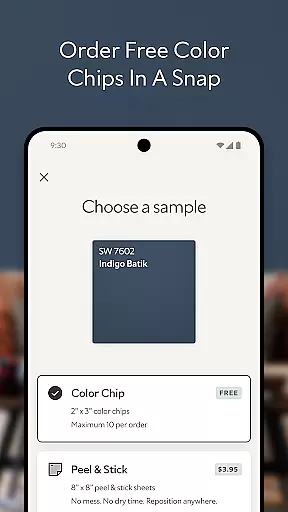
By offering physical color chips and peel & sticks for purchase, the app further reinforces its commitment to authenticity. These tangible samples allow you to experience how a color will look under your homeu2019s specific lighting conditions before making a final decision, ensuring complete satisfaction with your paint choices.
Effective home management involves careful planning and organization, especially when undertaking renovation projects. The Sherwin-Williams Color Expert app excels in this area by providing robust SAVE & PLAN functionalities. Once you find a color that resonates with your vision, you can easily save it within the app for future reference or order samples directly, streamlining your decision-making process.
In addition to saving favorite colors, the app offers an intuitive platform for exploring new possibilities. The EXPLORE & DISCOVER feature allows users to browse through various collections, trends, and color families. This comprehensive library empowers homeowners to experiment with different aesthetics, helping them refine their preferences and ultimately settle on the perfect shade for their project.
For those who appreciate convenience, the ability to order physical color chips and peel & sticks directly from the app is invaluable. These tools enable users to test colors in their actual living spaces without committing fully, thus enhancing confidence in their selections. Such practical solutions significantly simplify home management tasks related to painting and decorating.
Overall, the Sherwin-Williams Color Expert app transforms traditional home management practices by integrating digital innovation with real-world application. Its user-friendly interface and sophisticated features ensure that every step of your color journeyu2014from inspiration to executionu2014is seamless, efficient, and enjoyable.
User-friendly interface
Accurate color matching
Wide color selection
Personalized recommendations
Convenient sample ordering
Limited to Sherwin-Williams colors
Requires good lighting for photos
Premium features may cost extra
Occasional app performance issues
Physical samples require shipping time

Unlock AI-based barcode scanning and support the development of Grocy Android
 4.4
4.4
Find paints using a Color Muse & ColorSnap® Match
3.60
AI-powered home design, interior design, home decor, and room design solutions
4.50
Fully control your Philips TV with this all-in-one remote control app.
4.20
Resident Center, powered by Buildium, is designed with simplicity in mind.
4.50
Schlage Lock Company LLC
4.00
Your guide to apartments & rental homes. Find your next place to rent with AG.
4.60
Find contractors for all home renovation projects. Remodeling, repair, and more.
4.20
Security App with HD Video, 2-way Audio, and event detection for Home monitoring
4.40
Connect with reliable pros for maintenance services, plumbing, and home design!
4.80
Find homes for sale and apartments for rent in the best neighborhood.
4.70
Map-based search app for apartments and homes for rent.
4.60
Looking for the perfect apartment finder app? Find beautiful rental homes here!
4.60
WiZ smart light system
4.40
Samsung remote app helps control all Samsung Smartthings TVs. Fast and Stable!
4.10
Book your local plumber 24/7, track your service order & get exclusive coupons
4.00
Our app allows Sunrun customers to monitor systems, pay bills, and get support.
3.80
Calculate baluster spacing with ease and precision.
4.0
Universal TV Remote for TV, control all Smart TVs with your mobile phone.
4.1


User Reviews