
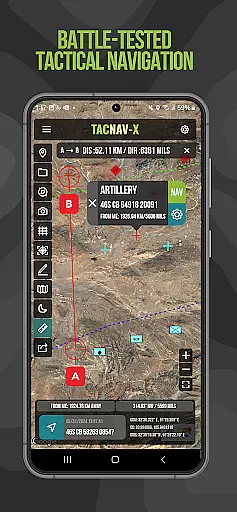
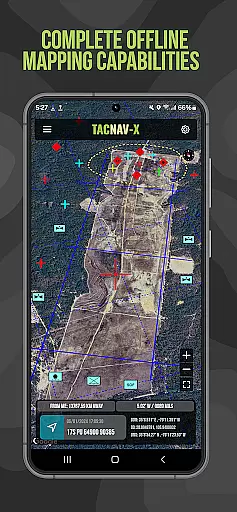
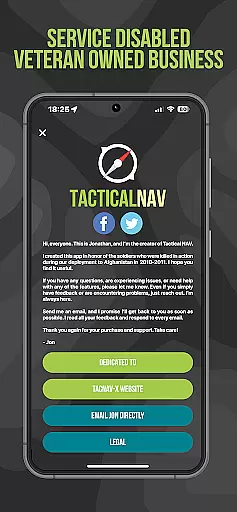
Tactical NAV is a specialized navigation app designed for military use, particularly by soldiers in the field. Developed during a combat deployment in Afghanistan, this app focuses on providing highly accurate MGRS-based navigation capabilities tailored to U.S. military operations. Its core function is to enhance mission success and soldier safety through precise mapping and targeting tools.
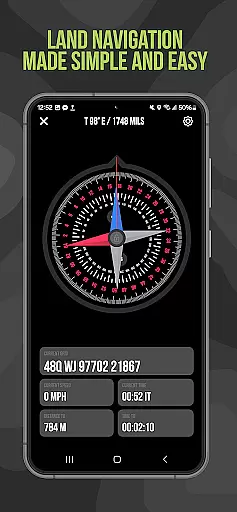
The app offers offline mapping functionality, ensuring operational security by not emitting cellular signals. It supports multiple coordinate systems including WGS-84, MGRS, UTM, BNG, and USNG. Key features include tactical drawing mode for mission planning, waypoint plotting with military graphics, and a 'Compass FastLock' function for capturing quick azimuths. These capabilities make Tactical NAV an essential tool for military personnel operating in austere environments.
While not officially endorsed by the Department of Defense, Tactical NAV has been evaluated against military-grade systems like Nett Warrior and ATAK, demonstrating accuracy within 1mm of these approved platforms. The app serves both training and combat scenarios, helping service members maintain situational awareness and execute missions effectively.
Tactical NAV distinguishes itself through its comprehensive set of military-grade features. The app's cornerstone is its TACNAV-X platform, which matches the performance of the AN/PSN-13 Defense Advanced GPS Receiver (DAGR). This level of accuracy makes it suitable for professional military applications while maintaining civilian accessibility.
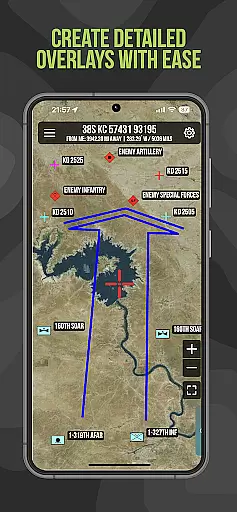
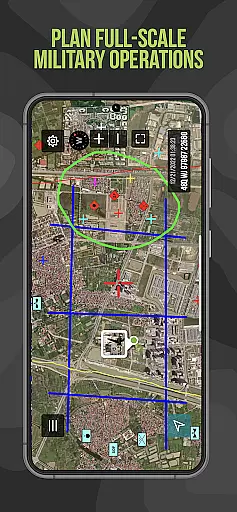
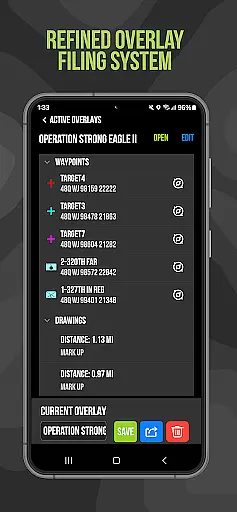
Among its notable capabilities are offline mapping functions that allow complete usage without emitting cellular signals - crucial for operational security. The tactical drawing mode enables users to create mission overlays and plan operations effectively. Waypoint plotting follows military standards (FM 1-02.2), and the unique 'Go to Grid' feature facilitates precision planning.
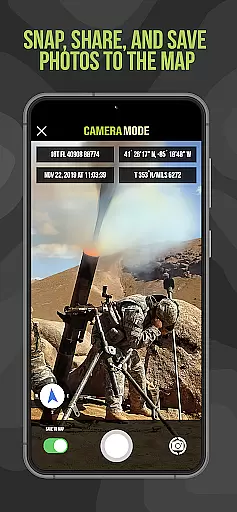
Additional innovative features include photo integration onto maps for enhanced situational awareness, location sharing via email and text, and a 'Compass FastLock' function for rapid azimuth capture. These tools collectively provide military personnel with a powerful mobile navigation platform that supports both training exercises and real-world operations.
Map accuracy is a critical feature for any navigation application, especially one designed for military use like Tactical NAV. This app offers precision targeting and mapping capabilities that are essential in austere and contested environments where every millimeter counts.
Tactical NAV's performance matches that of the AN/PSN-13 Defense Advanced GPS Receiver (DAGR), ensuring users can rely on its accuracy within 1mm of officially approved systems issued by the DoD. The app supports WGS-84 standard coordinates including MGRS, UTM, BNG, and USNG, which are crucial for military operations.
For soldiers in the field, this level of map accuracy means enhanced situational awareness and mission success. With offline mapping capabilities, users can operate without emitting a cellular signal, maintaining stealth while having access to precise location data.
The importance of such accurate mapping cannot be overstated when it comes to planning missions or executing them with precision. Tactical NAV empowers service members with reliable navigational support, enabling them to operate effectively in both training and combat scenarios.
Route planning is an essential component of Tactical NAV, providing military personnel with the tools needed for effective mission planning and execution. This feature allows users to plot waypoints using military graphics as per FM 1-02.2 standards, ensuring compatibility with existing military protocols.
With tactical drawing mode available as an in-app purchase, service members can create overlays and plan routes with precision. The 'Go to Grid' feature further enhances this capability by allowing detailed planning, drawing of overlays, and dropping waypoints at exact locations.
The compass 'FastLock' function captures quick and precise azimuths, aiding in accurate route determination. Snap and save photographs onto the main map increase situational awareness, while location, waypoint, and photo-sharing capabilities via email and text ensure seamless communication among team members.
Overall, these route planning features provide a powerful mobile navigation platform tailored for individual soldiers. By supporting both training exercises and real-world operations, Tactical NAV helps service members accomplish their missions efficiently and safely.
Highly accurate navigation
Offline mapping capability
Military-grade features
Regular updates
Veteran support initiative
No official DoD endorsement
Limited civilian use
Subscription required
Complex interface
Specialized market

Explore the world with Live Satellite View, 3D Maps, GPS Navigation & Earth Map.
 2.90
2.90
This app is military GPS coordinate systems helper. (MGRS, UTM & DMS Maps)
4.80
Airport parking, with airport shuttle (TPS shuttle), reservations, and Spot Club
4.80
Number locator, real connection map
4.10
Order a cab online. An affordable taxi ride and driver in no time. What a bolt!
4.80
Ride CTA, Metra & Pace: Manage your fares, buy Metra tickets, get arrivals.
3.00
Affordable rides and food delivery with incredible discounts in just one app.
4.50
Explore Live Earth Map with 3D World Map & locate cites, mountains real time.
3.80
Ride or drive at YOUR price
4.70
Offline maps & GPS for hiking, travel, fieldwork & outdoor adventures
4.70
Complete offline 1:50k South Island topo map including DOC Hunting Permit Areas
4.60
Voice GPS with driving directions, offline maps navigation GPS for safe travel
4.50
Find radar maps, GPS coordinates, altitude, offline maps, location, travel route
4.40
Use GPS maps or search by property owner, address or parcel to view parcel data
4.30
GPS phone tracker, family locator, secure location sharing app
4.20
Get directions, Maps, GPS navigation & GPS Maps using GPS App
4.10
Find routes fast with GPS Maps, GPS Navigation & driving directions.
4.10
Gas Station & Fuel Rewards Points
3.70
Explore offline maps with radar, satellite view, and real-time alerts.
3.60


User Reviews