
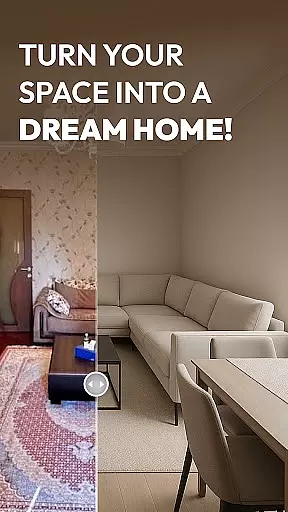
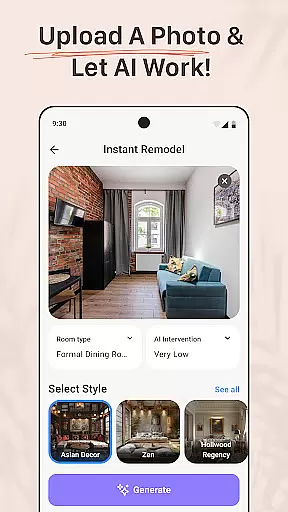
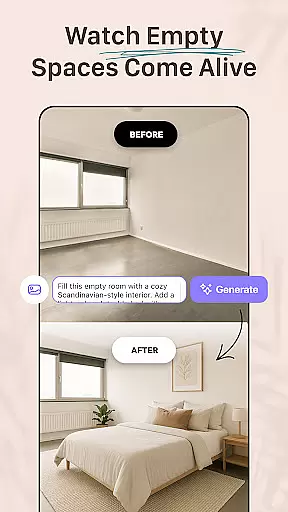
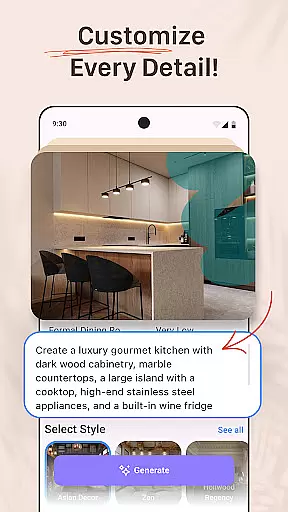


AI Remodel is a cutting-edge AI-powered home design application that enables users to plan, design, and visualize their dream spaces with professional precision. The app provides intuitive tools for creating accurate floor plans and immersive 3D renderings without requiring prior design experience. Whether remodeling a single room or redesigning an entire home, AI Remodel offers creative control over every detail, making it ideal for homeowners, renters, and professional designers alike.
One standout feature of AI Remodel is its advanced interior design AI functionality, which suggests layouts, color palettes, furniture arrangements, and material combinations tailored to user preferences. By integrating powerful room planner 3D tools and seamless compatibility with Planner 5D, the app ensures precision and flexibility in design projects. This makes it easy to experiment with styles, preview changes, and confidently execute renovation plans.
For users undertaking home renovations, AI Remodel transforms ideas into polished designs ready for implementation. Its ability to simulate real-world measurements and provide high-resolution export options adds immense practical value. Whether you're a DIY enthusiast testing layout concepts or a professional presenting ideas to clients, this app streamlines the process while fostering creativity through innovative AI-driven solutions.
AI Remodel stands out with its robust set of features designed to simplify and enhance home renovation projects. At its core, the app leverages advanced AI algorithms to guide users through every stage of design. From suggesting optimal furniture placements to recommending cohesive color schemes, the app ensures that even novice users can achieve professional-grade results. These AI-driven suggestions are customizable, empowering users to refine their vision effortlessly.
The interactive room planner 3D tool is another highlight, offering a fully responsive environment where users can drag, drop, and rotate elements such as furniture, decor, and fixtures. This hands-on approach allows for real-time visualization of changes, ensuring accuracy before any physical work begins. Additionally, the app's integration with Planner 5D enhances workflow efficiency by enabling precise scaling, real-time measurements, and high-resolution exports, all within an intuitive interface.
AI Remodel also supports creative experimentation by providing curated style templates and generating unique combinations based on user input. Whether exploring minimalism, bohemian aesthetics, or mid-century modern designs, users have the freedom to mix and match styles. With smart layout tools, including custom floor plan creation and material testing, the app caters to both small-scale updates and comprehensive remodels, delivering a versatile solution for all design needs.
In the realm of home design and renovation, having accurate and trustworthy property information is crucial. AI Remodel ensures that every design or remodel project starts with authentic and verified details. This commitment to accuracy begins at the foundation of any project, ensuring users have a reliable canvas to work on.
AI Remodel employs advanced verification mechanisms that scrutinize every uploaded photo or design input. By doing so, it guarantees that the digital representations match their real-world counterparts. This meticulous attention to detail provides peace of mind for users who rely on precise data to make informed design decisions.
The app's frequent updates and comprehensive checks further enhance the reliability of its property listings. Users can embark on their creative journey confidently, knowing that the foundational elements of their designs are based on verified and current information. This feature significantly elevates the user experience by removing doubts about data integrity.
Ultimately, AI Remodel's dedication to property listing authenticity empowers homeowners, renters, and designers alike. It enables them to focus on creativity and innovation without being hindered by inaccurate or outdated property details. This solid foundation is essential for transforming ideas into tangible, stunning spaces.
Beyond design capabilities, effective home management features are vital for overseeing renovation projects. AI Remodel offers an array of tools that simplify project oversight, ensuring smooth progress from conception to completion. These features provide users with the control needed to manage complex tasks efficiently.
The app allows users to draw custom floor plans, adjust layouts, and experiment with various materials and lighting options. Such functionalities enable comprehensive project visualization and planning. With these tools at their disposal, users can anticipate potential challenges and devise solutions in a virtual setting before implementing them in reality.
Additionally, AI Remodel supports seamless integration with platforms like Planner 5D, enhancing its home management capabilities. This compatibility ensures that all design modifications are accurately reflected across different tools, maintaining consistency and precision throughout the project lifecycle. The ability to sync and export high-resolution plans adds another layer of professionalism and preparedness.
By incorporating robust home management features, AI Remodel caters to both novices and professionals. Whether planning a minor update or a major overhaul, users benefit from organized, intuitive, and powerful tools that streamline the entire renovation process. This holistic approach not only simplifies project management but also amplifies the overall success of home improvement endeavors.
User-friendly interface
Advanced AI suggestions
Real-time 3D visualization
Wide range of styles
Planner 5D integration
Requires learning curve
Premium features costly
Limited offline access
Occasional glitches
Device compatibility issues

Unlock AI-based barcode scanning and support the development of Grocy Android
 4.5
4.5
PRO Version of GLB AR Viewer
4.3
Tailored Care Guides For Houseplants, Indoor Plants, Garden Plants & Flowers.
4.60
Calculate baluster spacing with ease and precision.
4.3
Our app allows Sunrun customers to monitor systems, pay bills, and get support.
3.80
Design your dream home with 3D planning app, Visualize your dream home in 3D.
4.20
Security App with HD Video, 2-way Audio, and event detection for Home monitoring
4.40
Fire & Power Safety
4.50
WiZ smart light system
4.40
Home Ideas | Renovation Advice | Local Pros. Go From Dream to Home with Houzz.
4.70
Download today to join the community to help bring lost pets home faster.
4.70
Convert your Phone to HiSense Smart TV Remote Control
4.70
Night Owl Protect helps you secure, protect, and connect your world!
4.60
Looking for the perfect apartment finder app? Find beautiful rental homes here!
4.60
The only mappable smart lights for custom decoration.
4.50
Set up your devices, customize settings, and monitor your home—from anywhere
4.40
Find contractors for all home renovation projects. Remodeling, repair, and more.
4.20
Draw your floor plan smartly. Make house design blueprint with home planner app
3.60
Find paints using a Color Muse & ColorSnap® Match
3.60


User Reviews