
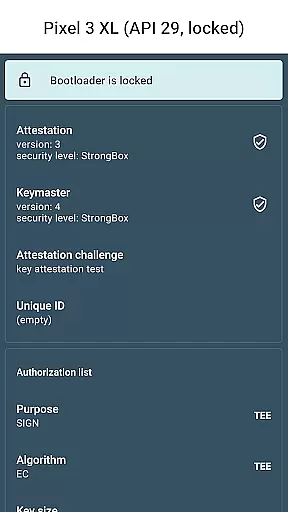
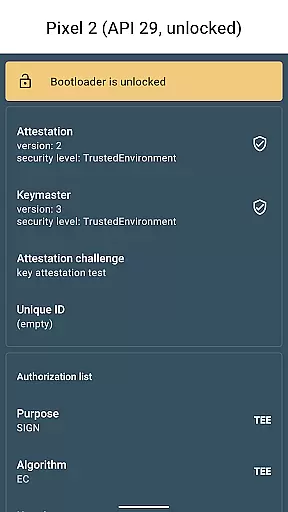
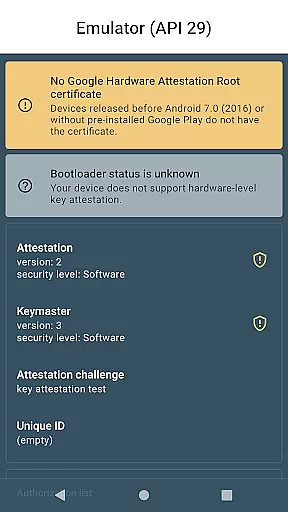
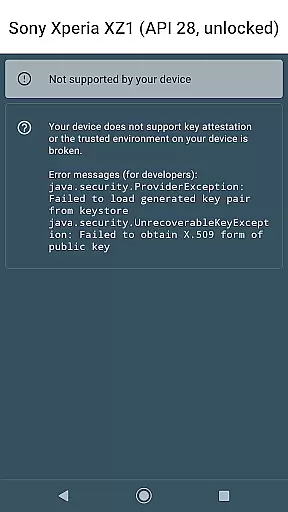
Key Attestation Demo is a specialized application designed for developers and power users who require advanced security features. This app allows users to verify the authenticity of cryptographic keys on Android devices, ensuring that the keys are stored in a secure hardware environment.
The app provides detailed documentation and source code access, making it an essential tool for those working with Android's security infrastructure. By leveraging Key Attestation, developers can enhance the security of their applications and protect sensitive data from unauthorized access.
One of the main features of Key Attestation Demo is its ability to provide comprehensive details about the cryptographic keys stored on an Android device. Users can view key properties, attestations, and hardware security levels directly within the app.
In addition to key verification, the app offers easy access to important documentation and resources. Developers can refer to official Android guides and explore the source code on GitHub, facilitating better integration of key attestation functionalities into their projects.
This app also supports transparency and trust by enabling users to validate the integrity of their device's security implementations. Such capabilities are crucial for building secure mobile applications in various industries.
Functionality completeness refers to the extent to which an application provides features that meet user needs and expectations. For Key Attestation Demo, this is particularly important as it targets developers and power users who require robust security features. The app offers key attestation capabilities, allowing users to verify the authenticity of cryptographic keys on Android devices.
The app's functionality is designed to support advanced use cases in security. By integrating with Android's Keystore system, it ensures that cryptographic keys are securely stored and managed. This feature is crucial for developers who need to implement secure authentication and data protection in their applications.
Users benefit from a comprehensive set of tools that cover various aspects of key attestation. The app provides detailed documentation and source code, enabling developers to understand and utilize its features effectively. This transparency not only enhances trust but also encourages community contributions and improvements.
Overall, the completeness and coverage of Key Attestation Demo's functionality make it a valuable resource for those involved in developing secure applications. Its alignment with industry standards and best practices ensures that users have access to reliable and effective security tools.
Usability and operational smoothness are critical factors that determine how easily users can interact with an application. For Key Attestation Demo, ensuring a seamless user experience is essential, especially given its technical audience. The app is designed with a straightforward interface that allows users to perform key attestation tasks without unnecessary complexity.
Operational smoothness is achieved through efficient processing and clear feedback mechanisms. When users initiate key attestation processes, the app provides real-time updates and results, helping them understand the status and outcome of their operations. This immediate feedback is vital for troubleshooting and verifying the integrity of cryptographic keys.
Additionally, the app offers extensive documentation and source code access, enhancing its usability. Developers can refer to these resources to gain insights into the app's operational mechanics and customize its functionality according to their specific requirements. Such transparency significantly reduces the learning curve and fosters a more intuitive user experience.
In summary, Key Attestation Demo excels in usability and operational smoothness by providing a clear, efficient, and well-documented environment for performing key attestation tasks. These attributes ensure that even users with limited expertise can effectively utilize the app's advanced security features.
User-friendly interface
Comprehensive key details
Access to official docs
Open-source project
Enhances app security
Limited to Android
Not for casual users
Requires technical knowledge
No iOS support
Complex setup process

Record with Double Camera Video Recording using Dual Camera Front and Back Video
 3.00
3.00
Sad ringtones full of feeling, sad music ringtones
3.90
With Endoscope Camera Connector you can connect your phone with endoscope cam
3.70
Collection of Maps and Mods for Dmod
3.30
TV USB connector app provides you a seamless cast option from your phone to tv.
4.70
Mobs maker Minecraft help MCPE creators make their own mob by using Blockbench
3.50
Experience virtual reality on your smartphone with Cardboard.
3.50
The best PS2 games from your childhood come to life in their mobile version!
4.00
Unlock the hidden menus of your phone with our mobile secret codes app.
4.20
SmartCast mirrors Android phone to TV screen With Cast Screen, Chromecast.
4.80
Tune your game graphics with our GFX optimizer for optimal gaming experience
4.50
An impressive collection of tools, characters, weapons, skins and more!
4.30
Android secret code for smart phone, mobile codes, with secret codes app
4.20
You can remote control and play much easier.
4.10
A Pydroid Quick Install repository provider.
4.00
a wireless controller that provides a seamless and gaming experience for players
3.80
Use your Phone as Drone Controller.
3.70
Ps2 plugins for 64 bit artitechture
3.70
Connect and Find your smart tag via our app.our app is compatible with smarttag.
3.30


User Reviews