
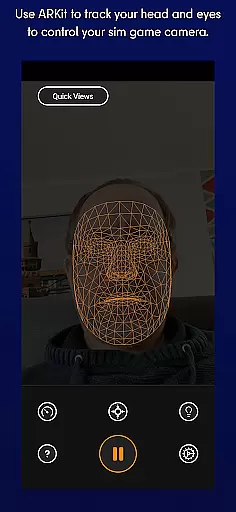
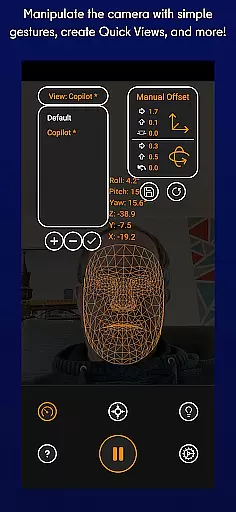
SmoothTrack is an innovative tool that transforms your mobile device into a 3D head tracking controller for sim games. By leveraging the AR capabilities of your device, it allows you to intuitively control your game's camera without any additional equipment. Simply position your device to see your face, and with slight head movements, you can manipulate the in-game perspective.
This app supports any game compatible with TrackIR, FreeTrack, or similar protocols, making it versatile for flight simulators, space exploration games, and truck simulators. Whether you want to lean forward to inspect your Flight Simulator cockpit or glance left before executing a sharp turn in Euro Truck Simulator 2, SmoothTrack delivers a seamless experience.
The app includes practical features like dark mode to conserve battery on OLED screens and bright mode for gaming in low-light environments. With its intuitive design and compatibility with numerous simulation games, SmoothTrack offers a near-magical way to enhance immersion and control in your favorite titles.
SmoothTrack stands out with its advanced AR-based head tracking technology, enabling precise camera control in simulation games. The app uses your device's front-facing camera to detect head movements, translating them into in-game perspective shifts. This creates an immersive experience where slight physical movements correspond to significant in-game actions.
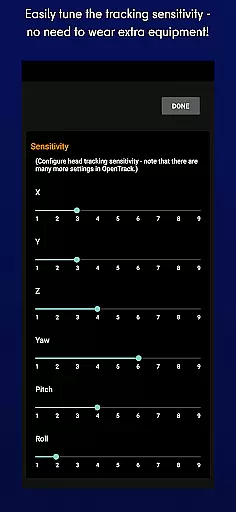
A key feature is the adjustable sensitivity settings, allowing users to customize how much their real-world movements affect the virtual environment. Additionally, SmoothTrack offers two display modes: dark mode for battery efficiency and OLED screen protection, and bright mode for optimal visibility in dimly lit rooms. The app also provides comprehensive support through Discord and email for troubleshooting and feature suggestions.
Compatibility is another major advantage, as SmoothTrack works with any game supporting FreeTrack or TrackIR protocols. This includes popular titles like Microsoft Flight Simulator, Elite: Dangerous, and Euro Truck Simulator 2. The lack of required accessories makes it an accessible solution for enhancing gameplay without extra costs or setup complexity.
SmoothTrack offers a highly accurate and effective core functionality by utilizing the AR capabilities of your device to provide 3D head tracking. This allows for intuitive control over your simulation game's camera without the need for any additional equipment.
The app supports any game compatible with TrackIR, magnifying your slight head movements to seamlessly shift perspective in-game. Whether you're flying a plane in Microsoft Flight Simulator or maneuvering through space in Elite: Dangerous, SmoothTrack ensures that every movement is precisely mirrored within the virtual environment.
Users benefit from enhanced immersion as they can lean forward to inspect their cockpit closely or glance sideways at an overhead panel simply by moving their heads slightly. The responsiveness of this feature creates a near-magical experience where real-world actions translate directly into dynamic changes on screen.
This level of precision not only elevates gameplay but also provides practical advantages such as improved situational awareness during complex maneuversu2014all achieved through natural body motion rather than traditional input methods.
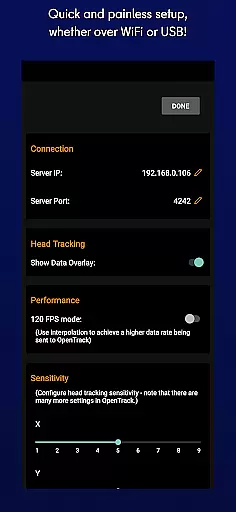
The interface design of SmoothTrack prioritizes simplicity and intuitiveness, ensuring users can easily set up and start using the application without hassle. By requiring just a device capable of installing Google AR services, it removes barriers to entry typically associated with advanced gaming peripherals.
Setup involves positioning your device so its camera can see your faceu2014no extra hardware like headsets needed. Simple camera gestures then allow you to manipulate your in-game perspective effortlessly. This straightforward approach makes adopting head-tracking technology accessible even for those unfamiliar with similar systems.
Bright mode caters to dark room play while dark mode conserves battery life and protects OLED screens when playing under brighter conditions. These thoughtful additions demonstrate how user-centric design enhances overall satisfaction without complicating usage.
With dedicated support available via Discord and email, addressing potential issues or exploring new features becomes equally uncomplicated, reinforcing SmoothTracku2019s commitment towards delivering both powerful functionality alongside ease-of-use.
Intuitive head tracking
No extra equipment needed
Wide game compatibility
Battery-saving dark mode
Responsive customer support
Requires AR capable device
Dependent on stable lighting
Limited to supported games
May cause motion sickness
Initial setup can be tricky

Change your GPS location instantly. Simulate routes anywhere in the world.
 4.90
4.90
Extremely fast, secure, and protects your privacy
4.80
Clean the junk files on your device
3.40
eXtended Permission Manager - a small app to manage permissions and AppOps
4.50
Fast Video Downloader, Movie Downloader, Torrent Downloader & Adblock Browser
4.70
Connect wirelessly to your computer to watch movies, browse the web, play games
5.00
Mobile Security with Scam Protection | Malware & Virus Cleaner | Safe Browser
4.70
A clean app.
4.50
Fast VPN USA for any country. Super secure VPN for calls, streaming, games, TV.
4.40
Enjoy smooth gameplay with Game Booster
4.90
The Ultimate Flex Drivers Utility App - Convenient Tapping & Block Filters
4.70
App to pay for FUTO Keyboard
4.60
Complete kernel toolbox with features to manage and tweak your rooted device
4.30
PC precision for mobile gaming: dominate with keyboard and mouse!
4.30
VESC Tool can monitor and configure VESC-compatible devices over BLE and Wifi
4.20
MS-DOS in your pocket. Play old DOS games anywhere you are ;)
4.10
Family Locator, Share location, StayConnect with your family in real time
3.90
A powerful, easy-to-use flight computer on your phone or tablet!
3.80
Smart and comfortable browsing experience.
3.80


User Reviews