
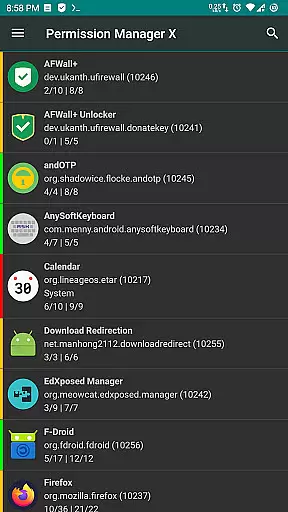
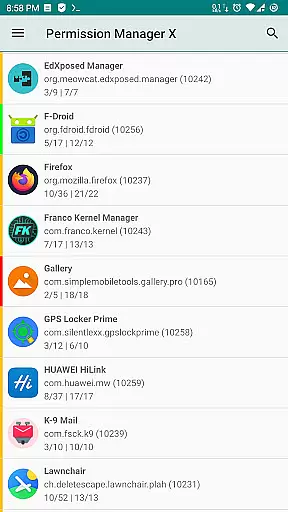
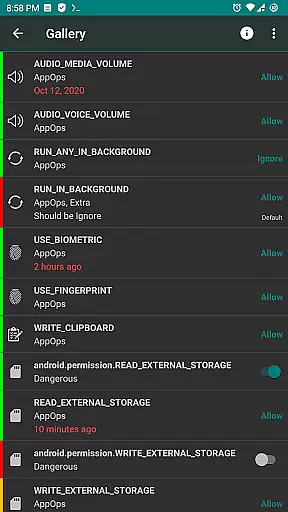
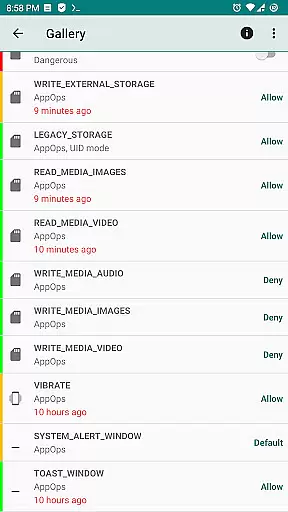
Permission Manager X is a powerful tool designed to give users complete control over app permissions on their Android devices. It allows you to manage both manifest permissions and AppOps, providing fine-grained access control for each installed application. With this app, you can view, grant, or revoke permissions, set reference values, and review permission states with ease.
The app is particularly useful for maintaining privacy and optimizing device performance. Whether you want to prevent apps from running in the background, accessing your location, or using your camera, Permission Manager X offers the tools you need. Its intuitive interface and advanced features make it an essential utility for privacy-conscious users.
Permission Manager X stands out with its comprehensive feature set tailored for advanced permission management. The app allows simultaneous control of manifest permissions and AppOps, showing how they relate to each other. This dual control becomes increasingly important with every new Android release, as the two permission systems become more interdependent.
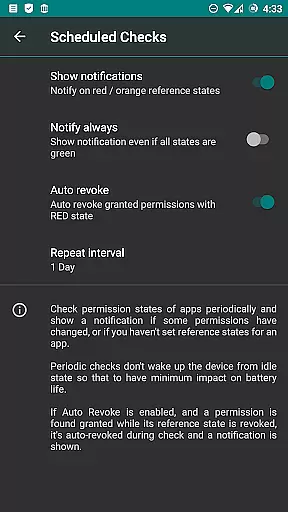
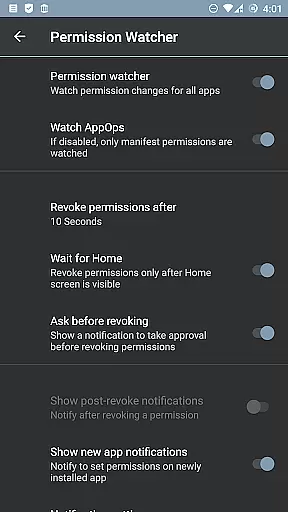
Among its standout capabilities are batch operations, scheduled permission checks, and the Permission Watcher feature that removes unwanted permissions automatically. Additionally, the app supports multi-user profiles, theming options, and auto-backup functionality. These features ensure that power users have all the tools needed to maintain optimal privacy and security settings.
For rooted devices or those with ADB network enabled, the app provides even deeper control, allowing changes to critical system apps and permissions. This makes Permission Manager X an invaluable tool for users who demand maximum control over their device's security posture.
Permission Manager X offers a comprehensive suite of tools for managing app permissions on Android devices. The core functionality revolves around granting or revoking manifest permissions and controlling AppOps settings, which are essential for maintaining privacy and security.
The application allows users to view and modify both manifest permissions like Storage and Camera, as well as AppOps permissions that provide granular control over background execution, clipboard access, and more. This dual-layer approach ensures that users have precise control over what each installed app can do on their device.
By setting reference states for permissions, users can easily back up and restore these settings, even after reinstalling apps or changing devices. This feature significantly reduces the time required to review and adjust permissions, making it an invaluable tool for those who prioritize privacy and control.
With its intuitive interface and robust capabilities, Permission Manager X empowers users to manage their app permissions effectively, ensuring that only necessary permissions are granted, thus enhancing overall device security and user privacy.
One of the standout features of Permission Manager X is its user-friendly interface, designed to simplify the complex task of permission management. The app consolidates all essential functions onto a single screen, allowing users to view, grant, or revoke permissions with ease.
The layout is thoughtfully organized, presenting manifest permissions and AppOps controls in a clear and accessible manner. Users can quickly navigate through different apps and permissions, thanks to the straightforward design that minimizes the learning curve.
Colored bars on the left side of the interface provide visual cues, enabling users to review packages and permissions at a glance. This visual aid enhances the overall user experience by making it easier to identify and manage critical permissions without getting overwhelmed by technical details.
Overall, Permission Manager X combines powerful functionality with an intuitive design, ensuring that users of all technical backgrounds can efficiently manage their app permissions and maintain optimal device security.
User-friendly interface
Comprehensive permission control
Advanced AppOps management
Regular feature updates
Open-source and privacy-focused
Requires root or ADB setup
Limited functionality on non-rooted devices
Complex for beginners
No built-in help section
Paid features may deter some users

pdf merge, word to pdf, jpg to pdf, edit pdf, convert to pdf and much more!
 4.20
4.20
Quickly switch to an encrypted DNS server on Android TV
4.50
Complete kernel toolbox with features to manage and tweak your rooted device
4.30
Use your phone as a webcam on your computer over WiFi or USB.
4.40
Carry a FTP server in your pocket and avoid USB cables for file transfer
4.20
Optimize your WiFi network, turn your phone into Wifi Analyzer
4.70
Best leveling tool for your Android device. Hang paintings like a pro.
4.90
Signal Strength, Mobile, Wifi, Speed Test, Bad Signals, Cellular, 5G, LTE, 4G
4.20
Clean up your phone, find files, play media, and share files offline
4.50
Unit and currency converter with easy and simple UI.
4.80
Excellent scientific calculator with symbolic algebra, integrals, derivatives
4.80
ADB support Android 4.X-Android 13(Support wireless pair mode).No root required!
4.70
Game Booster, GFX Tool is now compatible with newer game update
4.50 4.10
4.10
MS-DOS in your pocket. Play old DOS games anywhere you are ;)
4.10
Family Locator, Share location, StayConnect with your family in real time
3.90
Create your own live wallpaper or check out thousands already made presets
3.90
Fun lie-detection pranks for friends and parties.
3.80
A recovery soft,it features photo recovery, video recovery, file recovery.
3.40


User Reviews