
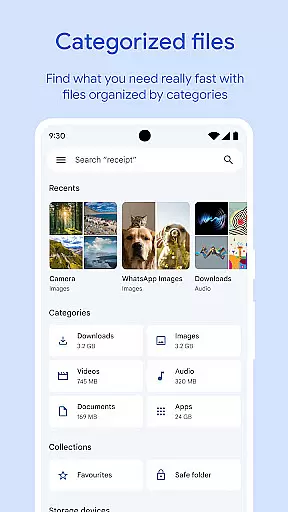
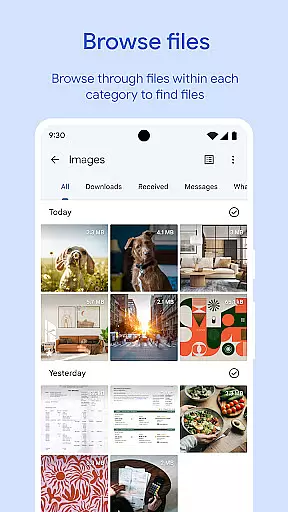
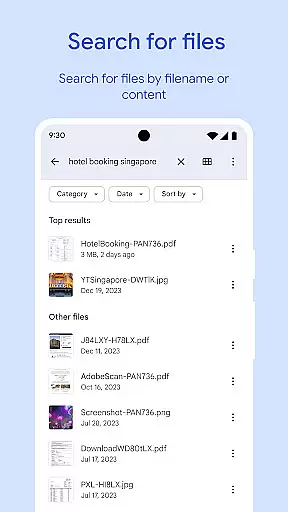
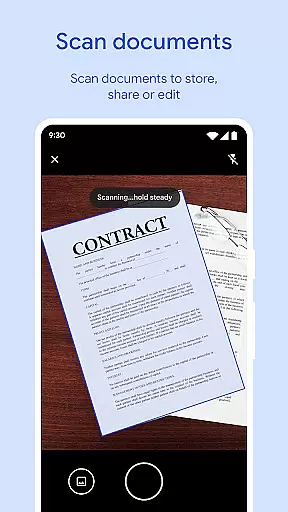
Files by Google is a powerful file management tool designed to help users efficiently organize, secure, and optimize their mobile storage. The app provides cleaning recommendations to free up space, advanced search features for faster file discovery, and offline sharing capabilities with Quick Share.
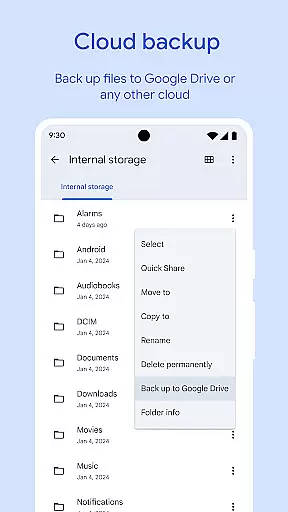
One of the standout features is its ability to back up files to cloud services like Google Drive, ensuring users can save device space while keeping their data secure. Additionally, Files by Google offers smart suggestions to improve user experience, such as identifying duplicate files or clearing cache. Its lightweight design ensures minimal impact on system resources, making it an essential utility for Android users.
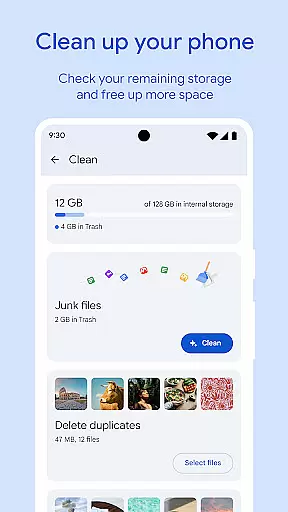
Files by Google stands out with its comprehensive suite of features tailored for efficient file management. The app allows users to monitor storage usage across their device, SD card, and USB drives, offering cleaning recommendations to remove unnecessary files. It supports advanced search functionalities, enabling users to quickly locate photos, videos, documents, and even GIFs.
Another key feature is Quick Share, which facilitates fast and secure offline file transfers at speeds up to 480 Mbps. These transfers are protected by end-to-end encryption, ensuring privacy. Additionally, the app includes playback controls for offline media, cloud backup options, and smart recommendations that adapt based on user behavior. This combination of tools makes Files by Google a versatile solution for managing digital content effectively.
Files by Google excels in providing accurate and effective core functions that cater to users' file management needs. The app offers precise recommendations for freeing up space by identifying old photos, duplicate files, and cache data. This targeted approach ensures users can efficiently manage their device storage without wasting time on irrelevant suggestions.
The search and browsing functionality is designed for speed and accuracy. Users can quickly locate specific files through an intelligent search feature that understands the context of what they're looking for. Whether it's photos, videos, or documents, the app provides intuitive sorting options that help users understand their storage usage patterns.
What sets Files by Google apart is its offline file-sharing capability. Through Quick Share, users can transfer files at impressive speeds of up to 480 Mbps without needing an internet connection. The end-to-end encryption guarantees that these transfers remain private and secure, giving users peace of mind when sharing sensitive information.
These features work together seamlessly to create a powerful tool that helps users maintain control over their device's storage while ensuring their files are organized and easily accessible whenever needed.
A standout feature of Files by Google is its commitment to interface simplicity and intuitiveness. The app employs a clean design language that makes navigation straightforward even for those who may not be tech-savvy. Key functions such as freeing up space, finding files, and sharing media are easily accessible from the main screen, reducing the learning curve typically associated with new applications.
Each section within the app has been thoughtfully crafted to guide users naturally through their file management tasks. For example, when looking to free up space, clear categories like 'Duplicate Files' or 'Large Files' make decision-making easier. Similarly, the search function provides instant results as you type, streamlining the process of locating specific items.
Moreover, advanced features do not come at the cost of complexity. Options like playback speed control for media files or setting separate security locks for sensitive documents are integrated smoothly into the overall layout. This balance between offering sophisticated tools while maintaining an intuitive interface ensures that all users can take full advantage of what Files by Google has to offer without feeling overwhelmed.
By prioritizing user experience through thoughtful design choices, Files by Google delivers an application where essential functionalities are just a tap away, making daily file management tasks effortless and efficient.
User-friendly interface
Fast offline sharing
Smart cleaning suggestions
Secure file encryption
Lightweight performance
Limited iOS support
No advanced editing tools
Dependent on Google services
Occasional bugs reported
Basic media player only

 4.50
4.50
Just one-tap to easy translate in any language after calls within seconds.
4.20
FV File Manager Pro, Fast and powerful file manager for Android
4.60
Learn the vast amount of system information about device and monitor it's state
4.70
Head tracking for PC sim games such as MSFS 2024 or Elite:Dangerous. No headset!
4.50
Unlock your Essential Key. Create custom shortcuts to your favorite apps!
4.2
Powerful collection of electronics tools and reference.A must for any enthusiast
4.90
Introducing Smart Printer, your ultimate destination for printing solutions!
4.00
Enjoy a smooth mobile reading experience!
3.60
Best leveling tool for your Android device. Hang paintings like a pro.
4.90
HD Camera captures every special moment.
4.60
Planner and Tracker for Stardew Valley
4.60
eXtended Permission Manager - a small app to manage permissions and AppOps
4.50
Universal TV remote control all TVs, Roku, LG, Samsung, Fire, Vizio, Sony, TCL.
4.40
Carry a FTP server in your pocket and avoid USB cables for file transfer
4.20
A convenient photo, video, and file recovery tool.
4.00
Detect hidden spy camera with advanced scanning {{ Premium version }}
4.00
A non-root local ADB shell client. READ BELOW!
3.40
Undelete and recover your lost or deleted files with DiskDigger!
3.40


User Reviews