
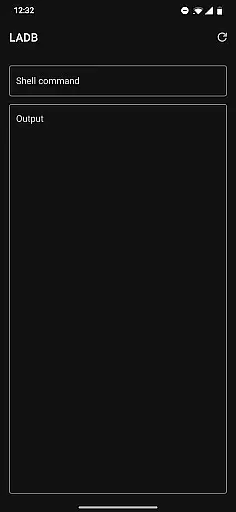
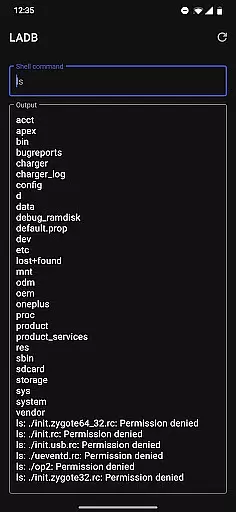
LADB is a powerful tool that brings the functionality of ADB (Android Debug Bridge) directly to your Android device. This innovative app allows developers and power users to execute ADB commands locally without requiring a computer. By bundling an ADB server within its libraries, LADB enables advanced device management and debugging capabilities right from your smartphone.
The app supports wireless debugging through pairing codes, making it convenient to establish secure connections. It's especially useful for tasks like file system access, package management, and system configuration. With careful attention to security, LADB implements necessary safeguards while providing professional-grade tools for Android enthusiasts.
LADB distinguishes itself through several key features that enhance local device management. The app incorporates a built-in ADB server, eliminating the need for external connections or computers for debugging purposes. Its wireless debugging capability uses pairing codes and ports for secure local connections, ensuring safe device interactions.
For optimal usability, LADB recommends using split-screen mode or pop-out windows alongside Android Settings. This approach streamlines the initial setup process while maintaining connection stability. The app also includes troubleshooting mechanisms such as data clearing and reboot options to resolve common connectivity issues efficiently.
LADB provides a reliable local ADB server bundled within the app libraries. This feature ensures that developers can execute commands on their Android devices without requiring an active USB connection.
The application leverages Wireless ADB Debugging, allowing seamless communication between the client and server locally. This method significantly enhances the efficiency of debugging processes for developers who need quick access to device functionalities.
Users benefit from LADB's ability to maintain stable connections during critical operations. By following the initial setup instructions, users can establish a persistent debugging session that remains active until manually terminated.
This core functionality is crucial for developers who require precise control over their Android devices. The app's effectiveness in maintaining these connections demonstrates its value as a developer tool.
The interface of LADB is designed to simplify complex ADB operations through clear instructions and intuitive controls. Users can easily navigate between different functions without needing extensive technical knowledge.
During the initial setup, the split-screen mode with Settings creates an intuitive pairing process. This design choice helps users complete the necessary steps without accidentally dismissing important dialogs or losing progress.
Troubleshooting features are presented in a straightforward manner, allowing users to resolve common issues quickly. The app provides clear guidance on fixing connection problems by clearing data and rebooting when needed.
This intuitive approach extends to the support section, where users can find detailed tutorials and direct contact information. Such accessibility makes LADB suitable for both experienced developers and newcomers to Android debugging.
User-friendly interface
Wireless debugging support
Built-in ADB server
Comprehensive troubleshooting
Regular updates
No Shizuku compatibility
Complex initial setup
Limited video tutorials
Occasional connection issues
Requires manual pairing

Use your phone as a webcam on your computer over WiFi or USB.
 4.40
4.40
Universal TV remote control all TVs, Roku, LG, Samsung, Fire, Vizio, Sony, TCL.
4.40
Keep track of your Palia friendships, tasks, and inventory with Palia Notebook
4.60
Amateur Radio app for APRS: Track friends, exchange messages, get tactical info.
3.90
Effortlessly run ADB commands directly on your device without a PC.
4.20
PC precision for mobile gaming: dominate with keyboard and mouse!
4.30
Pro Emulator is an easy to use game console emulator for a range of consoles.
4.40
Button mapper, mouse toggle, sleep timer and a lot of another features
4.50
Creation, Learning, Entertainment & More — The All-in-One AI Search Engine
4.70
Fast Video Downloader, Movie Downloader, Torrent Downloader & Adblock Browser
4.70
ADB support Android 4.X-Android 13(Support wireless pair mode).No root required!
4.70
pdf merge, word to pdf, jpg to pdf, edit pdf, convert to pdf and much more!
4.20
Carry a FTP server in your pocket and avoid USB cables for file transfer
4.20
Automate everything from settings to photos, SMS to speech. ADC2 prize winner.
4.10
A convenient photo, video, and file recovery tool.
4.00
Create your own live wallpaper or check out thousands already made presets
3.90
A powerful, easy-to-use flight computer on your phone or tablet!
3.80
card-reader app
2.20
Transfer Files, APK from Phone to Watch & Install.
4.0


User Reviews