
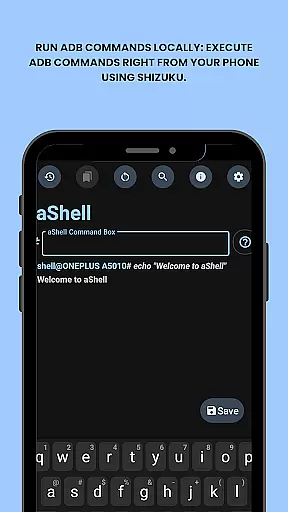
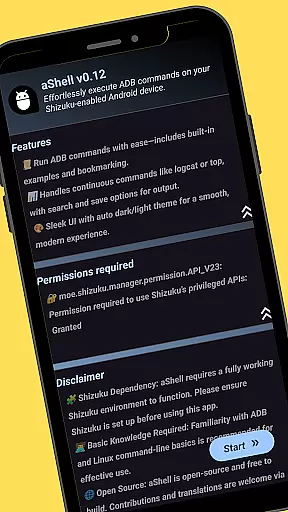
aShell is a specialized Android tool designed for users familiar with ADB and Linux command-line operations. This lightweight, open-source application allows direct execution of ADB commands on Android devices running Shizuku, removing the necessity for a PC.
Key features include live command output, search functionality within results, saving outputs to files, and automatic dark/light mode adaptation. It also supports bookmarking frequently used commands. The app is ideal for developers and power users seeking comprehensive device control.
The app's dependency on Shizuku and requirement for basic ADB knowledge make it particularly suited for technically inclined Android enthusiasts. By providing full access to device internals directly from a phone, aShell empowers advanced management and troubleshooting capabilities.
aShell offers several notable features that enhance the command-line experience on Android devices. Its primary function is the ability to run ADB commands locally through Shizuku, which is crucial for executing complex operations without needing a computer.
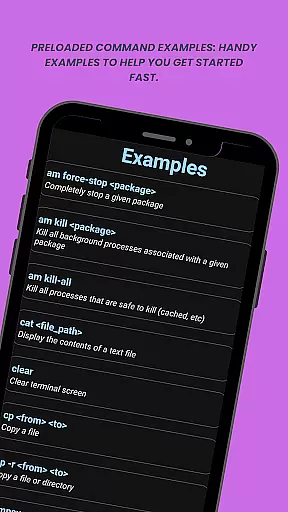
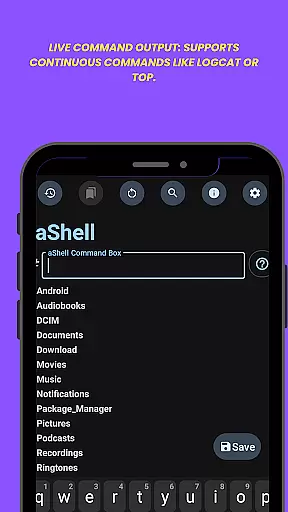
In addition to local command execution, aShell provides preloaded examples of common ADB commands, live output for continuous commands like logcat or top, and the ability to search within this output. Users can save command results to .txt files and switch between dark and light modes based on their system settings.
One standout feature is the command bookmarking system, allowing users to save and quickly access frequently used commands. These functionalities collectively streamline the process of managing and interacting with device internals, making aShell an invaluable tool for advanced users.
aShell is designed to execute ADB commands directly on Android devices, ensuring precision and reliability in its core functionality. By leveraging the Shizuku environment, it provides a seamless way for users to interact with their device internals without requiring a PC.
The app includes preloaded command examples that cater to both beginners and advanced users. These examples not only help users get started quickly but also ensure that the executed commands are accurate and effective. This feature significantly reduces the chances of errors while performing critical operations.
Live command output support enhances the user experience by allowing continuous monitoring of processes like logcat or top. The ability to search within the output and save results to a file further adds to the app's effectiveness, making it an indispensable tool for developers and power users who require full control over their devices.
aShell offers a clean and intuitive interface that simplifies the complex task of executing ADB commands on mobile devices. Its design eliminates unnecessary clutter, focusing on providing a straightforward way to run commands efficiently.
With automatic adaptation to dark or light modes based on the system theme, the app ensures a comfortable viewing experience in any environment. This attention to visual detail enhances usability, especially during extended sessions where eye strain could be a concern.
Additionally, features like bookmarking frequently used commands and easy access to preloaded examples make the interface more user-friendly. These elements contribute to an overall intuitive experience, enabling users to focus on their tasks without being hindered by a steep learning curve.
Lightweight design
Open-source nature
Live command output
Dark mode support
Command bookmarking
Requires Shizuku
Needs ADB knowledge
Limited user base
No iOS support
Complex for beginners

Just swipe the edge to do something!
 4.40
4.40
Use your phone as a webcam on your computer over WiFi or USB.
4.40
Unlock your Essential Key. Create custom shortcuts to your favorite apps!
4.1
Amateur Radio app for APRS: Track friends, exchange messages, get tactical info.
3.90
Create your own live wallpaper or check out thousands already made presets
3.90
View detailed information about your Nissan Leaf the dealer never shows you.
4.10
Making emulation easy for everyone!
4.30
Enjoy a smooth mobile reading experience!
3.60
Your personal health butler
3.60
Powerful collection of electronics tools and reference.A must for any enthusiast
4.90
Monitor car performance in real time and troubleshoot malfunctions.
4.80
Excellent scientific calculator with symbolic algebra, integrals, derivatives
4.80
Canon PRINT is a companion app for your Canon printer.
4.60
App to pay for FUTO Keyboard
4.60
eXtended Permission Manager - a small app to manage permissions and AppOps
4.50
Clean up large files and similar photos, fast and easy to use
4.40
PC precision for mobile gaming: dominate with keyboard and mouse!
4.30
Detect hidden spy camera with advanced scanning {{ Premium version }}
4.00
Undelete and recover your lost or deleted files with DiskDigger!
3.40


User Reviews