
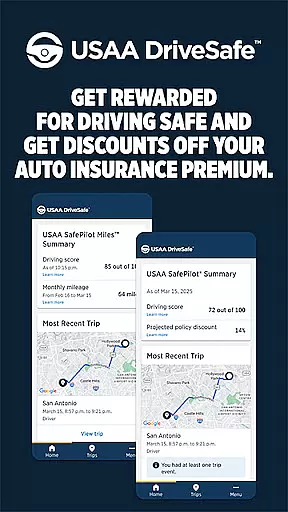
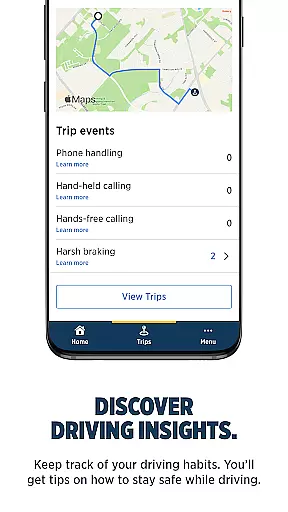
USAA DriveSafe is a cutting-edge mobile application designed to promote safe driving habits among USAA members. The app leverages advanced GPS and sensor technologies to monitor driving behaviors, providing users with detailed insights into their driving patterns. By tracking metrics such as distance driven, phone usage while driving, and instances of harsh braking, the app helps drivers understand and improve their driving habits.
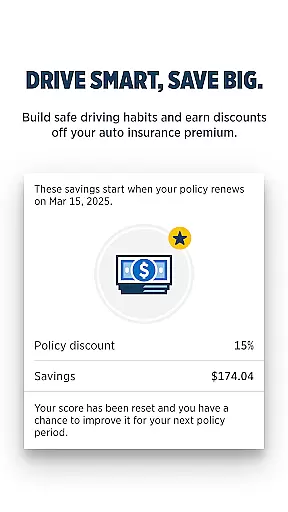
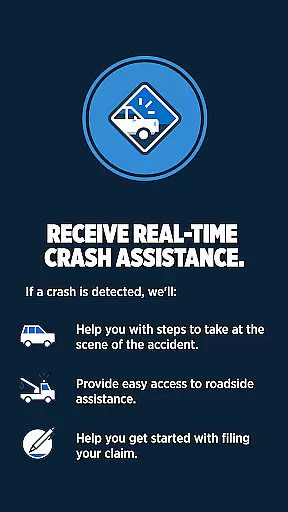
This innovative app not only assists in cultivating safer driving practices but also offers tangible benefits. Users enrolled in USAA's SafePilot programs can earn discounts on their auto insurance premiums by demonstrating responsible driving behavior. Additionally, the app includes a crash assistance feature that provides support in the event of an accident, ensuring users receive timely help and guidance.
Designed for USAA members with active auto insurance policies in select states, USAA DriveSafe transforms the way drivers interact with their vehicles. Whether you're looking to save on insurance costs or simply want to become a more conscientious driver, this app delivers significant value through its comprehensive monitoring and support features.
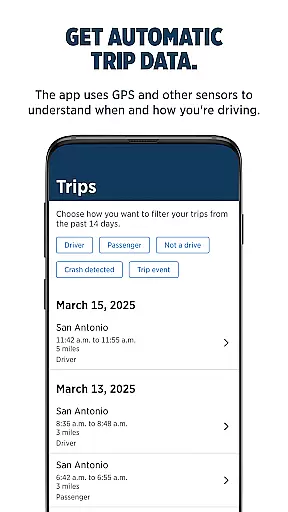
USAA DriveSafe stands out with its robust feature set tailored specifically for enhancing driving safety. One of its core functionalities is automatic trip data collection, where the app uses GPS and other sensors to map your trips and analyze driving conditions. This allows users to gain a clear understanding of their driving habits over time.
Beyond trip tracking, the app provides detailed driving insights. Users can monitor various aspects of their driving behavior, including frequency of phone usage while driving and occurrences of harsh braking. These insights empower drivers to make informed decisions about their driving practices, ultimately leading to safer road experiences.
In addition to behavioral tracking, USAA DriveSafe offers crucial safety features like crash assistance. In the unfortunate event of a collision, the app detects the crash and promptly checks on the user's well-being. It then guides them through the necessary steps, including filing a claim, which can be expedited thanks to the driving data collected by the app. This combination of preventative monitoring and emergency support makes USAA DriveSafe an invaluable tool for any driver.
When it comes to managing your auto insurance, having detailed vehicle information at your fingertips is crucial. The USAA DriveSafe App provides comprehensive data about your driving habits and trip details, ensuring you have the necessary insights to maintain a safe driving profile.
The app uses advanced GPS technology and sensors to track your trips automatically. It records essential metrics such as distance traveled, speed patterns, and even phone usage while driving. This level of detail helps users understand their driving behavior better and make informed decisions to improve safety.
Moreover, the app offers valuable feedback on specific driving events like harsh braking. By analyzing these instances, drivers can adjust their habits to not only enhance their safety but also potentially reduce their insurance premiums. Such precise tracking ensures that every aspect of your driving is captured accurately.
Ultimately, the detailed vehicle information provided by the USAA DriveSafe App empowers users with knowledge and control over their driving profiles. This leads to safer roads and more personalized insurance solutions tailored to individual driving patterns.
Price transparency in auto insurance is vital for making informed financial decisions. The USAA DriveSafe App excels in this area by offering clear insights into how driving behaviors can impact insurance premiums.
By enrolling in programs like USAA SafePilotu00ae or USAA SafePilot Milesu2122, users gain access to discounts based on their driving data. The app meticulously tracks various factors such as mileage, driving times, and risky behaviors, presenting this data in an easy-to-understand format.
This transparency allows users to see exactly how their safe driving habits translate into savings. For instance, fewer instances of harsh braking or reduced phone usage while driving can lead to significant discounts on auto insurance premiums. Users are thus motivated to adopt safer driving practices.
In summary, the USAA DriveSafe App ensures that users are fully aware of how their actions behind the wheel influence their insurance costs. This clarity not only promotes safer driving but also builds trust between the user and the insurer through open communication about pricing factors.
Enhances driving safety
Provides insurance discounts
Tracks driving habits
Offers crash assistance
Supports quicker claims
Limited to select states
Requires program enrollment
Depends on GPS accuracy
Constant data connection needed
Privacy concerns with tracking

The Smarter Way Forward
 3.30
3.30
OBD diagnostics, Live Data, DPF regeneration for BMW
4.00
Realtime Charts is a plugin for the Torque Pro App (OBD 2 & Car)
4.20
Practice the drills within MotoJitsu Master Riding Program Volume 1 & 2!
4.80
Wonder how much horsepower and torque your car/truck makes? Look no further.
3.40
Buy and sell your boat
4.70
BlueDriver® is a Premium Diagnostic OBD2 Scan Tool. www.BlueDriver.com
3.90
Car Values, Research and More
4.80
7-Day Returns on All Cars
4.80
Marathon ARCO Rewards members earn rewards & apply the rewards for fuel savings!
4.80
Lexus app currently supports 2010 or newer vehicles (2018 or newer for Hawaii).
4.80
DMV Test Pro offers all the updated FREE DMV tests online.
4.60
Find Fast EV Chargers | Charge Your Vehicle at 1,100+ Fast Car Charging Stations
4.60
Your Path to Driving Licensing Success Begins Here! Develop your driving skills.
4.40
Autotrader is your online solution for buying and selling new and used cars.
4.40
Ultimate OBD2 Car Scanner: Diagnostics, Service and Modification Tool
4.30
Your car is talking. Start listening.
4.30
Monitor your behind-the-wheel behavior to become a safer driver and save.
4.10
Theme for Car Launcher
4.3


User Reviews