
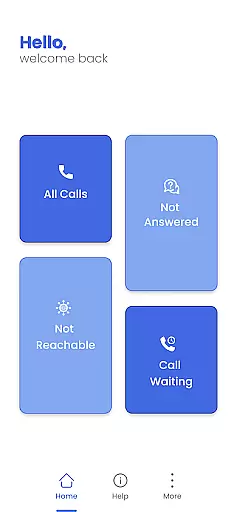

Call Forwarding Pro is a communication app designed to simplify the process of redirecting calls. With its user-friendly interface, users can effortlessly forward their calls to any desired number with just one tap. Whether you're busy, unreachable, or simply want to divert calls, this app ensures that you never miss an important call.
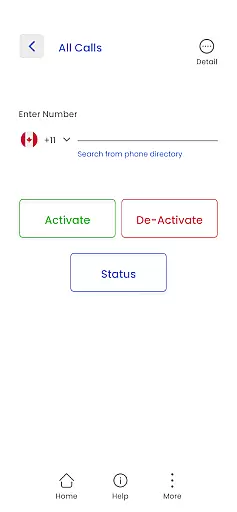
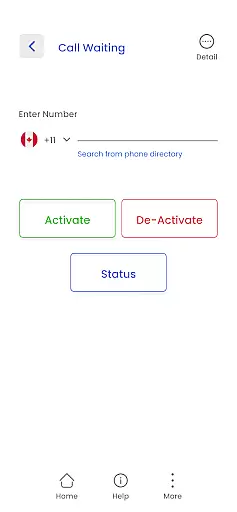
The app offers customizable options where users can input the target number and activate call forwarding instantly. Additionally, it provides confirmation notifications to keep users informed about the status of call forwarding. Suitable for both personal and professional use, Call Forwarding Pro helps users stay connected by managing their calls efficiently.
Call Forwarding Pro stands out with its quick and easy call redirection capabilities. The app eliminates the need to navigate through complex phone settings by offering a simple one-tap solution to forward calls. This feature is particularly beneficial for users who frequently redirect calls under various conditions such as being busy, unreachable, or on another call.
Another notable feature is the customizable call forwarding options. Users can easily input the desired forwarding number in the app's intuitive text box. Once activated, the app sends confirmation notifications to ensure users are always aware of the call forwarding status. These features collectively enhance the overall call management experience, making it seamless and hassle-free.
Real-time messaging speed and reliability are crucial for any communication app, ensuring that messages are delivered instantly and without fail. Call Forwarding Pro excels in this area by providing users with a seamless experience when redirecting their calls. The app's infrastructure is designed to handle high volumes of call forwarding requests without delay, ensuring that users' calls are forwarded as soon as they activate the feature.
The app employs advanced routing algorithms to optimize the path that each call takes to reach its destination. This ensures minimal latency and maximizes the reliability of the service. Whether you're on a poor network connection or at the edge of a coverage area, Call Forwarding Pro maintains its performance, delivering consistent call forwarding services.
For users, this means peace of mind knowing that their important calls will not be missed due to technical issues or delays. The real-time processing capabilities of Call Forwarding Pro make it an indispensable tool for professionals who need to stay connected at all times. With instant notifications confirming the activation of call forwarding, users can trust that their communication needs are being met efficiently and effectively.
Media sharing support is another essential aspect of modern communication apps, allowing users to exchange various types of media seamlessly. While Call Forwarding Pro primarily focuses on redirecting voice calls, it also offers robust support for managing different kinds of incoming communications. Although it doesn't directly facilitate media sharing like images or videos, it enhances overall communication efficiency by ensuring that all calls are directed to a device or number where media sharing can occur without interruption.
The app's intuitive interface simplifies the process of setting up call forwarding, which indirectly supports media sharing activities. By allowing users to forward calls to a preferred device or contact, it ensures that multimedia exchanges happen more smoothly. For instance, if a user expects an important MMS message but cannot attend to their primary phone, they can use Call Forwarding Pro to reroute the call to another device equipped for media sharing.
Moreover, Call Forwarding Pro's customizable options enable users to tailor their call management strategies according to their specific needs. This flexibility ensures that whether it's a busy signal, no answer scenario, or simply wanting to divert calls for convenience, the app provides reliable solutions that keep lines of communication open. In essence, while not a direct media sharing platform, Call Forwarding Pro plays a vital role in maintaining uninterrupted digital conversations.
Easy-to-use interface
Instant call forwarding
Customizable options
Confirmation notifications
Efficient call management
Limited to call forwarding
No advanced call features
Premium version required
Occasional bugs
Notification delays

Tether to Windows, OS X, Linux PCs or Android tablets. No root. No tether fees.
 3.90
3.90
Pure modern IRC experience for Android
3.70
Adblock & VPN Browser: Blocks banners, pop-ups and video ads, fast downloader!
4.60
SMS & MMS Messaging App to easily send messages or schedule SMS on Chat
4.10
Quickly and easily identify and block unknown callers
3.70
Messages is Private SMS Messenger 2023 with text message, instant messaging.
4.00
Comprehensive and powerful scan tool app with enhanced functions
3.00
Bringing the functionality of Winlink to your Android device
4.5
Manage your mobile phone plan, check unlimited 5g data usage and track rewards
4.50
Welcome to the future of phone service.
4.60
Messenger, an MMS & SMS messages app with Blockers, Driving mode & Private box
4.60
Build your web browser around you with private search, and more.
4.60
Say “hello” to privacy.
4.60
Manage your data, talk & text - affordable phone plans & data usage made simple
4.30
Block spam calls & scam - no more annoying calls with the call blocker function
4.30
Caller ID, Spam Call & SMS Blocker
3.80
A Browser with powerful ad blocker to help focus on what really matters.
3.00
Watchgram for Telegram: Experience seamless Telegram messaging on your watch
1.80
Enables Plus features of Quick Search.
4.5


User Reviews