
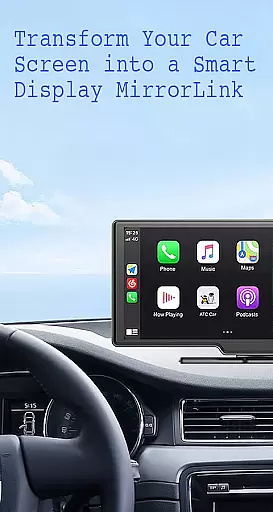
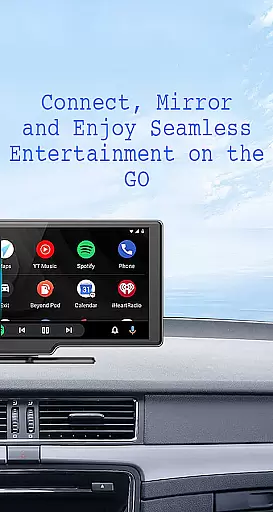
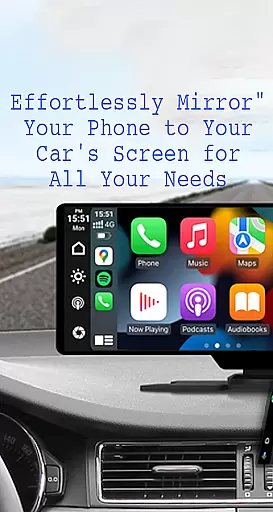
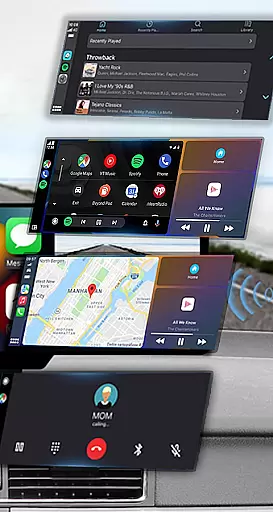
Mirror Link is a cutting-edge application designed to seamlessly connect your smartphone to your car's display system. This app enables users to project their phone's screen onto the car's larger display, enhancing accessibility and convenience while driving.
With both wireless and USB connection options, Mirror Link ensures stable screen sharing and communication. The app supports multimedia access, allowing drivers to listen to music, watch videos, make calls, and use navigation maps directly on their car's screen. Its automation features enable automatic playback of media when connected, providing a smooth user experience.
This app is particularly useful for modern drivers who want to maintain focus on the road while still having access to essential phone functions. By turning the car's display into an extended control panel for your smartphone, Mirror Link significantly improves driving safety and convenience.
Mirror Link offers an impressive array of features that cater to various user needs. The app's static screen sharing capability allows for easy and stable projection of your smartphone's content onto your car's display. This feature works seamlessly with both old and new car models, making it universally compatible.
The wireless and USB connection options provide flexibility in how users choose to connect their devices. With just one click, users can establish a simple and fast connection between their phone and car screen. The full mirror link functionality enables complete replication of the phone's interface on the car display, including access to apps like YouTube, Apple CarPlay, and Android Auto.
Additional features include smart automation that plays and pauses media automatically upon connection, and universal compatibility with all car brands equipped with built-in web browsers. These comprehensive capabilities make Mirror Link an essential tool for enhancing both entertainment and safety while driving.
Functionality completeness is a critical aspect of any application, especially for Mirror Link, which aims to enhance driving safety and convenience. This app offers a comprehensive suite of features that cover various aspects of smartphone integration with car systems.
Mirror Link provides static screen sharing, allowing users to display their phone's screen on their car's dashboard easily. It supports both wireless and USB connections, ensuring compatibility with different vehicle models and user preferences. The app also enables multimedia access, letting users listen to music, watch videos, make calls, and use navigation maps directly from their car screens.
One of the standout functionalities is its automation feature, which can automatically play and pause music when the device connects to the car display. Additionally, it works seamlessly with both old and new cars, offering universal compatibility with all car brands and devices equipped with built-in web browsers.
By providing full mirror link capabilities, Mirror Link ensures that drivers have easy access to their phone's features without compromising safety. This extensive functionality coverage makes it a versatile tool for enhancing the driving experience while maintaining focus on the road.
Usability and operational smoothness are essential for applications like Mirror Link, where ease of use directly impacts the driving experience. The app excels in providing a user-friendly interface that simplifies complex tasks into straightforward actions.
Connecting your phone to your car's display is made effortless through one-click screen sharing and communication. Users can quickly establish a connection by selecting u201cConnect Caru201d within the app and waiting for the device to be detected. This seamless process eliminates the need for cumbersome setup procedures, making it accessible even for those who may not be tech-savvy.
The appu2019s design emphasizes operational smoothness, ensuring that transitions between different functionsu2014such as playing music or using navigationu2014are fluid and uninterrupted. Its compatibility with systems like Apple CarPlay and Android Auto further enhances this smooth operation by integrating familiar interfaces into the car environment.
Overall, Mirror Link prioritizes usability, ensuring that drivers can efficiently utilize their smartphones' capabilities via their car's touchscreen. This focus on operational efficiency helps maintain driver attention on the road while still enjoying the benefits of modern technology.
User-friendly interface
Wireless connectivity
Wide compatibility
Automatic media control
Comprehensive feature set
Requires Miracast support
Limited to compatible devices
Dependent on car's hardware
Potential connection issues
No official brand endorsements

SmartCast mirrors Android phone to TV screen With Cast Screen, Chromecast.
 4.80
4.80
A great tool help you to format Micro SD memory Card
3.10
You can remote control and play much easier.
4.10
Read Quran pak offline & listen online mp3 Quran in Al Quran Majeed app
4.3
Zlink Carplay Android a mirror link app with a Carplay interface style
4.2
Recite Quran Majeed القران with special 16 line real Kuran page in hand
4.30
Manage apps & elevate your gaming experience with Game Launcher: Gaming Hub app.
4.30
Experience virtual reality on your smartphone with Cardboard.
3.50
The best PS2 games from your childhood come to life in their mobile version!
4.00
TV USB connector app provides you a seamless cast option from your phone to tv.
4.70
Expo is a free & open source platform to build apps using JavaScript and React.
4.70
use your smartphone as Remote control drones .
4.20
Test DPC is a sample device policy controller for use with Android Enterprise.
4.20
Do you want to drive easy ? do you wanna full mirror link Mobile with your car
4.10
Demo version of the mcpro24fps manual video camera. Try and buy a full version!
4.00
A Pydroid Quick Install repository provider.
4.00
Mobs maker Minecraft help MCPE creators make their own mob by using Blockbench
3.50
DamonSx2 is the open Source LGPL Emulator
3.20
If you are looking for melon playground mod that fun you deffinitely try our app
2.70


User Reviews