
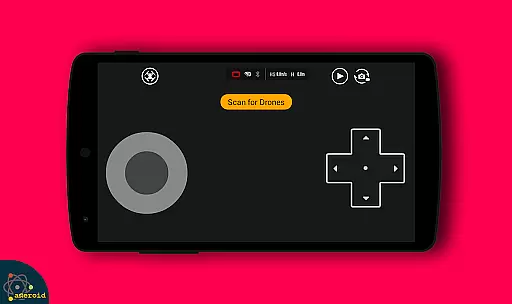
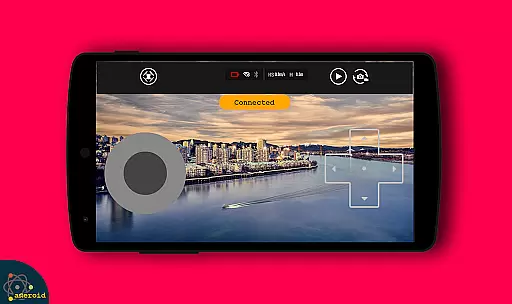
Drone Remote Control is an innovative application that transforms your Android smartphone into a powerful remote control for drones. This app allows users to easily configure and operate various drone models, replicating the functionality of traditional RC controllers. With intuitive controls and seamless integration, it offers both novice and experienced drone enthusiasts a convenient way to manage their flying devices.
The application supports key drone operations including flight planning, automated takeoff and landing, and live First Person View (FPV) streaming. Its compatibility with latest drone models and advanced features like video capture and camera control make it an essential tool for modern drone pilots. Whether you're looking to control your own drone or even manage a friend's device, this app provides a comprehensive solution for all your drone control needs.
Drone Remote Control stands out with its rich feature set designed for optimal drone management. The app enables users to create detailed flight plans on any device, automate complex operations such as takeoff and landing, and maintain control through live FPV streaming. These capabilities ensure precise drone handling while minimizing manual intervention.
Among its notable features are integrated camera controls allowing users to capture photos, record videos, and adjust camera settings directly from their smartphones. The app also supports WiFi camera connections, providing real-time video feeds and control options. With its ability to disable auto-flight modes instantly and resume manual control, Drone Remote Control offers both convenience and safety during drone operations.
What sets this application apart is its universal compatibility and user-friendly interface. It successfully replaces traditional physical remotes while offering additional functionalities that enhance the overall drone flying experience. These features collectively make it an indispensable tool for both recreational and professional drone users.
Functionality completeness in a drone remote control app refers to the range of features that allow users to fully operate and manage their drones. Drone Remote Control offers an extensive set of tools that cover various aspects of drone operation.
The application provides capabilities such as creating flight plans on any device, automating the stages of flight from takeoff to landing, and live streaming with First Person View (FPV). These features ensure that users have comprehensive control over their drone's activities.
With the ability to disable auto-flight and resume manual control with a single tap, Drone Remote Control ensures that operators can react quickly to changing conditions or unexpected obstacles. This level of responsiveness is crucial for safe and efficient drone piloting.
Users benefit from uninterrupted flights, making it possible to map large areas without the concern of session timeouts or connectivity issues. The inclusion of video and capture FPS functionalities further extends the app's utility for both recreational and professional drone enthusiasts.
Usability in a drone control application pertains to how easily and intuitively users can interact with the app to command their drones. Drone Remote Control excels in providing a seamless user experience through its thoughtfully designed interface.
The app simplifies the configuration process, allowing users to convert their Android phones into a drone remote control effortlessly. Its similarity to traditional RC drone controls reduces the learning curve significantly for new users.
Operational smoothness is evident in the app's ability to connect with WiFi camera devices, enabling users to receive live camera views, capture images, and record videos without any hassle. This integration enhances the overall piloting experience by combining control and media functions.
Drone Remote Control stands out by being compatible with the latest drone models, ensuring that users can enjoy current technological advancements in drone hardware. While it may not support some older drone models, the focus remains on delivering a smooth and reliable operational experience for the majority of modern drones.
User-friendly interface
Wide drone compatibility
Advanced camera controls
Automated flight features
Real-time FPV streaming
Not compatible with older hardware
Limited physical controls
Requires stable WiFi connection
Consumes device battery
Learning curve for beginners

Use your Phone as Drone Controller.
 3.70
3.70
Connect your phone to any endoscope camera, USB camera, or borescope with ease.
3.70
Popular mods fnaf mods for melon playground
4.50
charging your phone by other phone easly
4.00
Demo version of the mcpro24fps manual video camera. Try and buy a full version!
4.00
Mirror Link Car Display to share your screen with car dashboard wirelessly
4.5
CloudEye 365 is a easy-handling APP
3.60
Game booster GFX may reduce interruptions and improve gaming experience.
4.50
Now Available on Android ™
3.40
Demo for Key Attestation feature of the Android system.
4.80
TV USB connector app provides you a seamless cast option from your phone to tv.
4.70
Expo is a free & open source platform to build apps using JavaScript and React.
4.70
Manage apps & elevate your gaming experience with Game Launcher: Gaming Hub app.
4.30
The best PS2 games from your childhood come to life in their mobile version!
4.00
Mirror link car connector to share your screen with car dashboard
3.80
Ps2 plugins for 64 bit artitechture
3.70
Simulator of real black light
3.50
Looking to connect your phone to your car screen? Mirror Link is the solution.
3.20
Collection of high-quality, trendy skins and outfits!
4.1


User Reviews